Sign In Start Free Trial
Account

Add to playlist

Create a Playlist

Modal Close icon
You need to login to use this feature.
  • Book Overview & Buying Python Image Processing Cookbook
  • Table Of Contents Toc
Python Image Processing Cookbook

Python Image Processing Cookbook

By : Sandipan Dey
2 (2)
close
close
Python Image Processing Cookbook

Python Image Processing Cookbook

2 (2)
By: Sandipan Dey

Overview of this book

With the advancements in wireless devices and mobile technology, there's increasing demand for people with digital image processing skills in order to extract useful information from the ever-growing volume of images. This book provides comprehensive coverage of the relevant tools and algorithms, and guides you through analysis and visualization for image processing. With the help of over 60 cutting-edge recipes, you'll address common challenges in image processing and learn how to perform complex tasks such as object detection, image segmentation, and image reconstruction using large hybrid datasets. Dedicated sections will also take you through implementing various image enhancement and image restoration techniques, such as cartooning, gradient blending, and sparse dictionary learning. As you advance, you'll get to grips with face morphing and image segmentation techniques. With an emphasis on practical solutions, this book will help you apply deep learning techniques such as transfer learning and fine-tuning to solve real-world problems. By the end of this book, you'll be proficient in utilizing the capabilities of the Python ecosystem to implement various image processing techniques effectively.
Table of Contents (11 chapters)
close
close

Improving image contrast with histogram equalization

In Chapter 1, Image Manipulation and Transformation, we saw how the contrast stretching operation can be used to increase the contrast of an image. However, it is just a linear scaling function that is applied to image pixel values, and hence the image enhancement is less drastic than its more sophisticated counterpart, histogram equalization. This recipe will show how to implement contrast stretching using the histogram equalization. It is also a point transform that uses a non-linear mapping that reassigns the pixel intensity values in the input image in such a way that the output image has a uniform distribution of intensities (a flat histogram), and thereby enhances the contrast of the image.

Getting ready

In this recipe, we will implement histogram equalization with our own function, and also use scikit-image's global and local (adaptive) histogram equalization functions, starting with an RGB image. As usual, let's start by importing the required libraries:

import numpy as np
import matplotlib.pylab as plt
from skimage.io import imread
from skimage.exposure import equalize_hist, equalize_adapthist

How to do it...

To execute this recipe, perform the following steps:

  1. Define the plot_image() and plot_hist() functions to display an image and return its cumulative distribution function (cdf), respectively:
def plot_image(image, title):
plt.imshow(image)
plt.title(title, size=20)
plt.axis('off')

def plot_hist(img):
colors = ['r', 'g', 'b']
cdf = np.zeros((256,3))
for i in range(3):
hist, bins = np.histogram(img[...,i].flatten(),256,[0,256], \
normed=True)
cdf[...,i] = hist.cumsum()
cdf_normalized = cdf[...,i] * hist.max() / cdf.max()
plt.plot(cdf_normalized, color = colors[i], \
label='cdf ({})'.format(colors[i]))
binWidth = bins[1] - bins[0]
plt.bar(bins[:-1], hist*binWidth, binWidth,
label='hist ({})'.format(colors[i]))
plt.xlim([0,256])
plt.legend(loc = 'upper left')
return cdf
  1. Implement the histogram equalization by reassigning the pixel values with the corresponding cdf value for that pixel using the following code:
img = imread('images/train.png')
cdf = plot_hist(img)
img2 = np.copy(img)
for i in range(3):
cdf_m = np.ma.masked_equal(cdf[...,i],0)
cdf_m = (cdf_m - cdf_m.min())*255/(cdf_m.max()-cdf_m.min())
# min-max normalize
cdf2 = np.ma.filled(cdf_m,0).astype('uint8')
img2[...,i] = cdf2[img[...,i]]
  1. Perform histogram equalization with the same input image using scikit-image library functions that implement global and adaptive histogram equalization:
equ1 = (255*equalize_hist(img)).astype(np.uint8)
equ2 = (255*equalize_adapthist(img)).astype(np.uint8)

How it works...

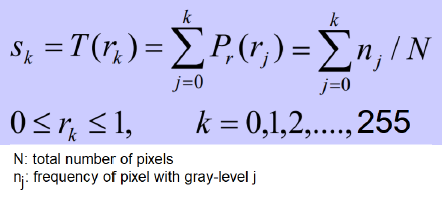
For each image channel, each pixel value needs to be reassigned to the corresponding cdf value for the pixel, as shown in the following diagram:

The equalize_hist() and equalize_adapthist() functions from the scikit-image.exposure module were used to get the globally and locally contrast-enhanced images, respectively.

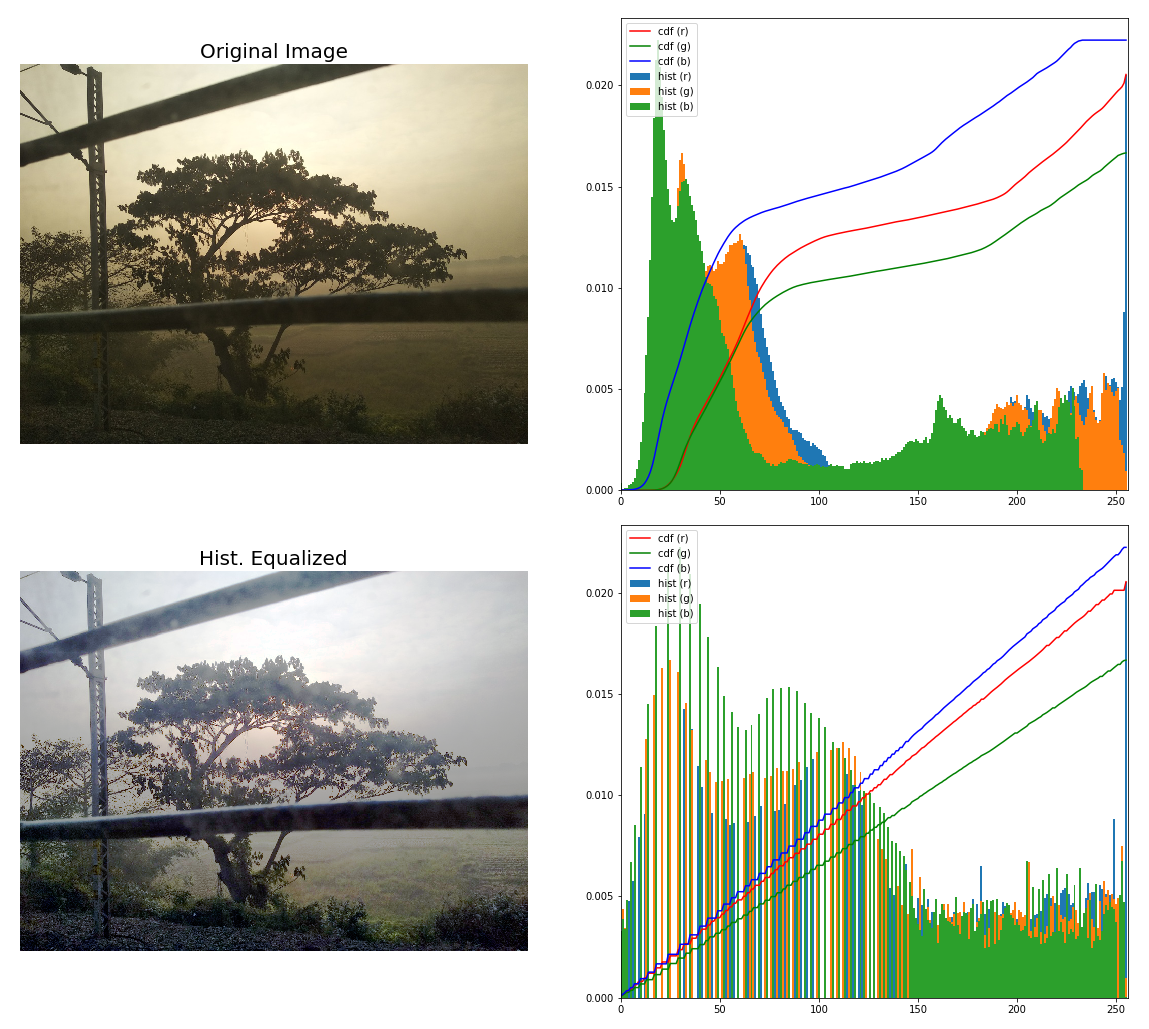
If you run the preceding code and plot the input and output images along with the corresponding histograms and cdfs, you will get the following output (the screenshot is just some part of the output):

There's more...

Use the createCLAHE() function from OpenCV-Python to perform adaptive histogram equalization. Compare the quality of the output results obtained using different implementations. Also, run with a few different low-contrast images.

CONTINUE READING
83
Tech Concepts
36
Programming languages
73
Tech Tools
Icon Unlimited access to the largest independent learning library in tech of over 8,000 expert-authored tech books and videos.
Icon Innovative learning tools, including AI book assistants, code context explainers, and text-to-speech.
Icon 50+ new titles added per month and exclusive early access to books as they are being written.
Python Image Processing Cookbook
notes
bookmark Notes and Bookmarks search Search in title playlist Add to playlist download Download options font-size Font size

Change the font size

margin-width Margin width

Change margin width

day-mode Day/Sepia/Night Modes

Change background colour

Close icon Search
Country selected

Close icon Your notes and bookmarks

Confirmation

Modal Close icon
claim successful

Buy this book with your credits?

Modal Close icon
Are you sure you want to buy this book with one of your credits?
Close
YES, BUY

Submit Your Feedback

Modal Close icon
Modal Close icon
Modal Close icon