Sign In Start Free Trial
Account

Add to playlist

Create a Playlist

Modal Close icon
You need to login to use this feature.
  • Book Overview & Buying Practical Automated Machine Learning Using H2O.ai
  • Table Of Contents Toc
Practical Automated Machine Learning Using H2O.ai

Practical Automated Machine Learning Using H2O.ai

By : Salil Ajgaonkar
4.6 (5)
close
close
Practical Automated Machine Learning Using H2O.ai

Practical Automated Machine Learning Using H2O.ai

4.6 (5)
By: Salil Ajgaonkar

Overview of this book

With the huge amount of data being generated over the internet and the benefits that Machine Learning (ML) predictions bring to businesses, ML implementation has become a low-hanging fruit that everyone is striving for. The complex mathematics behind it, however, can be discouraging for a lot of users. This is where H2O comes in – it automates various repetitive steps, and this encapsulation helps developers focus on results rather than handling complexities. You’ll begin by understanding how H2O’s AutoML simplifies the implementation of ML by providing a simple, easy-to-use interface to train and use ML models. Next, you’ll see how AutoML automates the entire process of training multiple models, optimizing their hyperparameters, as well as explaining their performance. As you advance, you’ll find out how to leverage a Plain Old Java Object (POJO) and Model Object, Optimized (MOJO) to deploy your models to production. Throughout this book, you’ll take a hands-on approach to implementation using H2O that’ll enable you to set up your ML systems in no time. By the end of this H2O book, you’ll be able to train and use your ML models using H2O AutoML, right from experimentation all the way to production without a single need to understand complex statistics or data science.
Table of Contents (19 chapters)
close
close
1
Part 1 H2O AutoML Basics
4
Part 2 H2O AutoML Deep Dive
10
Part 3 H2O AutoML Advanced Implementation and Productization

Basic implementation of H2O using Python

Python is one of the most popular languages in the ML field of computer programming. It is widely used in all industries and has tons of actively maintained ML libraries that provide a lot of support in creating ML pipelines.

We will start by installing the Python programming language and then installing H2O using Python.

Installing Python

Installing Python is very straightforward. It does not matter whether it is Python 2.7 or Python 3 and above as H2O works completely fine with both versions of the language. However, if you are using anything older than Python 2.7, then you will need to upgrade your version.

It is best to go with Python 3 as it is the current standard and Python 2.7 is outdated. Along with Python, you will also need pip, Python’s package manager. Now, let’s learn how to install Python on various operating systems:

  • On Linux (Ubuntu, Mint, Debian):
    • For Python 2.7, run the following command in the system Terminal:
      sudo apt-get python-pip 
    • For Python 3, run the following command in the system Terminal:
      sudo apt-get python3-pip
  • On macOS: macOS version 10.8 comes with Python 2.7 pre-installed. If you want to install Python 3, then go to https://python.org, go to the Downloads section, and download the latest version of Python 3 for macOS.
  • On Windows: Unlike macOS, Windows does not come with any pre-installed Python language support. You will need to download a Python installer for Windows from https://python.org. The installer will depend on your Windows operating system – that is, if it is 64-bit or 32-bit.

Now that you know how to install the correct version of Python, let’s download and install the H2O Python module using Python.

Installing H2O using Python

H2O has a Python module available in the Python package index. To install the h2o Python module, all you need to do is to execute the following command in your Terminal:

pip install h2o

And that’s pretty much it.

To test if it has been successfully downloaded and installed, follow these steps:

  1. Open your Python Terminal.
  2. Import the h2o module by running the following command:
    import h2o
  3. Initialize H2O to spin up a local h2o server by running the following command:
    h2o.init()

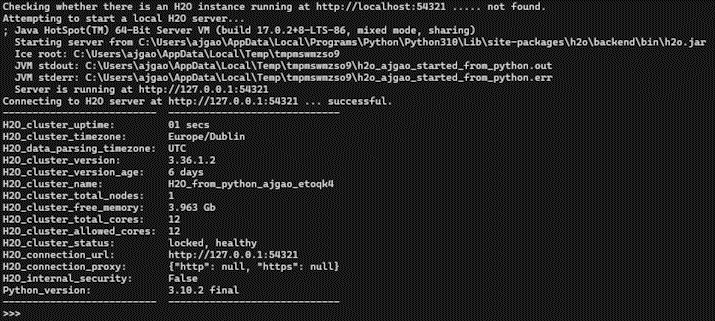
The following screenshot shows the results you should get after initializing h2o:

Figure 1.1 – H2O execution using Python

Figure 1.1 – H2O execution using Python

Let’s have a quick look at the output we got. First, it ran successfully, so mission accomplished.

After executing h2o.init() by reading the output logs, you will see that H2O checked if there is already an H2O server instance running on localhost with port 54321. In this scenario, there wasn’t any H2O server instance running previously, so H2O attempted to start a local server on the same port. If it had found an already existing local H2O instance on the port, then it would have reused the same instance for any further H2O command executions.

Then, it used Java version 16 to start the H2O instance. You may see a different Java version, depending on which version you have installed in your system.

Next, you will see the location of the h2o jar file that the server was started from, followed by the location of the Java Virtual Machine (JVM) logs.

Once the server is up and running, it shows the URL of the H2O server locally hosted on your system and the status of the H2O Python library’s connection to the server.

Lastly, you will see some basic metadata regarding the server’s configuration. This metadata may be slightly different from what you see in your execution as it depends a lot on the specifications of your system. For example, by default, H2O will use all the cores available on your system for processing. So, if you have an 8-core system, then the H2O_cluster_allowed_cores property value will be 8. Alternatively, if you decide to use only four cores, then you can execute h2o.init(nthreads=4) to use only four cores, reflecting the same in the server configuration output.

Now that you know how to implement H2O using Python, let’s learn how to do the same in the R programming language.

CONTINUE READING
83
Tech Concepts
36
Programming languages
73
Tech Tools
Icon Unlimited access to the largest independent learning library in tech of over 8,000 expert-authored tech books and videos.
Icon Innovative learning tools, including AI book assistants, code context explainers, and text-to-speech.
Icon 50+ new titles added per month and exclusive early access to books as they are being written.
Practical Automated Machine Learning Using H2O.ai
notes
bookmark Notes and Bookmarks search Search in title playlist Add to playlist download Download options font-size Font size

Change the font size

margin-width Margin width

Change margin width

day-mode Day/Sepia/Night Modes

Change background colour

Close icon Search
Country selected

Close icon Your notes and bookmarks

Confirmation

Modal Close icon
claim successful

Buy this book with your credits?

Modal Close icon
Are you sure you want to buy this book with one of your credits?
Close
YES, BUY

Submit Your Feedback

Modal Close icon
Modal Close icon
Modal Close icon