Sign In Start Free Trial
Account

Add to playlist

Create a Playlist

Modal Close icon
You need to login to use this feature.
  • Book Overview & Buying Azure Data Engineering Cookbook
  • Table Of Contents Toc
Azure Data Engineering Cookbook

Azure Data Engineering Cookbook - Second Edition

By : Nagaraj Venkatesan, Ahmad Osama
4.6 (13)
close
close
Azure Data Engineering Cookbook

Azure Data Engineering Cookbook

4.6 (13)
By: Nagaraj Venkatesan, Ahmad Osama

Overview of this book

The famous quote 'Data is the new oil' seems more true every day as the key to most organizations' long-term success lies in extracting insights from raw data. One of the major challenges organizations face in leveraging value out of data is building performant data engineering pipelines for data visualization, ingestion, storage, and processing. This second edition of the immensely successful book by Ahmad Osama brings to you several recent enhancements in Azure data engineering and shares approximately 80 useful recipes covering common scenarios in building data engineering pipelines in Microsoft Azure. You’ll explore recipes from Azure Synapse Analytics workspaces Gen 2 and get to grips with Synapse Spark pools, SQL Serverless pools, Synapse integration pipelines, and Synapse data flows. You’ll also understand Synapse SQL Pool optimization techniques in this second edition. Besides Synapse enhancements, you’ll discover helpful tips on managing Azure SQL Database and learn about security, high availability, and performance monitoring. Finally, the book takes you through overall data engineering pipeline management, focusing on monitoring using Log Analytics and tracking data lineage using Azure Purview. By the end of this book, you’ll be able to build superior data engineering pipelines along with having an invaluable go-to guide.
Table of Contents (16 chapters)
close
close

Configuring a firewall for an Azure Data Lake account using the Azure portal

Data Lake account access can be restricted to an IP or a range of IPs by whitelisting the allowed IPs in the storage account firewall. In this recipe, we'll learn to restrict access to a Data Lake account using a firewall.

Getting ready

Before you start, perform the following steps:

  1. Open a web browser and go to the Azure portal at https://portal.azure.com.
  2. Make sure you have an existing storage account. If not, create one using the Provisioning an Azure storage account using the Azure portal recipe in Chapter 1, Creating and Managing Data in Azure Data Lake.

How to do it…

To provide access to an IP or range of IPs, follow these steps:

  1. In the Azure portal, locate and open the Azure storage account. In our case, the storage account is packtadestoragev2, created in the Provisioning an Azure storage account using the Azure portal recipe of Chapter 1, Creating and Managing Data in Azure Data Lake.
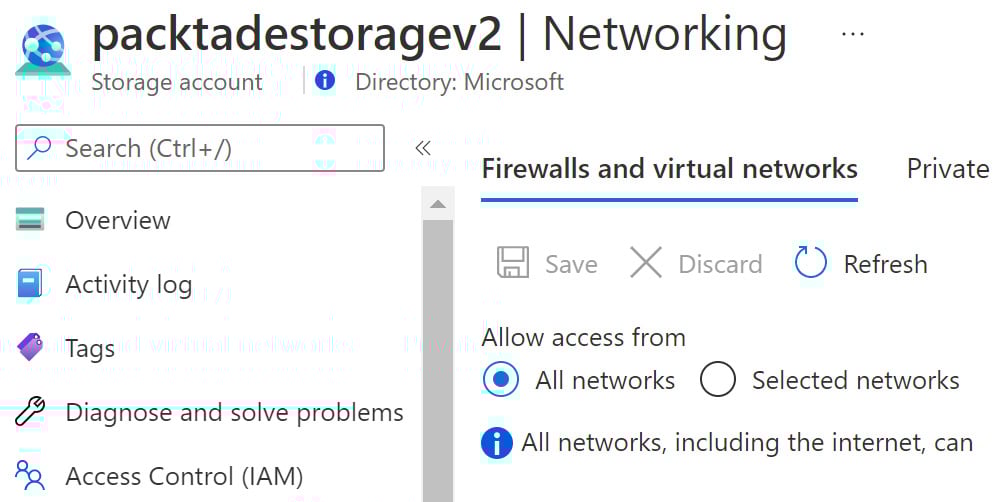
  2. On the storage account page, in the Security + Networking section, locate and select Firewalls and virtual networks.

As the packtadestoragev2 account was created with public access, it can be accessed from all networks.

  1. To allow access from an IP or an IP range, click on the Selected networks option on the storage account on the Firewalls and virtual networks page:
Figure 2.1 – Azure Storage – Firewalls and virtual networks

Figure 2.1 – Azure Storage – Firewalls and virtual networks

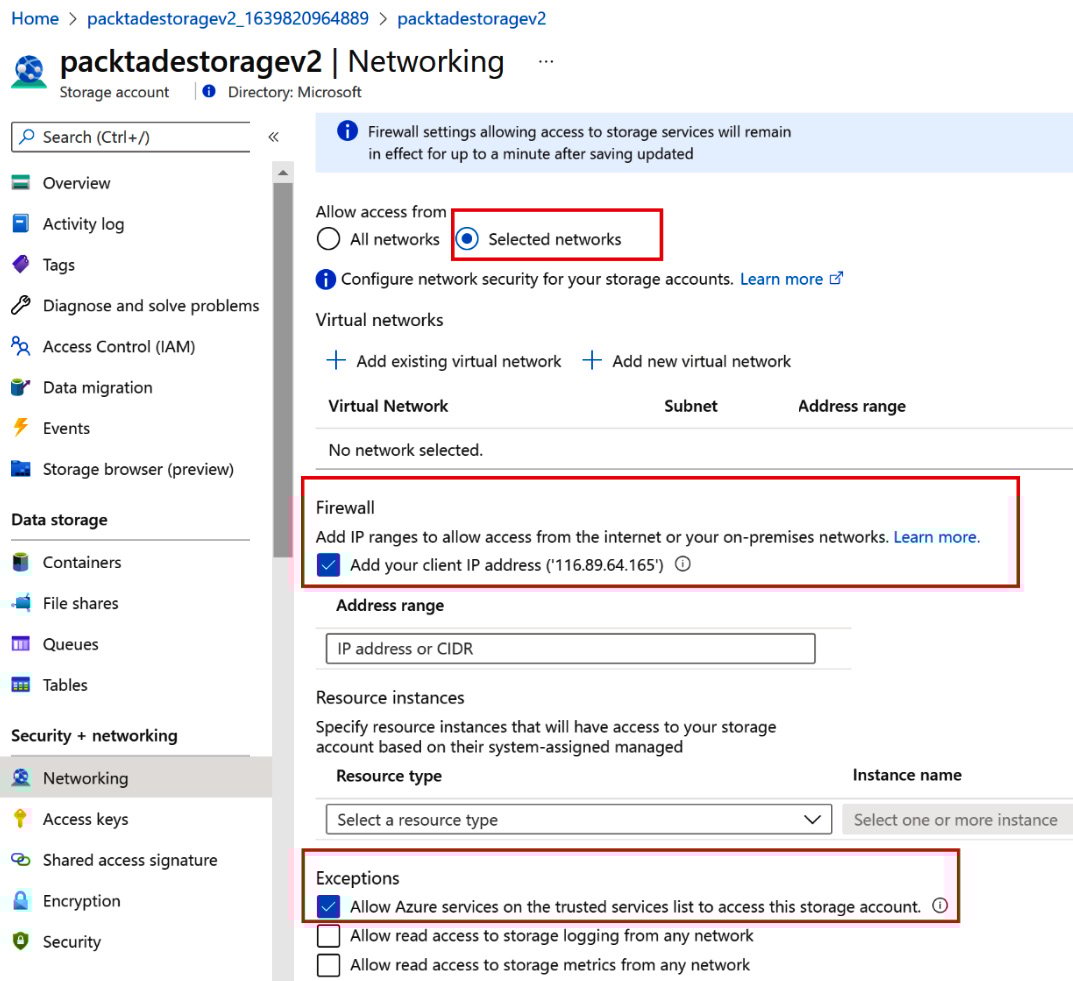
  1. In the Selected networks option, scroll down to the Firewall section. To give access to your machine only, select the Add your client IP address option. To give access to a different IP or range of IPs, type in the IPs in the Address range section:
Figure 2.2 – The whitelist IPs in the Azure Storage Firewall section

Figure 2.2 – The whitelist IPs in the Azure Storage Firewall section

  1. To access storage accounts from Azure services such as Azure Data Factory and Azure Functions, check Allow Azure services on the trusted services list to access this storage account under the Exceptions heading.
  2. Click Save to save the configuration changes.

How it works…

Firewall settings are used to restrict access to an Azure storage account to an IP or range of IPs. Even if a storage account is public, it will only be accessible to the whitelisted IPs defined in the firewall configuration.

CONTINUE READING
83
Tech Concepts
36
Programming languages
73
Tech Tools
Icon Unlimited access to the largest independent learning library in tech of over 8,000 expert-authored tech books and videos.
Icon Innovative learning tools, including AI book assistants, code context explainers, and text-to-speech.
Icon 50+ new titles added per month and exclusive early access to books as they are being written.
Azure Data Engineering Cookbook
notes
bookmark Notes and Bookmarks search Search in title playlist Add to playlist download Download options font-size Font size

Change the font size

margin-width Margin width

Change margin width

day-mode Day/Sepia/Night Modes

Change background colour

Close icon Search
Country selected

Close icon Your notes and bookmarks

Confirmation

Modal Close icon
claim successful

Buy this book with your credits?

Modal Close icon
Are you sure you want to buy this book with one of your credits?
Close
YES, BUY

Submit Your Feedback

Modal Close icon
Modal Close icon
Modal Close icon