Sign In Start Free Trial
Account

Add to playlist

Create a Playlist

Modal Close icon
You need to login to use this feature.
  • Book Overview & Buying Alteryx Designer Cookbook
  • Table Of Contents Toc
Alteryx Designer Cookbook

Alteryx Designer Cookbook

By : Alberto Guisande
4.9 (10)
close
close
Alteryx Designer Cookbook

Alteryx Designer Cookbook

4.9 (10)
By: Alberto Guisande

Overview of this book

Alteryx allows you to create data manipulation and analytic workflows with a simple, easy-to-use, code-free UI, and perform fast-executing workflows, offering multiple ways to achieve the same results. The Alteryx Designer Cookbook is a comprehensive guide to maximizing your Alteryx skills and determining the best ways to perform data operations This book's recipes will guide you through an analyst's complete journey, covering all aspects of the data life cycle. The first set of chapters will teach you how to read data from various sources to obtain reports and pass it through the required adjustment operations for analysis. After an explanation of the Alteryx platform components with a particular focus on Alteryx Designer, you’ll be taken on a tour of what and how you can accomplish by using this tool. Along the way, you’ll learn best practices and design patterns. The book also covers real-world examples to help you apply your understanding of the features in Alteryx to practical scenarios By the end of this book, you’ll have enhanced your proficiency with Alteryx Designer and an improved ability to execute tasks within the tool efficiently
Table of Contents (17 chapters)
close
close

DCM – setting up credentials

As we saw in this chapter introduction, DCM allows you to administer credentials and passwords in a single-source, centralized way, so it solves some pain points, for example, multiple credential inputs, credentials being unsafely shared, loss of connection to data sources upon workflow sharing, among others.

Before getting into the matter, we need to identify three types of objects/concepts within DCM:

  • Credentials: Authentication mechanism for the specific technology
  • Data Sources: All accessible technologies supported by Alteryx
  • Connections: The combination of a data source and the credentials used to validate within

Also, if you have Alteryx Server, you can synchronize and share your connections against it. If you don’t, credentials, data sources, and connections created with DCM will remain local.

Getting ready

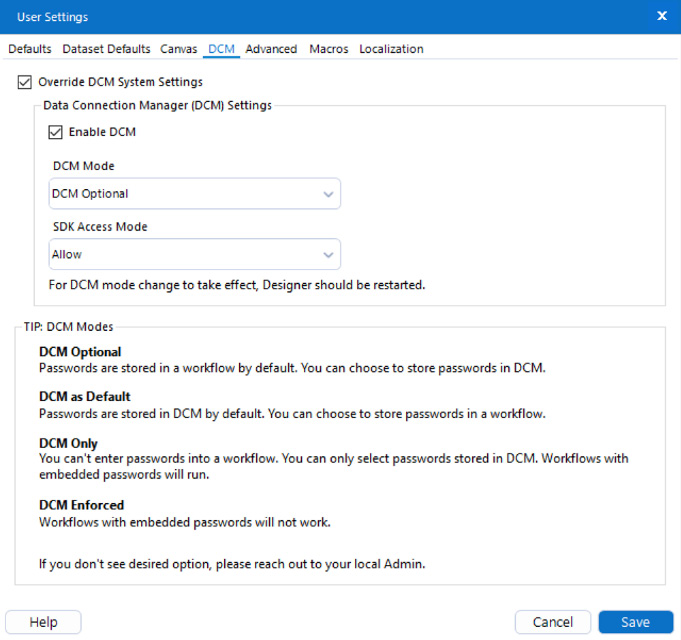
To follow this recipe, you must enable DCM on Alteryx Designer. To do so, go to Options → User Settings → Edit User Settings and from the DCM tab click on Enable DCM.

If the Enable DCM option appears disabled to you, click first on Override DCM System Settings, and it will enable it.

Figure 2.29: DCM options in User Settings

Figure 2.29: DCM options in User Settings

Make sure DCM Optional is the selected value for DCM Mode and SDK Access Mode is set to Allow.

Restart Alteryx Designer and you’ll be ready to work with DCM.

How to do it…

We will get started using the following steps:

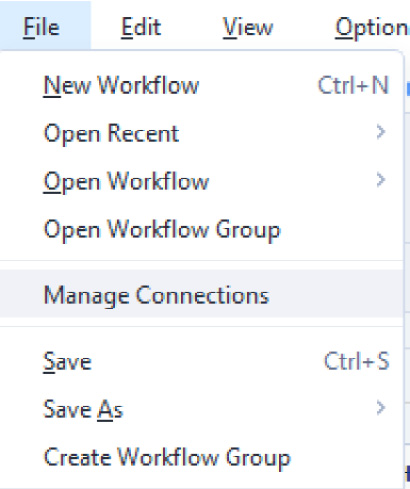
  1. Go to File → Manage Connections.
Figure 2.30: Manage Connections menu

Figure 2.30: Manage Connections menu

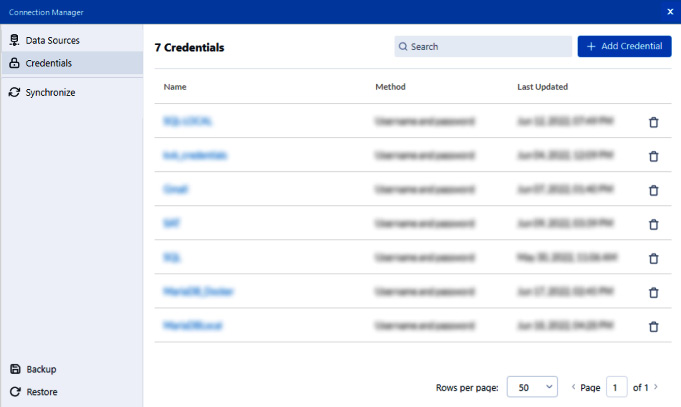
A new window is displayed (yours might be blank):

Figure 2.31: DCM main window

Figure 2.31: DCM main window

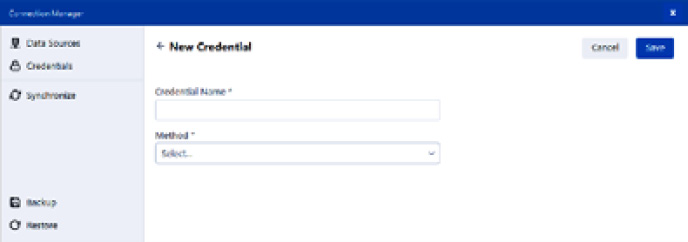
  1. Click on + Add Credential at the top right of the window and Alteryx will ask you to enter values for Credential Name and Method.
Figure 2.32: DCM main window

Figure 2.32: DCM main window

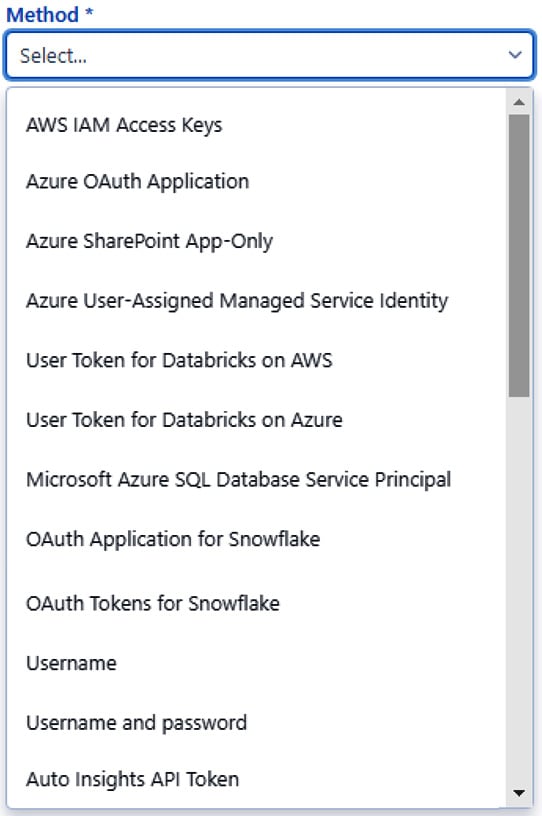
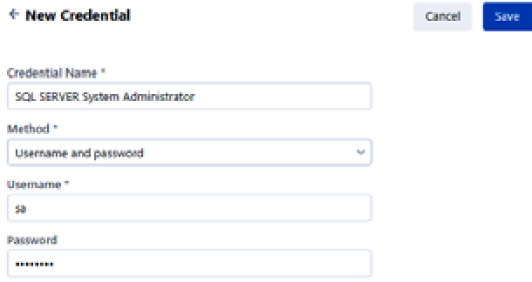
  1. Enter a meaningful name for your credential, such as SQL SERVER System Administrator, and select from the dropdown for Method. In this case, we’ll be using Username and password.
Figure 2.33: Credential Method options

Figure 2.33: Credential Method options

  1. Once you make a selection for Method, Alteryx will show you the Username and Password input fields, so fill them in with your credentials.
Figure 2.34: Credential Method options

Figure 2.34: Credential Method options

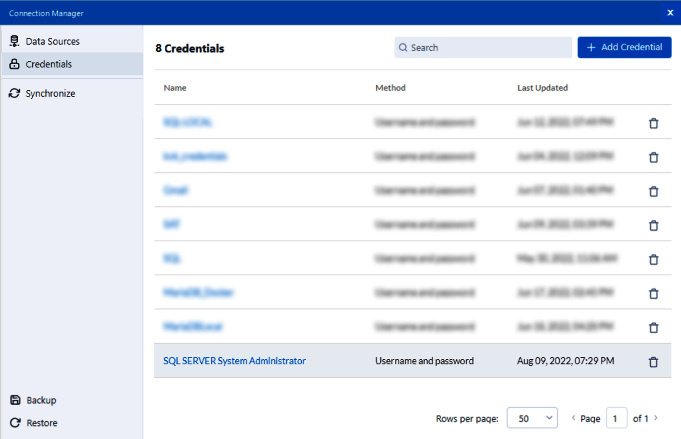
Click Save and your credential will appear in the Credentials panel.

Figure 2.35: New credential added

Figure 2.35: New credential added

Thus, we have learned how to set up credentials using DCM.

How it works…

DCM saves the credential information provided as a credential object, encrypted as a secure object, and makes it available to be reused when you need it.

This actually improves the way that credentials are managed, since using DCM changes how that information is saved (if DCM is disabled, credentials are embedded within the workflow).

CONTINUE READING
83
Tech Concepts
36
Programming languages
73
Tech Tools
Icon Unlimited access to the largest independent learning library in tech of over 8,000 expert-authored tech books and videos.
Icon Innovative learning tools, including AI book assistants, code context explainers, and text-to-speech.
Icon 50+ new titles added per month and exclusive early access to books as they are being written.
Alteryx Designer Cookbook
notes
bookmark Notes and Bookmarks search Search in title playlist Add to playlist download Download options font-size Font size

Change the font size

margin-width Margin width

Change margin width

day-mode Day/Sepia/Night Modes

Change background colour

Close icon Search
Country selected

Close icon Your notes and bookmarks

Confirmation

Modal Close icon
claim successful

Buy this book with your credits?

Modal Close icon
Are you sure you want to buy this book with one of your credits?
Close
YES, BUY

Submit Your Feedback

Modal Close icon
Modal Close icon
Modal Close icon