Sign In Start Free Trial
Account

Add to playlist

Create a Playlist

Modal Close icon
You need to login to use this feature.
  • Book Overview & Buying Grome Terrain Modeling with Ogre3D, UDK, and Unity3D
  • Table Of Contents Toc
Grome Terrain Modeling with Ogre3D, UDK, and Unity3D

Grome Terrain Modeling with Ogre3D, UDK, and Unity3D

By : Richard A. Hawley
close
close
Grome Terrain Modeling with Ogre3D, UDK, and Unity3D

Grome Terrain Modeling with Ogre3D, UDK, and Unity3D

By: Richard A. Hawley

Overview of this book

This book is a practical guide with examples and clear steps to explain terrain modeling with Grome. If you’re a developer or artist looking for a guide to walk you through GROME 3.1, then this book is for you. This book will help you from the first step to exporting a terrain as a workable art asset in a game engine.
Table of Contents (9 chapters)
close
close

Workspace panel


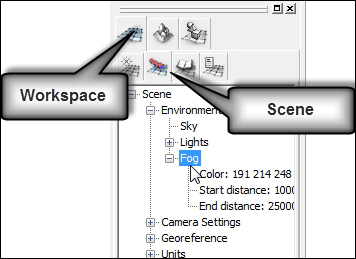
All of the editing functions we'll be using are located in two main areas of the interface; the Tool panel and the Workspace panel. Both of these panels are headed by two rows of tabs which we make good use of, so get familiar with them.

The first row is like a master mode and the second row of tabs gives access to the submode. The Workspace panel is located to the left-hand side of the viewports in the default interface layout.

Workspace tab

Workspace is an overview of what our current scene contains, scene settings, layers, and any objects we're using.

Scene tab

The scene tab allows access to how a scene is rendered and contains settings for the camera field of view (FOV), camera range, lighting, and fog. This is illustrated in the following image:

We can adjust how a fog is rendered by changing the color and range through the scene.

  1. Click on the Workspace master mode (first tab icon).

  2. Select the Scene tab to bring up the scene tree.

  3. Right-click on the Fog node and select Properties...

CONTINUE READING
83
Tech Concepts
36
Programming languages
73
Tech Tools
Icon Unlimited access to the largest independent learning library in tech of over 8,000 expert-authored tech books and videos.
Icon Innovative learning tools, including AI book assistants, code context explainers, and text-to-speech.
Icon 50+ new titles added per month and exclusive early access to books as they are being written.
Grome Terrain Modeling with Ogre3D, UDK, and Unity3D
notes
bookmark Notes and Bookmarks search Search in title playlist Add to playlist font-size Font size

Change the font size

margin-width Margin width

Change margin width

day-mode Day/Sepia/Night Modes

Change background colour

Close icon Search
Country selected

Close icon Your notes and bookmarks

Confirmation

Modal Close icon
claim successful

Buy this book with your credits?

Modal Close icon
Are you sure you want to buy this book with one of your credits?
Close
YES, BUY

Submit Your Feedback

Modal Close icon
Modal Close icon
Modal Close icon