Sign In Start Free Trial
Account

Add to playlist

Create a Playlist

Modal Close icon
You need to login to use this feature.
  • Book Overview & Buying Raspberry Pi Zero W Wireless Projects
  • Table Of Contents Toc
  • Feedback & Rating feedback
Raspberry Pi Zero W Wireless Projects

Raspberry Pi Zero W Wireless Projects

By : Tzivaras
close
close
Raspberry Pi Zero W Wireless Projects

Raspberry Pi Zero W Wireless Projects

By: Tzivaras

Overview of this book

The Raspberry Pi has always been the go–to, lightweight ARM-based computer. The recent launch of the Pi Zero W has not disappointed its audience with its $10 release. "W" here stands for Wireless, denoting that the Raspberry Pi is solely focused on the recent trends for wireless tools and the relevant use cases. This is where our book—Raspberry Pi Zero W Wireless Projects—comes into its own. Each chapter will help you design and build a few DIY projects using the Raspberry Pi Zero W board. First, you will learn how to create a wireless decentralized chat service (client-client) using the Raspberry Pi's features?. Then you will make a simple two-wheel mobile robot and control it via your Android device over your local Wi-Fi network. Further, you will use the board to design a home bot that can be connected to plenty of devices in your home. The next two projects build a simple web streaming security layer using a web camera and portable speakers that will adjust the playlist according to your mood. You will also build a home server to host files and websites using the board. Towards the end, you will create free Alexa voice recognition software and an FPV Pi Camera, which can be used to monitor a system, watch a movie, spy on something, remotely control a drone, and more. By the end of this book, you will have developed the skills required to build exciting and complex projects with Raspberry Pi Zero W.
Table of Contents (11 chapters)
close
close

The Raspberry Pi family

As mentioned previously, Raspberry Pi Zero W is a new member of the Raspberry Pi family of boards. Throughout the years, Raspberry Pi has been evolving and has become more user-friendly with endless possibilities. Let's have a look at the rest of the family, so we can understand how the Pi Zero board is different.

Right now, the heavy board is named Raspberry Pi 3 Model B. It is the best solution for projects such as face recognition, video tracking, gaming, or anything else that is demanding:
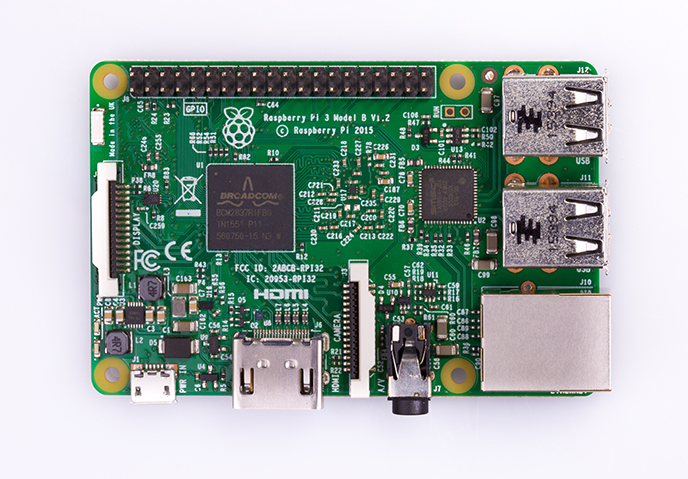
A Raspberry Pi 3 model

This is the third generation of Raspberry Pi boards after Raspberry Pi 2 and has the following specifications:

  • A 1.2 GHz 64-bit quad core ARMv8 CPU
  • 802.11 n wireless LAN
  • Bluetooth 4.1
  • Bluetooth Low Energy (BLE)

Like Pi 2, it also has:

  • 1 GB RAM
  • 4 USB ports
  • 40 GPIO pins
  • Full HDMI port
  • Ethernet port
  • Combined 3.5 mm audio jack and composite video
  • Camera interface (CSI)
  • Display interface (DSI)
  • MicroSD card slot (now push-pull rather than push-push)
  • VideoCore IV 3D graphics core

The next board is Raspberry Pi Zero, in which Zero W is based, a small, low-cost power board able to do many things:
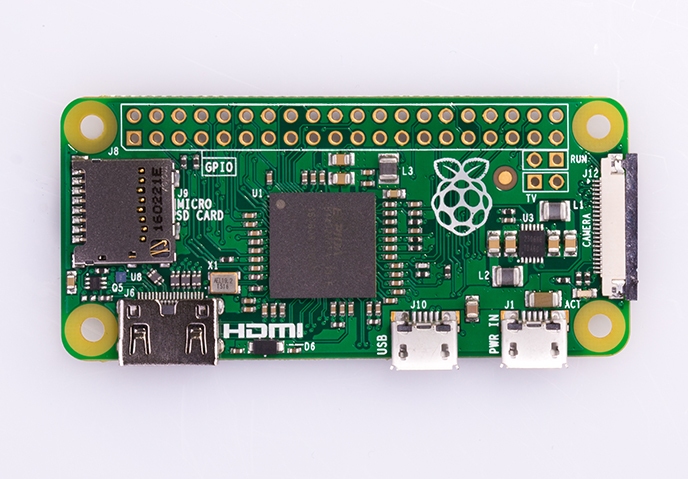
A Raspberry Pi Zero board

The specifications of this board are as follows:

  • 1 GHz, single-core CPU
  • 512 MB RAM
  • Mini HDMI port
  • Micro-USB OTG port
  • Micro-USB power
  • HAT-compatible 40-pin header
  • Composite video and reset headers
  • CSI camera connector (v1.3 only)

At this point, we should not forget to mention that apart from the boards mentioned previously, there are several other modules and components such as Sense Hat or Raspberry Pi Touch Display available that will work well for advanced projects.

The 7″ touchscreen monitor of Raspberry Pi gives users the ability to create all-in-one, integrated projects such as tablets, infotainment systems, and embedded projects:

The Raspberry Pi Touch display

The Sense HAT is an add-on board for Raspberry Pi made especially for the Astro Pi mission. The Sense HAT has an 8×8 RGB LED matrix, a five-button joystick and includes the following sensors:

  • Gyroscope
  • Accelerometer
  • Magnetometer
  • Temperature
  • Barometric pressure
  • Humidity
A Sense HAT borad

Stay tuned for new boards and modules at the official website https://www.raspberrypi.org.

Visually different images
CONTINUE READING
83
Tech Concepts
36
Programming languages
73
Tech Tools
Icon Unlimited access to the largest independent learning library in tech of over 8,000 expert-authored tech books and videos.
Icon Innovative learning tools, including AI book assistants, code context explainers, and text-to-speech.
Icon 50+ new titles added per month and exclusive early access to books as they are being written.
Raspberry Pi Zero W Wireless Projects
notes
bookmark Notes and Bookmarks search Search in title playlist Add to playlist download Download options font-size Font size

Change the font size

margin-width Margin width

Change margin width

day-mode Day/Sepia/Night Modes

Change background colour

Close icon Search
Country selected

Close icon Your notes and bookmarks

Confirmation

Modal Close icon
claim successful

Buy this book with your credits?

Modal Close icon
Are you sure you want to buy this book with one of your credits?
Close
YES, BUY

Submit Your Feedback

Modal Close icon
Modal Close icon
Modal Close icon