
Sign In Start Free Trial
Account

Add to playlist

Create a Playlist

Modal Close icon
You need to login to use this feature.
  • Book Overview & Buying HoloLens Beginner's Guide
  • Table Of Contents Toc
HoloLens Beginner's Guide

HoloLens Beginner's Guide

By : Jason M. Odom
3 (2)
close
close
HoloLens Beginner's Guide

HoloLens Beginner's Guide

3 (2)
By: Jason M. Odom

Overview of this book

HoloLens revolutionizes the way we work and interact with the virtual world. HoloLens brings you the amazing world of augmented reality and provides an opportunity to explore it like never before. This is the best book for developers who want to start creating interactive and intuitive augmented reality apps for the HoloLens platform. You will start with a walkthrough of the HoloLens hardware before creating your first app. Next you will be introduced to the various HoloLens sensors and find out how to program them efficiently so that they can interact with the real world seamlessly. Moving on, you will learn how to create smart animations and add video overlay that implements real-time tracking and motion-sensing abilities to your HoloLens app. Finally, you will learn how to test your app effectively.
Table of Contents (11 chapters)
close
close

Unity3d quick overview

In the Unity3d quick overview, we will have a quick, very general overview of Unity. In the next chapter, we will begin the first stages of our project. With the following overview, what you will learn in the chapter will stick a little bit better:

  1. Click on the Unity HoloLens icon to run Unity, as follows:
  1. If you have a Unity account, enter your account name and password, otherwise you will need to create a new account before you can move forward.
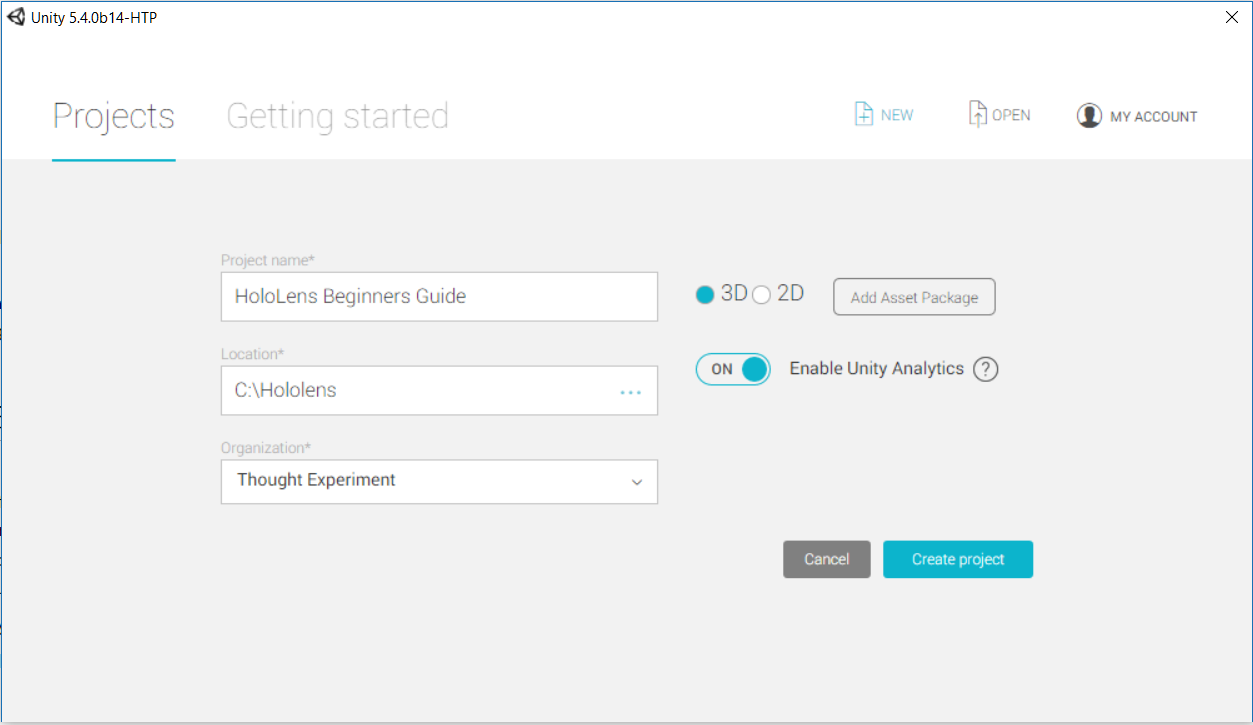
  1. Type the name of the project--HoloLens Beginners Guide--into the Project name input field.
  2. Ensure that you have 3D selected as the project type and click on Create project.

The main view

When the project is created and the program finishes loading, you should see the following default view:

Here, we can see our main work areas:

  • Scene: This is where we view our scene and can make certain types of changes.
  • Hierarchy: This is a list of all objects currently in the scene.
  • Project Window: Here, we have all the assets of the project. This will list our 3D models, scripts, textures, materials, sounds, prefabs, and all other elements of the programs.
  • Inspector: When an object is selected, we will be given many changeable details about that object.

You may notice a few in at the upper part of certain windows. These windows offer other functions, as shown in the following screenshot:

  • Console: Here, we can have the debug information presented to us. This allows us to test certain parts of a program to ensure that it is working.
  • Game View: When we test our project on our development computer, this is the window that our program will appear in; this is the main camera view.
CONTINUE READING
83
Tech Concepts
36
Programming languages
73
Tech Tools
Icon Unlimited access to the largest independent learning library in tech of over 8,000 expert-authored tech books and videos.
Icon Innovative learning tools, including AI book assistants, code context explainers, and text-to-speech.
Icon 50+ new titles added per month and exclusive early access to books as they are being written.
HoloLens Beginner's Guide
notes
bookmark Notes and Bookmarks search Search in title playlist Add to playlist download Download options font-size Font size

Change the font size

margin-width Margin width

Change margin width

day-mode Day/Sepia/Night Modes

Change background colour

Close icon Search
Country selected

Close icon Your notes and bookmarks

Confirmation

Modal Close icon
claim successful

Buy this book with your credits?

Modal Close icon
Are you sure you want to buy this book with one of your credits?
Close
YES, BUY

Submit Your Feedback

Modal Close icon
Modal Close icon
Modal Close icon