Sign In Start Free Trial
Account

Add to playlist

Create a Playlist

Modal Close icon
You need to login to use this feature.
  • Book Overview & Buying Oracle APEX Cookbook : Second Edition
  • Table Of Contents Toc
Oracle APEX Cookbook : Second Edition

Oracle APEX Cookbook : Second Edition

4.6 (7)
close
close
Oracle APEX Cookbook : Second Edition

Oracle APEX Cookbook : Second Edition

4.6 (7)

Overview of this book

Table of Contents (21 chapters)
close
close
Oracle APEX Cookbook Second Edition
Credits
About the Authors
About the Reviewers
www.PacktPub.com
Preface
1
Index

Securing an application with Authentication


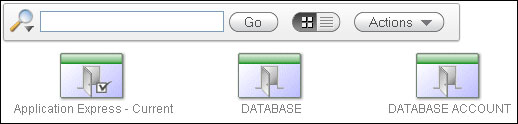
Application Express comes with three standard ways to authenticate users on applications. We can use the credentials of database users, we can use the credentials of users defined within APEX itself, or we can use the credentials defined in the Database Access Descriptor. In this recipe, we will show how to add our own Authentication Scheme to this list.

An Authentication Scheme controls access to an entire application as opposed to an Authorization Scheme that controls access to individual components inside the application.

Simply put, an Authentication Scheme is what is called when a user clicks on the Login button.

Getting ready

First, we need a table to store the data for our users. In our application, this table will be APP_USERS. It contains columns for username and password, so we can create a very basic authentication scheme. Make sure this table is ready before continuing in this recipe.

Enter at least one row of data into the table that we can use to login at the end of the recipe.

Also we need two functions in place. APP_HASH is a function that will use a hashing algorithm and a salt to mask the real password. To make it more secure, the current date can be used in the algorithm, but this is enough for our example.

In a production environment, it is probably a good idea to wrap this code, because it can help intruders gain access to the application.

create or replace function app_hash (p_username in varchar2, p_password in varchar2)
return varchar2
is
  l_password varchar2(4000);
  l_salt varchar2(4000) := 'DFS2J3DF4S5HG666IO7S8DJGSDF8JH';
                                     
begin

  l_password := utl_raw.cast_to_raw(dbms_obfuscation_toolkit.md5
  (input_string => p_password || substr(l_salt,10,13) || p_username ||
    substr(l_salt, 4,10)));
  return l_password;
end;
[9672_01_13.txt]

APP_AUTH is a function that will check if the user is valid and if the password is entered correctly:

create or replace function app_auth (p_username in VARCHAR2, p_password in VARCHAR2)
return BOOLEAN
is
  l_password varchar2(4000);
  l_stored_password varchar2(4000);
  l_expires_on date;
  l_count number;
begin
  select count(*) 
    into l_count 
    from app_users 
   where upper(username) = upper(p_username);

  if l_count > 0 
  then
    select password 
      into l_stored_password
      from app_users 
      where upper(username) = upper(p_username);

    l_password := app_hash(p_username, p_password);

    if l_password = l_stored_password 
    then
      return true;
    else
      return false;
    end if;
  else
    return false;
  end if;

end;
[9672_01_14.txt]

How to do it...

The first thing we have to do is add the new authentication scheme to the list of existing schemes:

  1. Click on the Create button.

  2. Choose From Scratch and click on Next.

  3. Name it Application Authentication and click on Next.

  4. Click on Next on the following two screens as well.

  5. Select Page in This Application and page 101 on the Invalid Session Target and click on Next until you reach Credentials verification method.

  6. Select Use my custom function to authenticate and enter return app_auth in Authentication Function.

  7. Click on Next until you reach Logout URL.

  8. The Logout URL is wwv_flow_custom_auth_std.logout?p_this_flow=&APP_ID.&p_next_flow_page_sess=&APP_ID.:1

  9. Click on Next and then on Create Scheme.

The last step is to make the new Authentication Scheme the current for the application. To do this, navigate to the tab Change Current on the Schemes Overview screen. Select the new scheme from the list and click on the Make Current button.

You can now log in to the application using a username and password from the APP_USERS table.

Visually different images
CONTINUE READING
83
Tech Concepts
36
Programming languages
73
Tech Tools
Icon Unlimited access to the largest independent learning library in tech of over 8,000 expert-authored tech books and videos.
Icon Innovative learning tools, including AI book assistants, code context explainers, and text-to-speech.
Icon 50+ new titles added per month and exclusive early access to books as they are being written.
Oracle APEX Cookbook : Second Edition
notes
bookmark Notes and Bookmarks search Search in title playlist Add to playlist font-size Font size

Change the font size

margin-width Margin width

Change margin width

day-mode Day/Sepia/Night Modes

Change background colour

Close icon Search
Country selected

Close icon Your notes and bookmarks

Confirmation

Modal Close icon
claim successful

Buy this book with your credits?

Modal Close icon
Are you sure you want to buy this book with one of your credits?
Close
YES, BUY

Submit Your Feedback

Modal Close icon
Modal Close icon
Modal Close icon