Sign In Start Free Trial
Account

Add to playlist

Create a Playlist

Modal Close icon
You need to login to use this feature.
  • Book Overview & Buying Oracle APEX Cookbook : Second Edition
  • Table Of Contents Toc
  • Feedback & Rating feedback
Oracle APEX Cookbook : Second Edition

Oracle APEX Cookbook : Second Edition

4.6 (7)
close
close
Oracle APEX Cookbook : Second Edition

Oracle APEX Cookbook : Second Edition

4.6 (7)

Overview of this book

Table of Contents (21 chapters)
close
close
Oracle APEX Cookbook Second Edition
Credits
About the Authors
About the Reviewers
www.PacktPub.com
Preface
1
Index

Creating a report with PL/SQL Dynamic Content


APEX offers many item types and templates to use when designing an application. Sometimes this isn't enough, for example, when you have an existing web application built with mod PL/SQL that you want to reuse.

It's possible by using built-in packages such as HTP or HTF, or by using some native APEX code to create these types of pages directly in PL/SQL.

How to do it...

In this example, we are going to build a report without using any items, but only PL/SQL code.

On an empty page, create a new region:

  1. Choose a PL/SQL Dynamic Content region type.

  2. Name it Employees.

The PL/SQL Source is the most important part of this region. With this, we will be building up the report. To show how this works, we will first create the region without any layout.

Enter the following as the PL/SQL and click on Next, and then on Create Region:

declare
  cursor c_emp
      is
         select apex_item.hidden(1,emp.id) id
              , apex_item.display_and_save(2,emp.firstname) firstname
              , apex_item.display_and_save(2,emp.lastname) lastname
              , apex_item.display_and_save(2,emp.username) username
              , apex_item.display_and_save(2,dept.name) department
              , apex_item.display_and_save(2,job.abbreviation) job
              , apex_item.display_and_save(2,job.description) job_desc
           from app_employees emp
              , app_departments dept
              , app_jobs job
          where emp.dept_id = dept.id
            and emp.job_id  = job.id;
begin
  for r_emp in c_emp
  loop
    htp.p(r_emp.id);
    htp.p(r_emp.firstname);
    htp.p(r_emp.lastname);
    htp.p(r_emp.username);
    htp.p(r_emp.department);
    htp.p(r_emp.job);
    htp.p(r_emp.job_desc);
  end loop;
end;
[9672_01_20.txt]

When the page is run, all data from each employee is placed on one continuous line. To change this and make it look more like a report, we will add some HTML encoding, using the htp package.

Change the code inside the begin-end to the following:

  htp.tableopen;

  for r_emp in c_emp
  loop
      htp.tablerowopen;
        htp.tabledata(r_emp.id);
        htp.tabledata(r_emp.firstname);
        htp.tabledata(r_emp.lastname);
        htp.tabledata(r_emp.username);
        htp.tabledata(r_emp.department);
        htp.tabledata(r_emp.job);
        htp.tabledata(r_emp.job_desc);
      htp.tablerowclose;
  end loop;

  htp.tableclose;
[9672_01_21.txt]

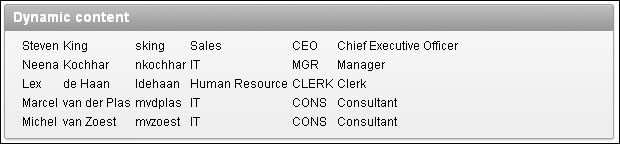
This looks a lot better and gives us a starting point to apply a better layout:

Applying layout can now be done on multiple levels. For starters, the APEX_ITEM package can be used to select different item types in the cursor query. We have now used APEX_ITEM.DISPLAY_AND_SAVE to show the data as text only, but we could also use item type TEXT to make it a text field.

On a second level, we can start using classes from the CSS that is used by the application. These can be applied to the items, tables, tablerows, and so forth. How this can be done as explained in Chapter 2, Themes and Templates.

Visually different images
CONTINUE READING
83
Tech Concepts
36
Programming languages
73
Tech Tools
Icon Unlimited access to the largest independent learning library in tech of over 8,000 expert-authored tech books and videos.
Icon Innovative learning tools, including AI book assistants, code context explainers, and text-to-speech.
Icon 50+ new titles added per month and exclusive early access to books as they are being written.
Oracle APEX Cookbook : Second Edition
notes
bookmark Notes and Bookmarks search Search in title playlist Add to playlist font-size Font size

Change the font size

margin-width Margin width

Change margin width

day-mode Day/Sepia/Night Modes

Change background colour

Close icon Search
Country selected

Close icon Your notes and bookmarks

Confirmation

Modal Close icon
claim successful

Buy this book with your credits?

Modal Close icon
Are you sure you want to buy this book with one of your credits?
Close
YES, BUY

Submit Your Feedback

Modal Close icon
Modal Close icon
Modal Close icon