-
Book Overview & Buying
-
Table Of Contents
Delphi Cookbook - Second Edition
By :
JSON (JavaScript Object Notation) is a lightweight data-interchange format. As the reference site says, "It is easy for humans to read and write. It is easy for machines to parse and generate." It is based on a subset of the JavaScript programming language, but it is not limited to JavaScript in any way. Indeed, JSON is a text format that is completely language agnostic. These properties make JSON an ideal data-interchange language for many uses. In recent years, JSON has become on a par with XML in many applications, especially when the data size matters, because of its intrinsic conciseness and simplicity.
JSON provides the following five datatypes: String, Number, Object, Array, Boolean, and Null.
This simplicity is an advantage when you have to read a JSON string into some kind of language-specific structure, because every modern language supports the JSON datatypes as simple types or as HashMap (in the case of JSON objects) or List (in the case of JSON arrays). So, it makes sense that a data format that is interchangeable with programming languages is also based on these types and structures.
Since version 2009, Delphi provides built-in support for JSON. The System.JSON.pas unit contains all the JSON types with a nice object oriented interface. In this recipe, you'll see how to generate, modify, and parse a JSON string.
btnGenerateJSON, btnModifyJSON, and btnParseJSON.type TCarInfo = ( Manufacturer = 1, Name = 2, Currency = 3, Price = 4); var Cars: array [1 .. 4] of array [Manufacturer .. Price] of string = ( ('Ferrari','360 Modena','EUR', '250000'), ('Ford', 'Mustang', 'USD', '80000'), ('Lamborghini', 'Countach', 'EUR','300000'), ('Chevrolet', 'Corvette', 'USD', '100000') );
JSON on the form and map its setter and getter to the Memo1.Lines.Text property. Use the following code://…other form methods declaration private procedure SetJSON(const Value: String); function GetJSON: String; public property JSON: String read GetJSON write SetJSON; end; //…then in the implementation section function TMainForm.GetJSON: String; begin Result := Memo1.Lines.Text; end; procedure TMainForm.SetJSON(const Value: String); begin Memo1.Lines.Text := Value; end;
procedure TMainForm.btnGenerateJSONClick(Sender: TObject); var i: Integer; JSONCars: TJSONArray; Car, Price: TJSONObject; begin JSONCars := TJSONArray.Create; try for i := Low(Cars) to High(Cars) do begin Car := TJSONObject.Create; JSONCars.AddElement(Car); Car.AddPair('manufacturer', Cars[i][TCarInfo.Manufacturer]); Car.AddPair('name', Cars[i][TCarInfo.Name]); Price := TJSONObject.Create; Car.AddPair('price', Price); Price.AddPair('value', TJSONNumber.Create(Cars[i][TCarInfo.Price].ToInteger)); Price.AddPair('currency',Cars[i][TCarInfo.Currency]); end; JSON := JSONCars.ToJSON; finally JSONCars.Free; end; end; procedure TMainForm.btnModifyJSONClick(Sender: TObject); var JSONCars: TJSONArray; Car, Price: TJSONObject; begin JSONCars := TJSONObject.ParseJSONValue(JSON) as TJSONArray; try Car := TJSONObject.Create; JSONCars.AddElement(Car); Car.AddPair('manufacturer', 'Hennessey'); Car.AddPair('name', 'Venom GT'); Price := TJSONObject.Create; Car.AddPair('price', Price); Price.AddPair('value', TJSONNumber.Create(600000)); Price.AddPair('currency', 'USD'); JSON := JSONCars.ToJSON; finally JSONCars.Free; end; end; procedure TMainForm.btnParseJSONClick(Sender: TObject); var JSONCars: TJSONArray; i: Integer; Car, JSONPrice: TJSONObject; CarPrice: Double; s, CarName, CarManufacturer, CarCurrencyType: string; begin s := ''; JSONCars := TJSONObject.ParseJSONValue(JSON) as TJSONArray; if not Assigned(JSONCars) then raise Exception.Create('Not a valid JSON'); try for i := 0 to JSONCars.Count - 1 do begin Car := JSONCars.Items[i] as TJSONObject; CarName := Car.GetValue('name').Value; CarManufacturer := Car.GetValue('manufacturer').Value; JSONPrice := Car.GetValue('price') as TJSONObject; CarPrice := (JSONPrice.GetValue('value') as TJSONNumber).AsDouble; CarCurrencyType := JSONPrice.GetValue('currency') .Value s := s + Format( 'Name = %s' + sLineBreak + 'Manufacturer = %s' + sLineBreak + 'Price = %.0n%s' + sLineBreak + '-----' + sLineBreak, [CarName, CarManufacturer, CarPrice, CarCurrencyType]); end; JSON := s; finally JSONCars.Free; end; end;
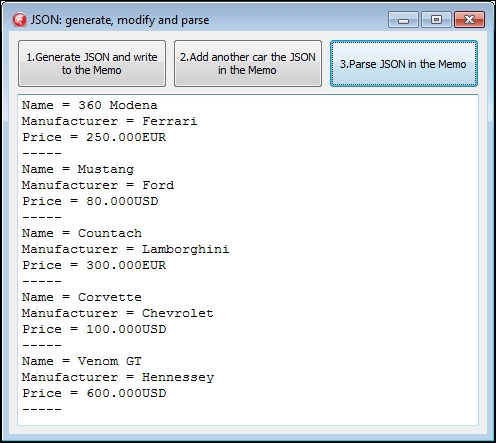
btnGenerateJSON button, and you should see a JSON array and some JSON objects in the memo.btnModifyJSON button, and you should see one more JSON object inside the outer JSON array in the memo.
Figure 6.1: Text representation of the JSON data generated and modified
Although not the fastest or the most standard compliant on the market, JSON usability is important because other Delphi technologies, such as DataSnap, use it. Luckily, there are a lot of alternative JSON parsers for Delphi, if you find you have trouble with the standard one.
Other notable JSON parsers are:
If your main concern is speed, then check out these alternative JSON parsers.
There are also a lot of serialization libraries that use JSON as a serialization format. In general, every parser has its own way to serialize an object to JSON. Find your favorite. Just as an example, in Chapter 5, The Thousand Faces of Multithreading, in the Using tasks to make your customer happier recipe you will see an open source library containing a set of serialization helpers using the default Delphi JSON parser.
However, JSON is not the right tool for every interchange or data-representation job. XML has been creating other technologies that can help if you need to search, transform, and validate your data in a declarative way. In JSON land, there is no such level of standardization, apart from the format itself. However, over the years, there is an effort to include at least the XML Schema counterpart in JSON, and you can find more details at http://json-schema.org/.
Change the font size
Change margin width
Change background colour