Sign In Start Free Trial
Account

Add to playlist

Create a Playlist

Modal Close icon
You need to login to use this feature.
  • Book Overview & Buying Spring 5.0 Cookbook
  • Table Of Contents Toc
Spring 5.0 Cookbook

Spring 5.0 Cookbook

By : Sherwin John C. Tragura
3.5 (2)
close
close
Spring 5.0 Cookbook

Spring 5.0 Cookbook

3.5 (2)
By: Sherwin John C. Tragura

Overview of this book

The Spring framework has been the go-to framework for Java developers for quite some time. It enhances modularity, provides more readable code, and enables the developer to focus on developing the application while the underlying framework takes care of transaction APIs, remote APIs, JMX APIs, and JMS APIs. The upcoming version of the Spring Framework has a lot to offer, above and beyond the platform upgrade to Java 9, and this book will show you all you need to know to overcome common to advanced problems you might face. Each recipe will showcase some old and new issues and solutions, right from configuring Spring 5.0 container to testing its components. Most importantly, the book will highlight concurrent processes, asynchronous MVC and reactive programming using Reactor Core APIs. Aside from the core components, this book will also include integration of third-party technologies that are mostly needed in building enterprise applications. By the end of the book, the reader will not only be well versed with the essential concepts of Spring, but will also have mastered its latest features in a solution-oriented manner.
Table of Contents (14 chapters)
close
close

Installing the MySQL 5.7 database server

The book will be covering some concepts on how Spring 5.0 handles data persistence involving relational database management systems. MySQL 5.7 will be the database server that will be used to create, store, update, and delete records of data.

Getting started

How to do it...

  1. On the download page, choose the General Available (GA) Releases tab.
  2. Choose the desired platform through the Select Platform dropdown. The book will be using the MySQL server for Windows.
  3. Once the Windows platform is chosen, there are other options available for download under the Other Downloads link. Choose the Windows (x86, 32-bit) Windows MSI installer for easy installation.
  4. Afterwards, just click No thanks, just start my downloads! to download the installer immediately.
  5. After downloading the installer (for example, mysql-installer-community-5.7.17.0.msi), click the file and start the following wizards.
  6. Choose Developer Default as our server type.
  7. Install all the connectors.
  8. Use port 3306 and set the password to packt.
  9. After installing the MySQL server, proceed with installing the Samples and Examples scripts.
  10. After finishing the installation, create MySQL_HOME in your classpath and expose <installation_folder>MySQLMySQL Server 5.7bin commands.
  11. At this point, you are now ready to install the server for database transactions.

How it works...

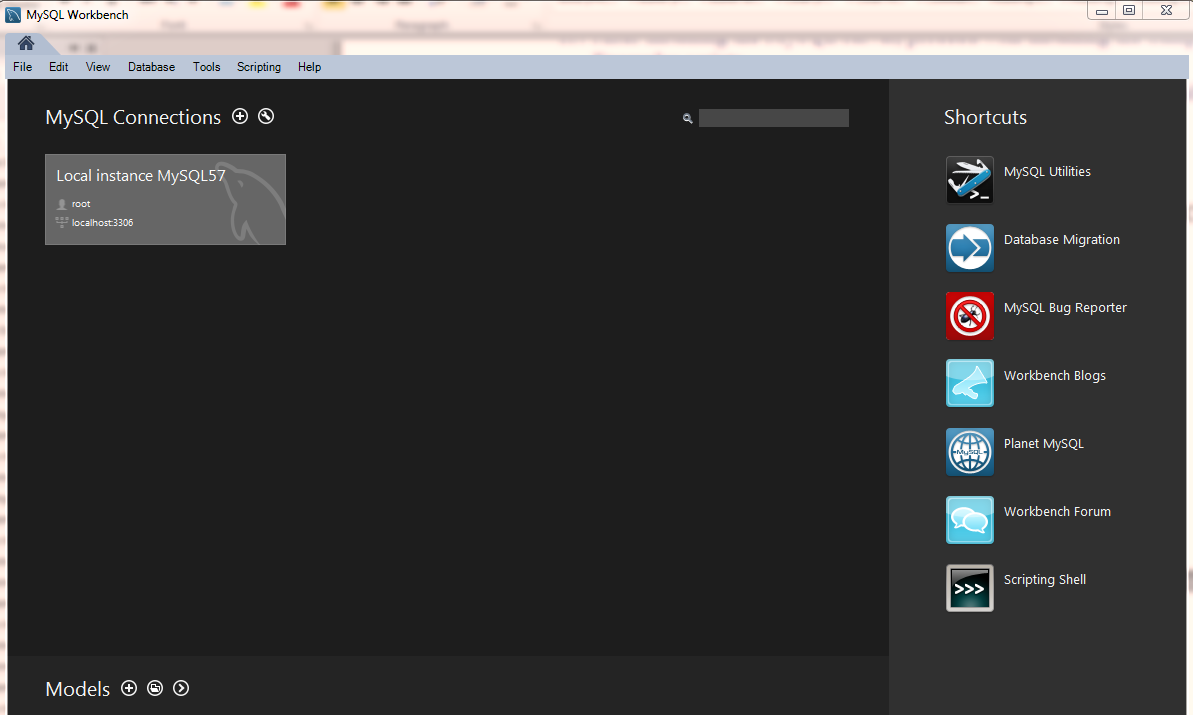
To deal with SQL transactions, we can us the CLI of MySQL or the given GUI-based MySQL Workbench:

CONTINUE READING
83
Tech Concepts
36
Programming languages
73
Tech Tools
Icon Unlimited access to the largest independent learning library in tech of over 8,000 expert-authored tech books and videos.
Icon Innovative learning tools, including AI book assistants, code context explainers, and text-to-speech.
Icon 50+ new titles added per month and exclusive early access to books as they are being written.
Spring 5.0 Cookbook
notes
bookmark Notes and Bookmarks search Search in title playlist Add to playlist download Download options font-size Font size

Change the font size

margin-width Margin width

Change margin width

day-mode Day/Sepia/Night Modes

Change background colour

Close icon Search
Country selected

Close icon Your notes and bookmarks

Confirmation

Modal Close icon
claim successful

Buy this book with your credits?

Modal Close icon
Are you sure you want to buy this book with one of your credits?
Close
YES, BUY

Submit Your Feedback

Modal Close icon
Modal Close icon
Modal Close icon