Sign In Start Free Trial
Account

Add to playlist

Create a Playlist

Modal Close icon
You need to login to use this feature.
  • Book Overview & Buying Modern R Programming Cookbook
  • Table Of Contents Toc
  • Feedback & Rating feedback
Modern R Programming Cookbook

Modern R Programming Cookbook

By : Jaynal Abedin
close
close
Modern R Programming Cookbook

Modern R Programming Cookbook

By: Jaynal Abedin

Overview of this book

R is a powerful tool for statistics, graphics, and statistical programming. It is used by tens of thousands of people daily to perform serious statistical analyses. It is a free, open source system whose implementation is the collective accomplishment of many intelligent, hard-working people. There are more than 2,000 available add-ons, and R is a serious rival to all commercial statistical packages. The objective of this book is to show how to work with different programming aspects of R. The emerging R developers and data science could have very good programming knowledge but might have limited understanding about R syntax and semantics. Our book will be a platform develop practical solution out of real world problem in scalable fashion and with very good understanding. You will work with various versions of R libraries that are essential for scalable data science solutions. You will learn to work with Input / Output issues when working with relatively larger dataset. At the end of this book readers will also learn how to work with databases from within R and also what and how meta programming helps in developing applications.
Table of Contents (10 chapters)
close
close

Installing and configuring base R in Linux

It is not necessarily the case that every user will use Windows platform. In this recipe, you will see how to install and configure R on the Linux platform. Each of the steps is described with an appropriate screenshot so that you can easily understand the steps.

Getting ready

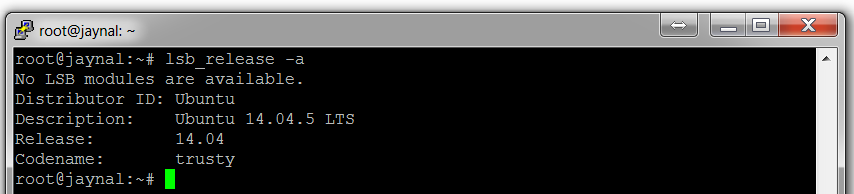
To install R in the Linux operating system, first, you need to know the version of Linux you are using. To know the version of Linux installed on your computer, there are many options. One of the options is the following command:

lsb_release -a

This command will give the release information as shown in the following screenshot:

In this recipe, you will see the example from the Ubuntu 14.04 release.

How to do it...

Once you have the version number, you simply need to install base R onto your computer. The step-by-step procedure is as follows:

  1. Update etc/apt/source.list by adding an entry as follows:
        deb <cran mirror address>/bin/linux/ubuntu trusty/
  1. Replace <cran mirror address> by putting an actual mirror link from the list of available mirrors from https://cran.r-project.org/mirrors.html. Remember that you must have administrator privileges to edit etc/apt/source.list.
  2. Once you have performed the preceding step, type the following command to install R:
      sudo apt-get update
sudo apt-get install r-base
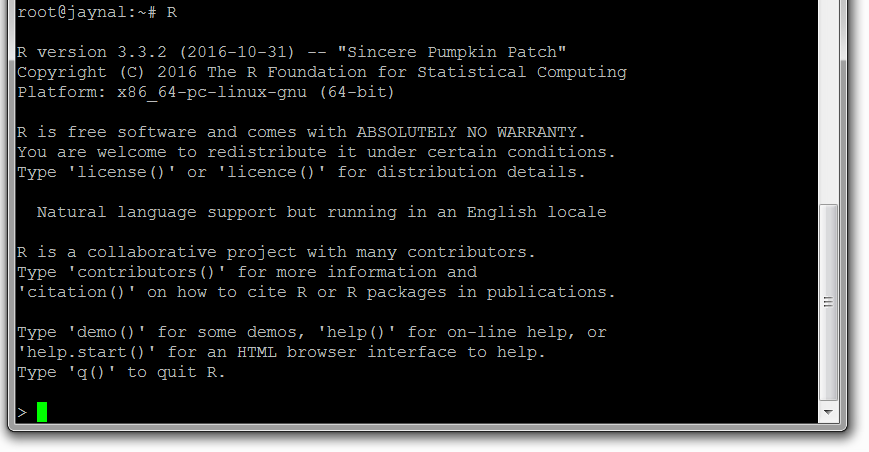
  1. The preceding two commands will complete the installation process and you can check whether R has been installed correctly or not, by typing R and hitting Enter on the Terminal window. If the R console opens, then you are ready to go:
  1. Some of the users may need to compile R packages from the source code. In that case, you will need to install the following component of R:
      sudo apt-get install r-base-dev
Your computer must connect to the internet to install R.

There's more...

In this recipe, you have installed base R into Ubuntu 14.04 release. If your operating system has another release of Linux, then visit https://cran.r-project.org/, select Download R for Linux, and follow the steps outlined there.

See also

To understand how to install an IDE into either Windows or Linux, follow the next recipe.

Visually different images
CONTINUE READING
83
Tech Concepts
36
Programming languages
73
Tech Tools
Icon Unlimited access to the largest independent learning library in tech of over 8,000 expert-authored tech books and videos.
Icon Innovative learning tools, including AI book assistants, code context explainers, and text-to-speech.
Icon 50+ new titles added per month and exclusive early access to books as they are being written.
Modern R Programming Cookbook
notes
bookmark Notes and Bookmarks search Search in title playlist Add to playlist download Download options font-size Font size

Change the font size

margin-width Margin width

Change margin width

day-mode Day/Sepia/Night Modes

Change background colour

Close icon Search
Country selected

Close icon Your notes and bookmarks

Confirmation

Modal Close icon
claim successful

Buy this book with your credits?

Modal Close icon
Are you sure you want to buy this book with one of your credits?
Close
YES, BUY

Submit Your Feedback

Modal Close icon
Modal Close icon
Modal Close icon