Sign In Start Free Trial
Account

Add to playlist

Create a Playlist

Modal Close icon
You need to login to use this feature.
  • Book Overview & Buying Low-Code Application Development with Appian
  • Table Of Contents Toc
Low-Code Application Development with Appian

Low-Code Application Development with Appian

By : Helzle
5 (5)
close
close
Low-Code Application Development with Appian

Low-Code Application Development with Appian

5 (5)
By: Helzle

Overview of this book

This book is an exhaustive overview of how the Appian Low-Code BPM Suite enables tech-savvy professionals to rapidly automate business processes across their organization, integrating people, software bots, and data. This is crucial as 80% of all software development is expected to be carried out in low code by 2024. This practical guide helps you master business application development with Appian as a beginner low-code developer. You'll learn to automate business processes using Appian low-code, records, processes, and expressions quickly and on an enterprise scale. In a fictional development project, guided by step-by-step explanations of the concepts and practical examples, this book will empower you to transform complex business processes into software. At first, you’ll learn the power of no-code with Appian Quick Apps to solve some of your most crucial business challenges. You’ll then get to grips with the building blocks of an Appian, starting with no-code and advancing to low-code, eventually transforming complex business requirements into a working enterprise-ready application. By the end of this book, you'll be able to deploy Appian Quick Apps in minutes and successfully transform a complex business process into low-code process models, data, and UIs to deploy full-featured, enterprise-ready, process-driven, mobile-enabled apps.
Table of Contents (22 chapters)
close
close
1
Section 1: No-Code with Appian Quick Apps
11
Section 3: Implementing Software
17
Section 4: The Code in Appian Low-Code

Testing your app

Testing is an important step in any software development, even in low-code with Appian and in a no-code approach when creating a Quick App. Later in this book, we will have a closer look at how testing and QA in Appian works. For now, let's create some new improvements to make sure the app works as designed. Proceed as follows:

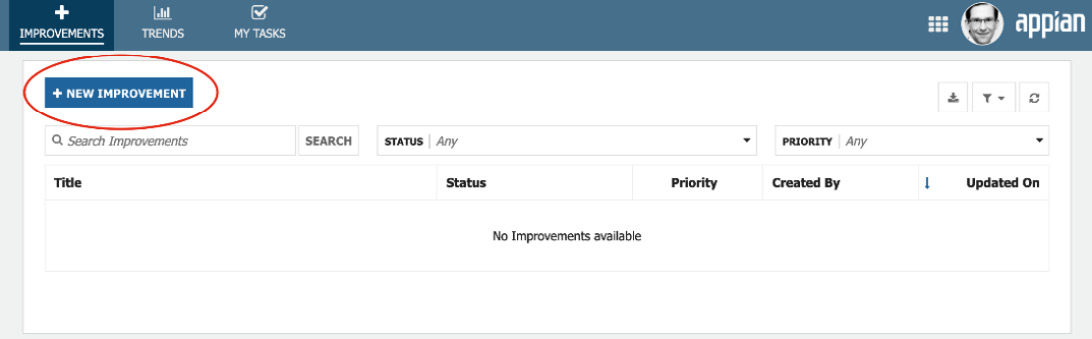
  1. Click the + NEW IMPROVEMENT button, as illustrated in the following screenshot:
Figure 1.23 – Empty list, ready for adding items

Figure 1.23 – Empty list, ready for adding items

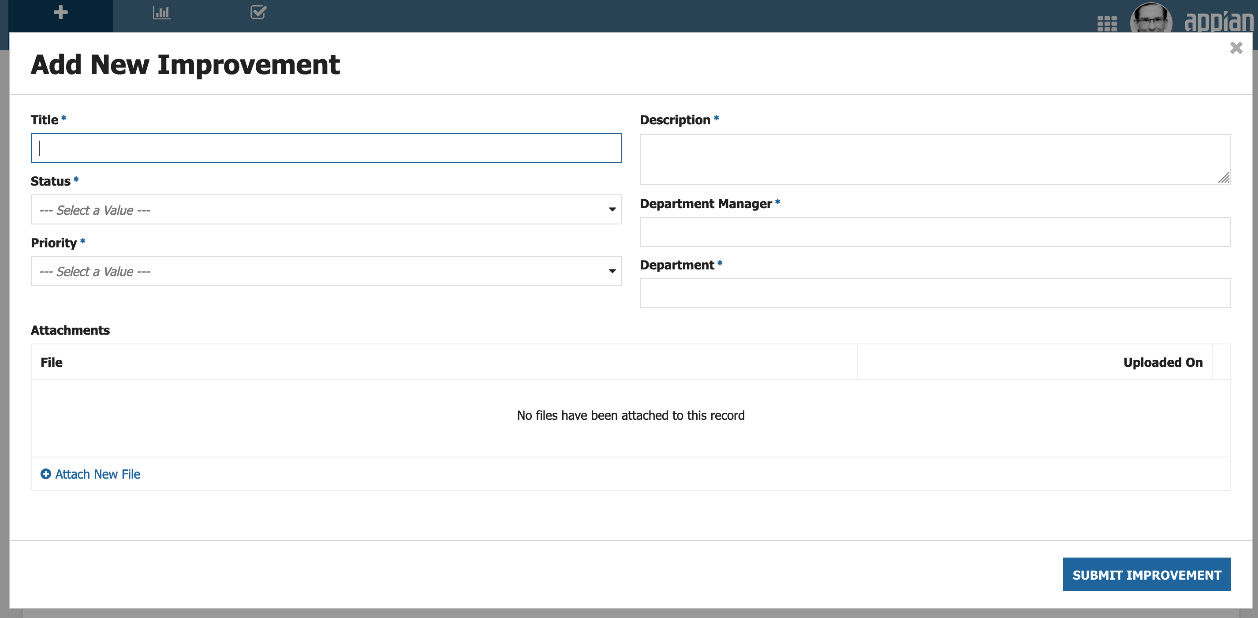
  1. You now see a screen to add a new improvement. This screen looks very similar to the one you saw just minutes ago in the preview function of the Quick Apps Designer, as we can see here:
Figure 1.24 – Add New Improvement screen

Figure 1.24 – Add New Improvement screen

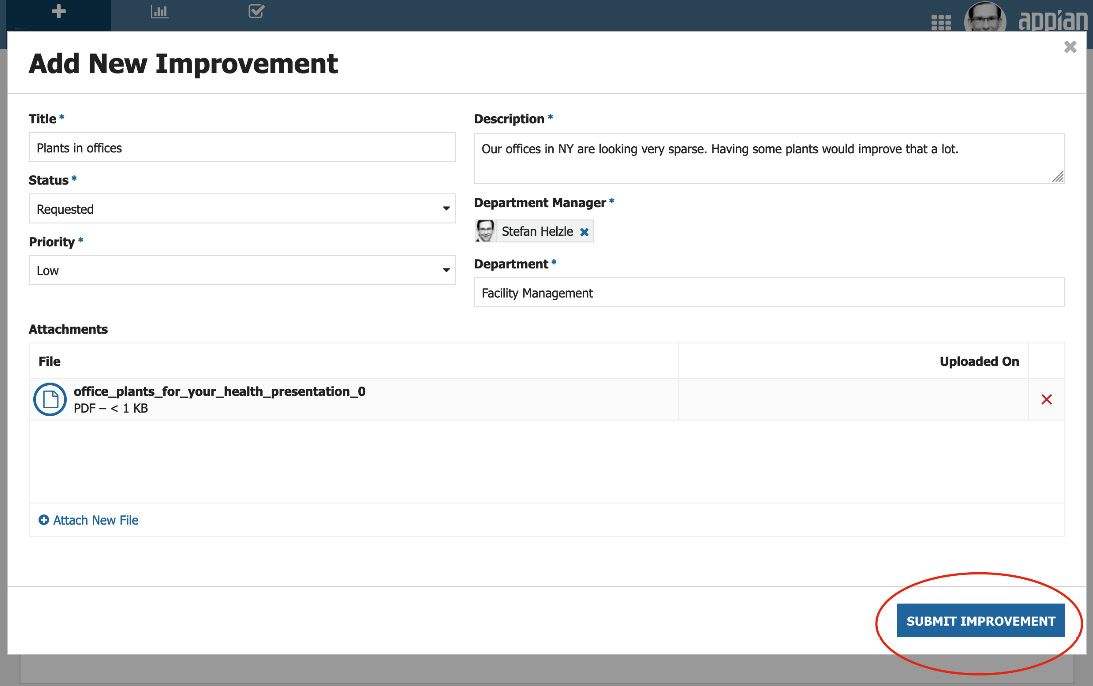
  1. Enter some data to create a new improvement record item. An example of what to add is provided in the following screenshot:
Figure 1.25 – New improvement with some data entered

Figure 1.25 – New improvement with some data entered

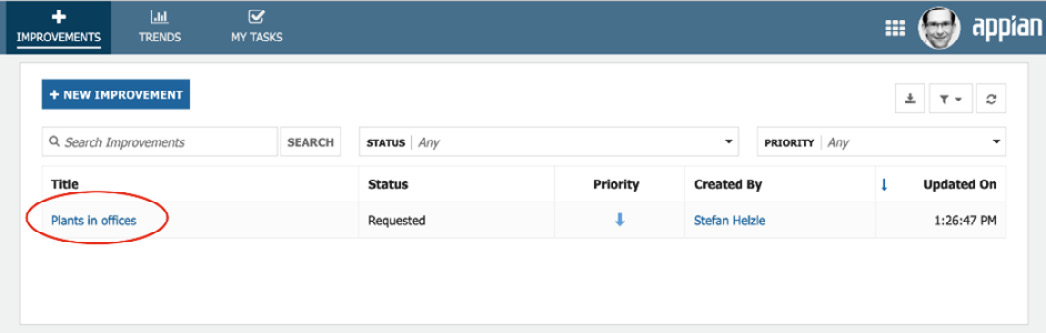
  1. After clicking the SUBMIT IMPROVEMENT button, you should see a list showing your just created item, as depicted in the following screenshot:
Figure 1.26 – The record list showing one item

Figure 1.26 – The record list showing one item

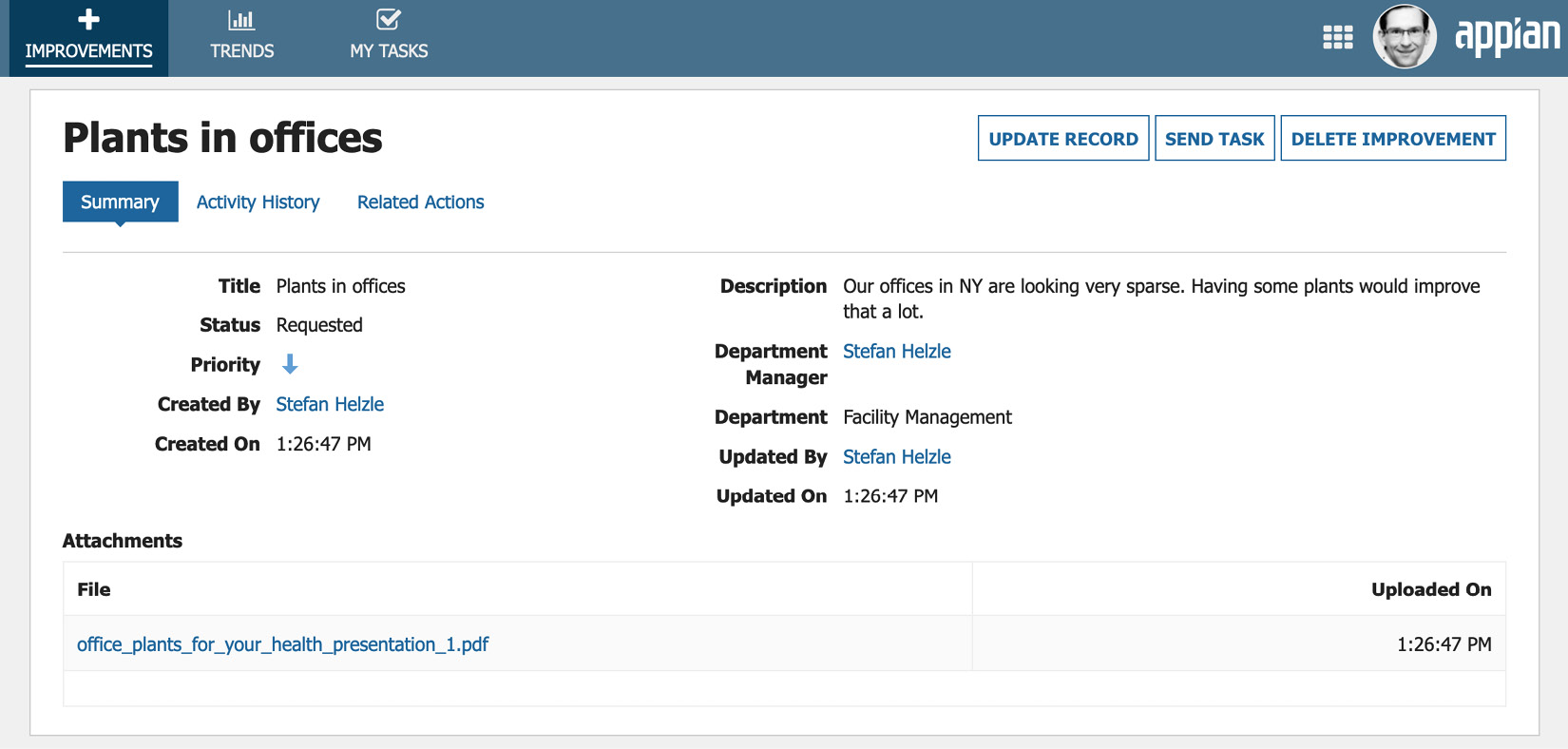
  1. Click the new item to open it. You will see the data you entered a moment ago in the format as defined in the Quick Apps Designer, as illustrated in the following screenshot:
Figure 1.27 – The improvement record dashboard

Figure 1.27 – The improvement record dashboard

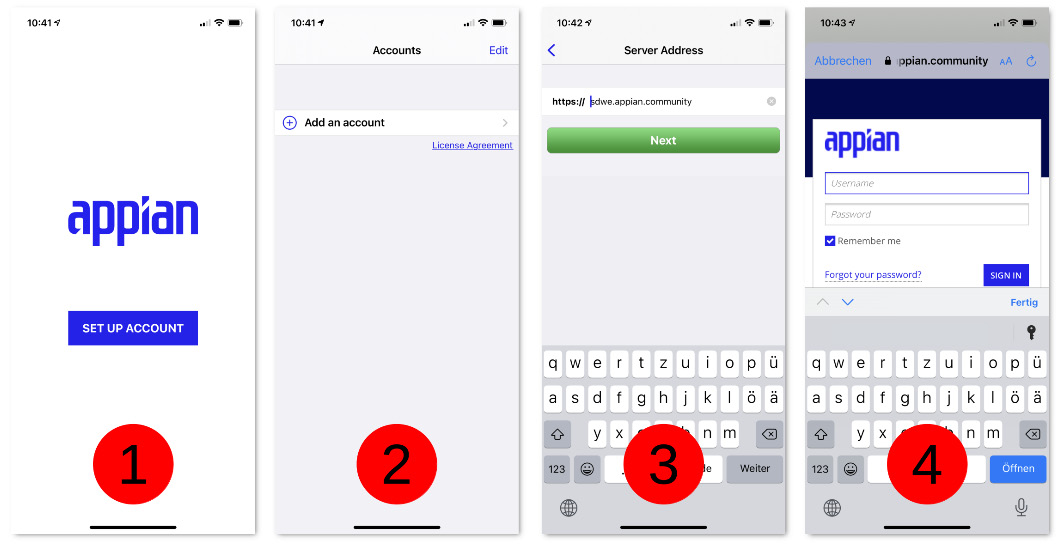
This app is instantly available on your mobile device. Download the Appian app from your mobile app store, start it and follow these four simple steps:

  1. Set up a new account.
  2. Add a new account.
  3. Enter the server name of your Appian environment.
  4. Enter your credentials.

The preceding steps are illustrated in the following screenshot:

Figure 1.28 – Account setup steps

Figure 1.28 – Account setup steps

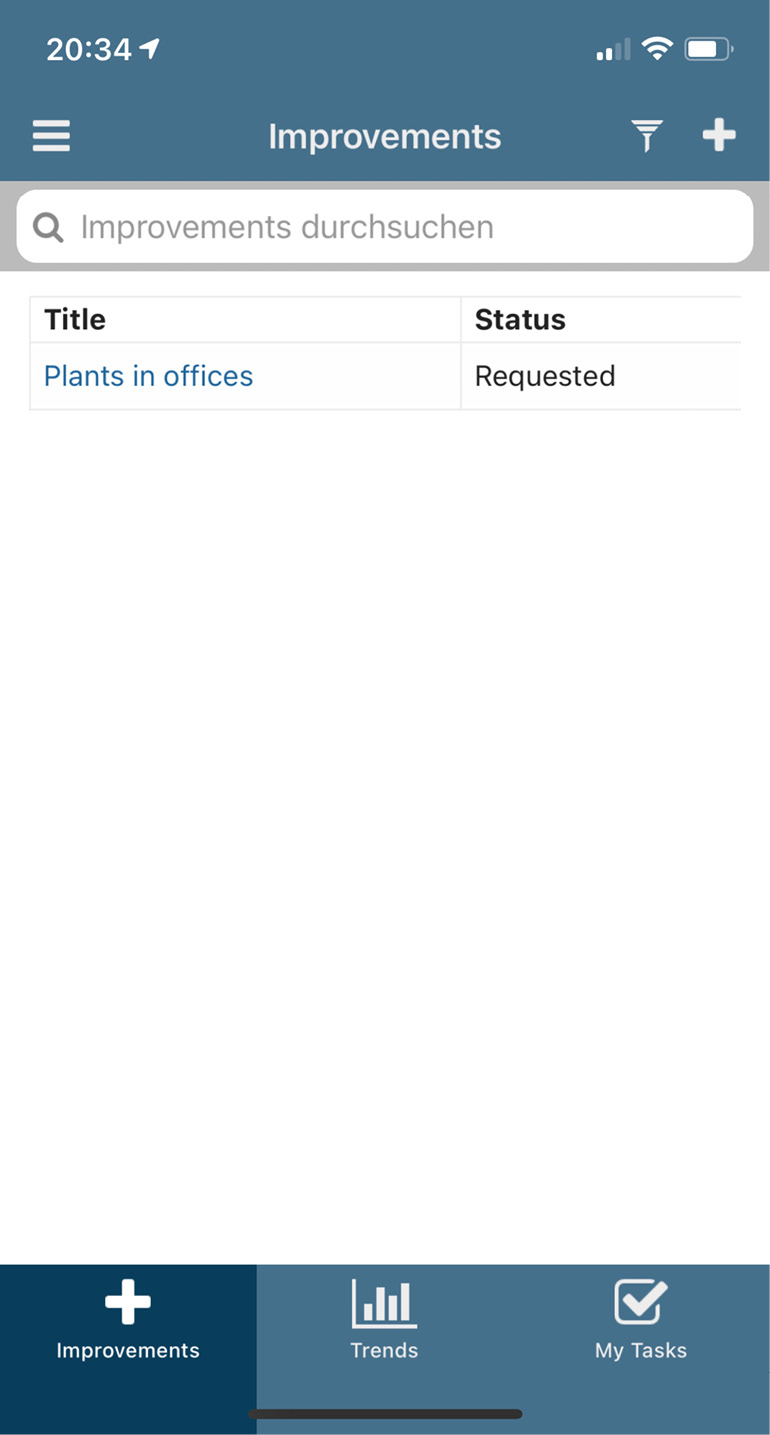
Voilà—your first mobile app! Take a look:

Figure 1.29 – List of improvements on mobile

Figure 1.29 – List of improvements on mobile

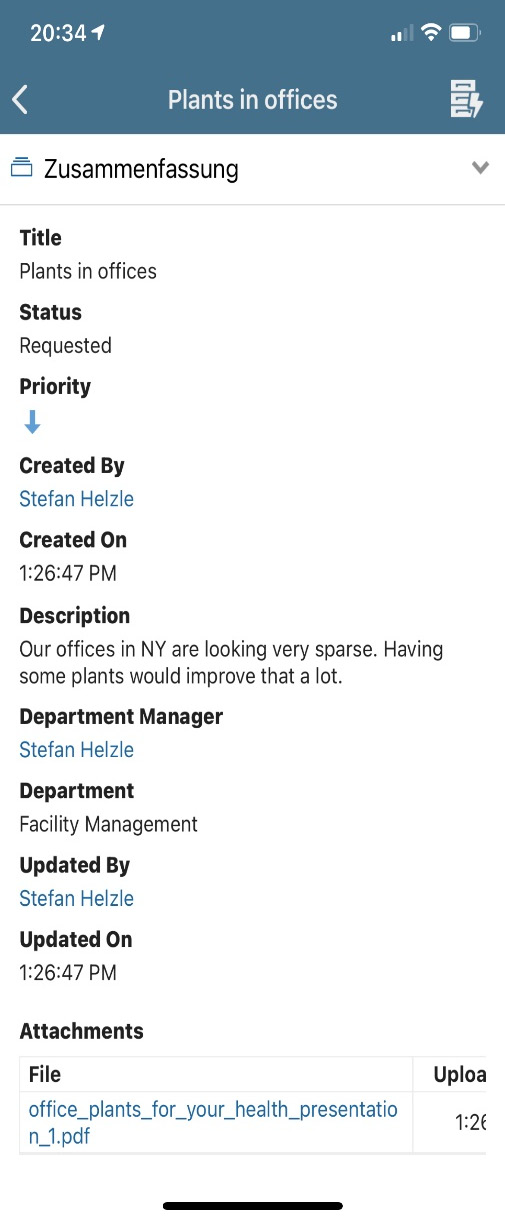
Tap that list item to open the improvement. The following information is shown in the next figure:

Figure 1.30 – Improvement dashboard on mobile

Figure 1.30 – Improvement dashboard on mobile

Hence, with this we are done with testing our very first application.

CONTINUE READING
83
Tech Concepts
36
Programming languages
73
Tech Tools
Icon Unlimited access to the largest independent learning library in tech of over 8,000 expert-authored tech books and videos.
Icon Innovative learning tools, including AI book assistants, code context explainers, and text-to-speech.
Icon 50+ new titles added per month and exclusive early access to books as they are being written.
Low-Code Application Development with Appian
notes
bookmark Notes and Bookmarks search Search in title playlist Add to playlist download Download options font-size Font size

Change the font size

margin-width Margin width

Change margin width

day-mode Day/Sepia/Night Modes

Change background colour

Close icon Search
Country selected

Close icon Your notes and bookmarks

Confirmation

Modal Close icon
claim successful

Buy this book with your credits?

Modal Close icon
Are you sure you want to buy this book with one of your credits?
Close
YES, BUY

Submit Your Feedback

Modal Close icon
Modal Close icon
Modal Close icon