Sign In Start Free Trial
Account

Add to playlist

Create a Playlist

Modal Close icon
You need to login to use this feature.
  • Book Overview & Buying Accelerating Nonprofit Impact with Salesforce
  • Table Of Contents Toc
Accelerating Nonprofit Impact with Salesforce

Accelerating Nonprofit Impact with Salesforce

By : Melissa Hill Dees
5 (7)
close
close
Accelerating Nonprofit Impact with Salesforce

Accelerating Nonprofit Impact with Salesforce

5 (7)
By: Melissa Hill Dees

Overview of this book

Salesforce Nonprofit Cloud enables a 360-degree view of people related to your nonprofit to connect fundraising, program management, and grantmaking. With a single, unified view of every interaction with constituents, nonprofits can create strong relationships with the community and streamline internal processes. The book starts by covering the tools and features that make up Nonprofit Cloud, helping you understand their standard functionalities and how Nonprofit Success Pack's (NPSP) data architecture is critical to implementation. You’ll learn how the Nonprofit Cloud Program Management Module can connect your programs, automate case management, and track client progress. Next, you’ll explore the tools for creating a change management process to increase user adoption. Moving ahead, you’ll understand how to configure necessary permissions for NPSP administration and explore how declarative tools help better align the goals of a nonprofit organization. Toward the concluding chapters, you’ll cover customizations, deployment, custom reports, and dashboards for fundraising analytics, as well as best practices for data management to maintain its integrity. By the end of this Salesforce book, you’ll be able to build and configure the Nonprofit Cloud for a variety of use cases to achieve maximum social impact with the least amount of technical debt.
Table of Contents (21 chapters)
close
close
1
Section 1: Get Ready – Learn the Basics of NPSP
8
Section 2: Get Set – Correlating Need with Nonprofit Cloud Tools
14
Section 3: Go! – Data for Impact

Program management features

The program management features are much more recent in the Salesforce.org timeline. Program management features include both open source and paid modules.

The open source programs include the following:

  • Program Management Module
  • Volunteers for Salesforce
  • NPSP Reports and Dashboards

The paid programs include the following:

  • Nonprofit Cloud Case Management with Service Cloud
  • Tableau

Program Management Module

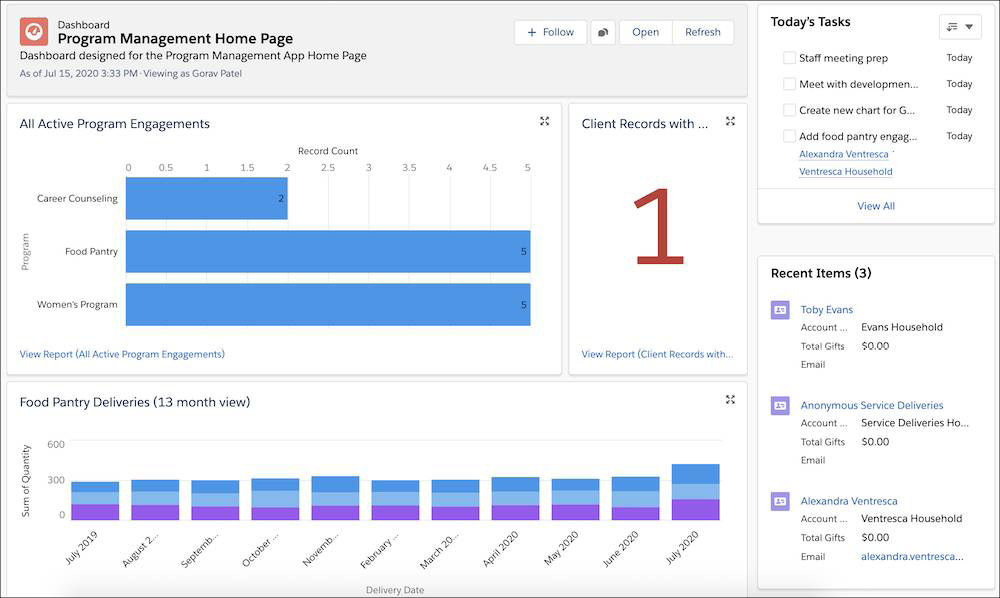
Program Management Module (PMM) encompasses a wide range of programs and/or services and provides a framework to track and automate what your team may currently be recording in a spreadsheet. The module is easily installed from AppExchange and comes with a pre-created profile and unmanaged reports to get you started quickly.

PMM only consists of five custom objects, so it is highly customizable. It starts with a baseline and accurate reporting to get your programs up and running in the Salesforce environment. It's a 1, 2, 3 process (once it's been configured) to define the nonprofit's programs and services, add clients to those areas, and report on the metrics with the handy prebuilt reports included in PMM:

Figure 1.6 – A sample Program Management home page in Salesforce

Figure 1.6 – A sample Program Management home page in Salesforce

Volunteers for Salesforce

Volunteers for Salesforce is also a free, open source application available on AppExchange. You may also see it abbreviated as V4S. It is also considered a part of PMM, although it is installed separately, and is designed to help nonprofits manage volunteers and track their volunteer hours, shifts, and jobs. The functionality to host volunteer signup for a specific job and/or shift on a nonprofit website is also an available feature. V4S has been around since Groundwire originally created it in 2012 and became a part of the NPSP offering in 2016. We will explore the use cases for V4S and best practices for implementing it in Chapter 11, Configuring Additional Features and Security:

Figure 1.7 – A sample page for V4S for finding and assigning volunteers

Figure 1.7 – A sample page for V4S for finding and assigning volunteers

Visually different images
CONTINUE READING
83
Tech Concepts
36
Programming languages
73
Tech Tools
Icon Unlimited access to the largest independent learning library in tech of over 8,000 expert-authored tech books and videos.
Icon Innovative learning tools, including AI book assistants, code context explainers, and text-to-speech.
Icon 50+ new titles added per month and exclusive early access to books as they are being written.
Accelerating Nonprofit Impact with Salesforce
notes
bookmark Notes and Bookmarks search Search in title playlist Add to playlist font-size Font size

Change the font size

margin-width Margin width

Change margin width

day-mode Day/Sepia/Night Modes

Change background colour

Close icon Search
Country selected

Close icon Your notes and bookmarks

Confirmation

Modal Close icon
claim successful

Buy this book with your credits?

Modal Close icon
Are you sure you want to buy this book with one of your credits?
Close
YES, BUY

Submit Your Feedback

Modal Close icon
Modal Close icon
Modal Close icon