-
Book Overview & Buying
-
Table Of Contents
Go Programming - From Beginner to Professional - Second Edition
By :
While variables hold the data for your application, they become truly useful when you start using them to build the logic of your software. Operators are the tools you use to work with your software’s data. With operators, you can compare data to other data – for example, you can check whether a price is too low or too high in a trading application. You can also use operators to manipulate data. For example, you can use operators to add the costs of all the items in a shopping cart to get the total price.
The following list mentions groups of operators:
bool value is false.In this exercise, we are going to simulate a restaurant bill. To build our simulation, we’ll need to use mathematic and comparison operators. We’ll start by exploring all the major uses for operators.
In our simulation, we’ll sum everything together and work out the tip based on a percentage. Then, we’ll use a comparison operator to see whether the customer gets a reward. Let’s get started:
Note
We have considered the US dollar as the currency for this exercise. You may consider any currency of your choice; the main focus here is the operations.
main.go file to it.main.go, add the main package name to the top of the file:package main
import "fmt"
main() function:func main() {* to do the multiplication. Then, we must print a subtotal: // Main course
var total float64 = 2 * 13
fmt.Println("Sub :", total)+ to add it to the previous total value, and then assign that back to the total: // Drinks
total = total + (4 * 2.25)
fmt.Println("Sub :", total)– to subtract 5 USD from the total: // Discount
total = total - 5
fmt.Println("Sub :", total) // 10% Tip
tip := total * 0.1
fmt.Println("Tip :", tip) total = total + tip
fmt.Println("Total:", total)/ to divide the total into two parts: // Split bill
split := total / 2
fmt.Println("Split:", split)visitCount and then add 1 USD to this visit:// Reward every 5th visit visitCount := 24 visitCount = visitCount + 1
% to give us any remainder after dividing visitCount by 5 USD:remainder := visitCount % 5
== operator to check whether the remainder is 0: if remainder == 0 { fmt.Println("With this visit, you've earned a reward.")
}
}go run .
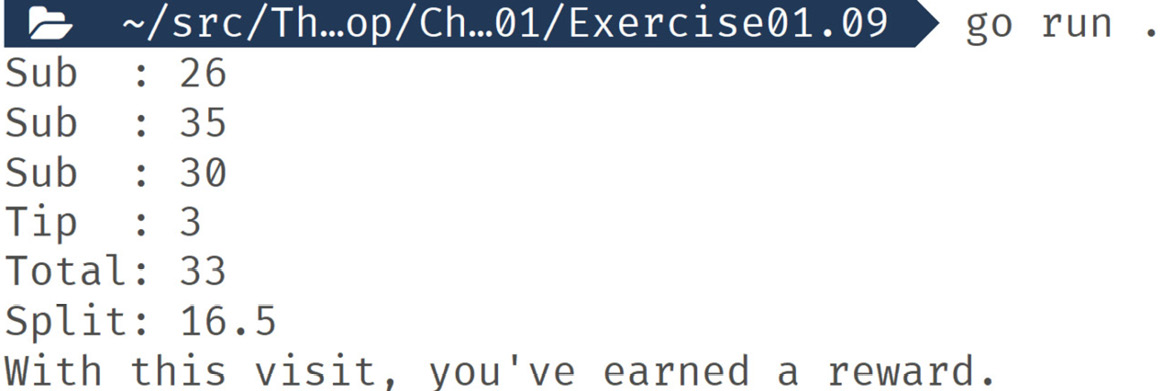
The following is the output:
Figure 1.13: Output of operators used with numbers
In this exercise, we used the math and comparison operators with numbers. They allowed us to model a complex situation – calculating a restaurant bill. There are lots of operators and which ones you can use vary with the different types of values. For example, as well as there being an addition operator for numbers, you can use the + symbol to join strings together. Here’s this in action:
package main
import "fmt"
func main() {
givenName := "John"
familyName := "Smith"
fullName := givenName + " " + familyName
fmt.Println("Hello,", fullName)
} The following is the output:
Hello, John Smith
For some situations, there are some shortcuts we can make with operators. We’ll go over this in the next section.
Bitwise operators
Go has all the familiar bitwise operators you’d find in programming languages. If you know what bitwise operators are, then there will be no surprises here for you. If you don’t know what bitwise operators are, don’t worry – they aren’t common in real-world code.
There are a few shorthand assignment operators when you want to perform operations on an existing value with its own value:
--: Reduce a number by 1++: Increase a number by 1+=: Add and assign-=: Subtract and assignIn this exercise, we’ll use some examples of operator shorthand to show how they can make your code more compact and easier to write. We’ll create some variables and then use shorthand to change them, printing them out as we go. Let’s get started:
main.go file to it.main.go, add the main package name to the top of the file:package main
import "fmt"
main() function:func main() {count := 5
count += 5 fmt.Println(count)
count++ fmt.Println(count)
count-- fmt.Println(count)
count -= 5 fmt.Println(count)
name := "John"
name += " Smith"
fmt.Println("Hello,", name)main() function:}
go run .
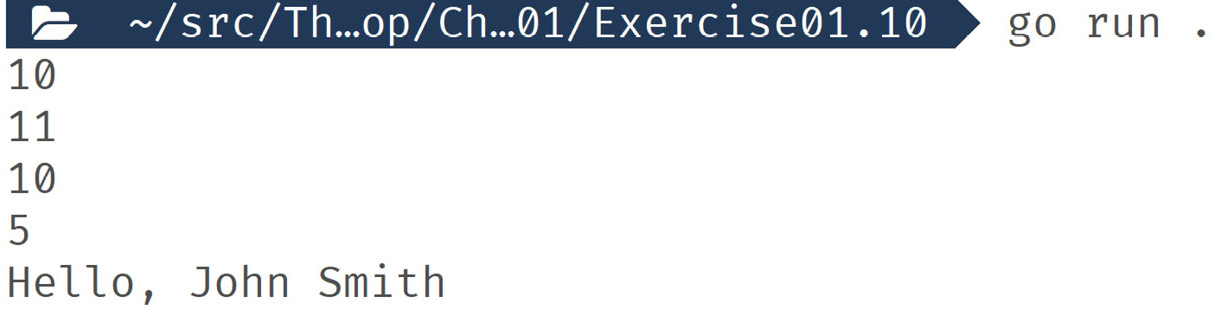
The following is the output:
Figure 1.14: Output using shorthand operators
In this exercise, we used some shorthand operators. One set focused on modification and then assignment. This type of operation is common, and having these shortcuts makes coding more engaging. The other operators are increment and decrement. These are useful in loops when you need to step over data one at a time. These shortcuts make it clear what you’re doing to anyone who reads your code.
Next, we’ll look at comparing values to each other in detail.
Logic in applications is a matter of having your code make a decision. These decisions are made by comparing the values of variables to the rules you define. These rules come in the form of comparisons. We use another set of operators to make these comparisons. The result of these comparisons is always true or false. You’ll also often need to make lots of these comparisons to make a single decision. To help with that, we have logical operators.
These operators, for the most part, work with two values and always result in a Boolean value. You can only use logical operators with Boolean values. Let’s take a look at comparison operators and logical operators in more detail.
Comparison operators:
==: True if two values are the same!=: True if two values are not the same<: True if the left value is less than the right value<=: True if the left value is less or equal to the right value>: True if the left value is greater than the right value>=: True if the left value is greater than or equal to the right valueLogical operators:
&&: True if the left and right values are both true||: True if one or both the left and right values are true!: This operator only works with a single value and results in true if the value is falseIn this exercise, we’ll use comparison and logical operators to see what Boolean results we get when testing different conditions. We are testing to see what level of membership a user has based on the number of visits they’ve had.
Our membership levels are as follows:
Let’s get started:
main.go file to it.main.go, add the main package name to the top of the file:package main
import "fmt"
main() function:func main() {visits variable and initialize it with a value:visits := 15
fmt.Println("First visit :", visits == 1) fmt.Println("Return visit :", visits != 1) fmt.Println("Silver member :", visits >= 10 && visits < 21) fmt.Println("Gold member :", visits > 20 && visits <= 30) fmt.Println("Platinum member :", visits > 30)main() function:}
go run .
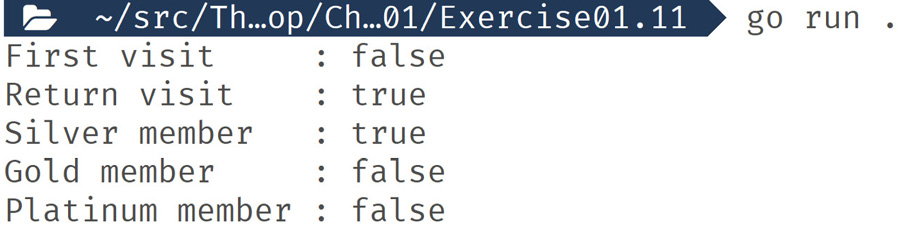
The following is the output:
Figure 1.15: Output displaying the comparison result
In this exercise, we used comparison and logical operators to make decisions about data. You can combine these operators in an unlimited number of ways to express almost any type of logic your software needs to make.
Next, we’ll look at what happens when you don’t give a variable an initial value.
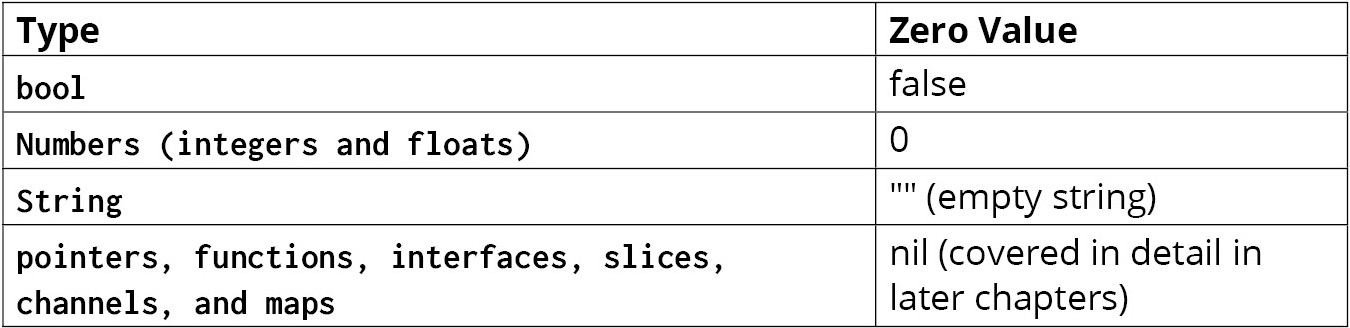
The zero value of a variable is the empty or default value for that variable’s type. Go has a set of rules stating that the zero values are for all the core types. Let’s take a look:
Figure 1.16: Variable types and their zero values
There are other types, but they are all derived from these core types, so the same rules still apply.
We’ll look at the zero values of some types in the upcoming exercise.
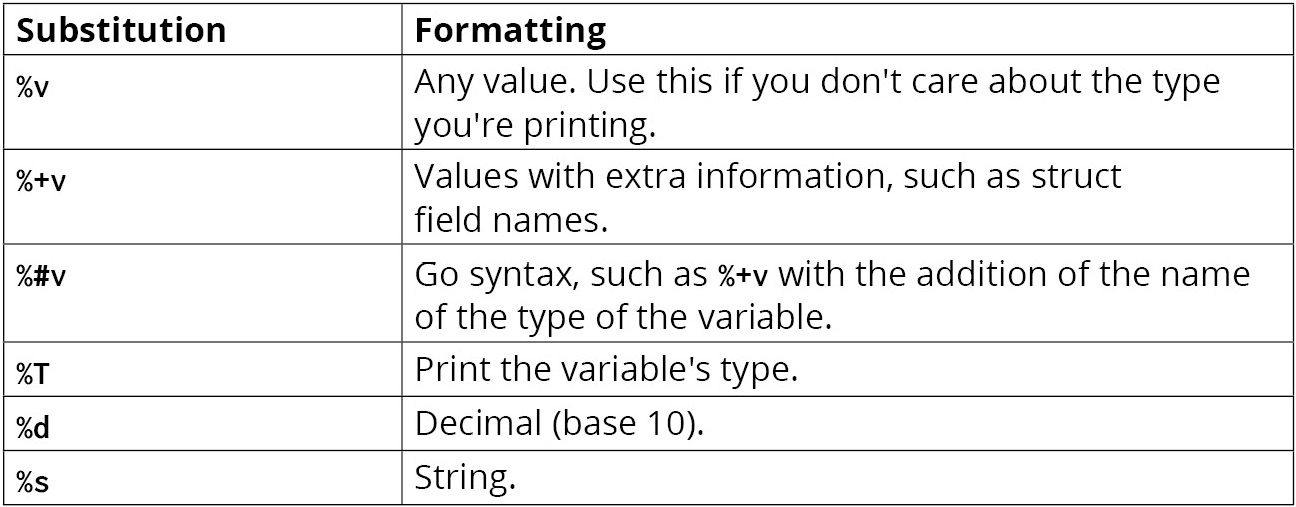
In this example, we’ll define some variables without an initial value. Then, we’ll print out their values. We’re using fmt.Printf to help us in this exercise as we can get more detail about a value’s type. fmt.Printf uses a template language that allows us to transform passed values. The substitution we’re using is %#v. This transformation is a useful tool for showing a variable’s value and type. Some other common substitutions you can try are as follows:
Figure 1.17: Table on substitutions
When using fmt.Printf, you need to add the new line symbol yourself. You can do this by adding \n to the end of the string. Let’s get started:
main.go file to it.main.go, add the main package name to the top of the file:package main
import ( "fmt" "time" )
main() function:func main() { var count int
fmt.Printf("Count : %#v \n", count)float value: var discount float64
fmt.Printf("Discount : %#v \n", discount)bool value: var debug bool
fmt.Printf("Debug : %#v \n", debug)string value: var message string
fmt.Printf("Message : %#v \n", message) var emails []string
fmt.Printf("Emails : %#v \n", emails) var startTime time.Time
fmt.Printf("Start : %#v \n", startTime)main() function:}
go run .
The following is the output:
Figure 1.18: Output showing initial variable values
In this exercise, we defined a variety of variable types without an initial value. Then, we printed them out using fmt.Printf to expose more detail about the values. Knowing what the zero values are and how Go controls them allows you to avoid bugs and write concise code.
Next, we’ll look at what pointers are and how they can enable you to write efficient software.