Sign In Start Free Trial
Account

Add to playlist

Create a Playlist

Modal Close icon
You need to login to use this feature.
  • Book Overview & Buying The Python Workshop Second Edition
  • Table Of Contents Toc
The Python Workshop Second Edition

The Python Workshop Second Edition - Second Edition

By : Wade, Mario Corchero Jiménez , Bird, Dr. Lau Cher Han, Graham Lee
4.6 (20)
close
close
The Python Workshop Second Edition

The Python Workshop Second Edition

4.6 (20)
By: Wade, Mario Corchero Jiménez , Bird, Dr. Lau Cher Han, Graham Lee

Overview of this book

Python is among the most popular programming languages in the world. It’s ideal for beginners because it’s easy to read and write, and for developers, because it’s widely available with a strong support community, extensive documentation, and phenomenal libraries – both built-in and user-contributed. This project-based course has been designed by a team of expert authors to get you up and running with Python. You’ll work though engaging projects that’ll enable you to leverage your newfound Python skills efficiently in technical jobs, personal projects, and job interviews. The book will help you gain an edge in data science, web development, and software development, preparing you to tackle real-world challenges in Python and pursue advanced topics on your own. Throughout the chapters, each component has been explicitly designed to engage and stimulate different parts of the brain so that you can retain and apply what you learn in the practical context with maximum impact. By completing the course from start to finish, you’ll walk away feeling capable of tackling any real-world Python development problem.
Table of Contents (16 chapters)
close
close
13
Chapter 13: The Evolution of Python – Discovering New Python Features

Dictionary keys and values

A Python dictionary is an unordered collection that contains keys and values. Dictionaries are written with curly brackets, and the keys and values are separated by colons.

Have a look at the following example, where you store the details of an employee:

employee = {
  'name': "Jack Nelson",
  'age': 32,
  'department': "sales"
}

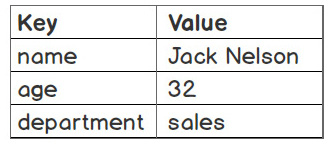
Python dictionaries contain key-value pairs. They simply map keys to associated values, as shown here:

Figure 2.12 – Mapping keys and values in Python dictionaries

Figure 2.12 – Mapping keys and values in Python dictionaries

Dictionaries are like lists. They both share the following properties:

  • Both can be used to store values
  • Both can be changed in place and can grow and shrink on demand
  • Both can be nested: a dictionary can contain another dictionary, a list can contain another list, and a list can contain a dictionary and vice versa

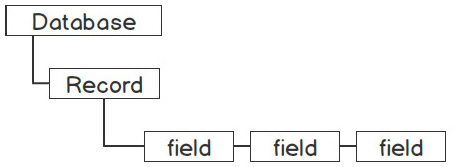
The main difference between lists and dictionaries is how elements are accessed. List elements are accessed by their position index, which is [0,1,2…], while dictionary elements are accessed via keys. Therefore, a dictionary is a better choice for representing collections, and mnemonic keys are more suitable when a collection’s items are labeled, as in the database record shown in Figure 2.13. The database here is equivalent to a list, and the database list contains a record that can be represented using a dictionary. Within each record, there are fields to store respective values, and a dictionary can be used to store a record with unique keys mapped to values:

Figure 2.13 – A sample database record

Figure 2.13 – A sample database record

There are, however, a few rules that you need to remember with Python dictionaries:

  • Keys must be unique – no duplicate keys are allowed
  • Keys must be immutable – they can be strings, numbers, or tuples

You will work with dictionaries and store a record in the next exercise.

Exercise 29 – using a dictionary to store a movie record

In this exercise, you will be working with a dictionary to store movie records, and you will also try and access the information in the dictionary using a key. The following steps will enable you to complete this exercise:

  1. Open a Jupyter Notebook.
  2. Enter the following code in a blank cell:
    movie = {
      "title": "The Godfather",
      "director": "Francis Ford Coppola",
      "year": 1972,
      "rating": 9.2
    }

Here, you have created a movie dictionary with a few details, such as title, director, year, and rating.

  1. Access the information from the dictionary by using a key. For instance, you can use 'year' to find out when the movie was first released using bracket notation:
    print(movie['year'])

Here’s the output:

1972
  1. Now, update the dictionary value:
    movie['rating'] = (movie['rating'] + 9.3)/2
    print(movie['rating'])

The output is as follows:

9.25

As you can see, a dictionary’s values can also be updated in place.

  1. Construct a movie dictionary from scratch and extend it using key-value assignment:
    movie = {}
    movie['title'] = "The Godfather"
    movie['director'] = "Francis Ford Coppola"
    movie['year'] = 1972
    movie['rating'] = 9.2

As you may have noticed, similar to a list, a dictionary is flexible in terms of size.

  1. You can also store a list inside a dictionary and store a dictionary within that dictionary:
    movie['actors'] = ['Marlon Brando', 'Al Pacino',  
      'James Caan']
    movie['other_details'] = {
      'runtime': 175,
      'language': 'English'
    }
    print(movie)

The output is as follows:

Figure 2.14 – Output while storing a dictionary within a dictionary

Figure 2.14 – Output while storing a dictionary within a dictionary

So far, you have learned how to implement nesting in both lists and dictionaries. By combining lists and dictionaries creatively, we can store complex real-world information and model structures directly and easily. This is one of the main benefits of scripting languages such as Python.

Activity 7 – storing company employee table data using a list and a dictionary

Remember the employee dataset, which you previously stored using a nested list? Now that you have learned about lists and dictionaries, you will learn how to store and access our data more effectively using dictionaries that contain lists.

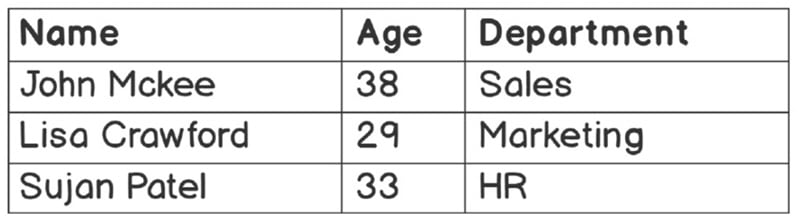
The following table contains employee data:

Figure 2.15 – Employee data in a table

Figure 2.15 – Employee data in a table

Follow these steps to complete this activity:

  1. Open a Jupyter notebook (you can create a new one or use an existing one).
  2. Create a list named employees.
  3. Create three dictionary objects inside employees to store the information of each employee.
  4. Print the employees variable.
  5. Print the details of all employees in a presentable format.
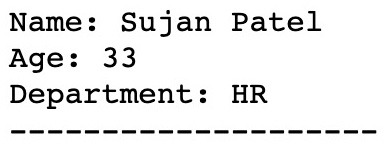
  6. Print only the details of Sujan Patel.

The output is as follows:

Figure 2.16 – Output when we only print the employee details of Sujan Patel

Figure 2.16 – Output when we only print the employee details of Sujan Patel

Note

The solution for this activity can be found in Appendix on GitHub.

CONTINUE READING
83
Tech Concepts
36
Programming languages
73
Tech Tools
Icon Unlimited access to the largest independent learning library in tech of over 8,000 expert-authored tech books and videos.
Icon Innovative learning tools, including AI book assistants, code context explainers, and text-to-speech.
Icon 50+ new titles added per month and exclusive early access to books as they are being written.
The Python Workshop Second Edition
notes
bookmark Notes and Bookmarks search Search in title playlist Add to playlist download Download options font-size Font size

Change the font size

margin-width Margin width

Change margin width

day-mode Day/Sepia/Night Modes

Change background colour

Close icon Search
Country selected

Close icon Your notes and bookmarks

Confirmation

Modal Close icon
claim successful

Buy this book with your credits?

Modal Close icon
Are you sure you want to buy this book with one of your credits?
Close
YES, BUY

Submit Your Feedback

Modal Close icon
Modal Close icon
Modal Close icon