-
Book Overview & Buying
-
Table Of Contents
Python Automation Cookbook - Third Edition
By :
A regular expression, or regex, is a pattern to match text. In other words, it allows us to define an abstract string (typically, the definition of a structured kind of text) to check against other strings to see if they match or not.
It is better to describe them with an example. Think of defining a pattern of text, such as a word that starts with an uppercase A and contains only lowercase 'n's and 'a's after that. Let's show some possible comparisons and results:
|
Text to compare |
Result |
|---|---|
|
Anna |
Match |
|
Bob |
No match (No initial A) |
|
Alice |
No match (l is not n or a after initial A) |
|
James |
No match (No initial A) |
|
Aaan |
Match |
|
Ana |
Match |
|
Annnn |
Match |
|
Aaaan |
Match |
|
ANNA |
No match (N is not n or a) |
Table 1.1: A pattern matching example
If this sounds complicated, that's because it is. Regexes can, notoriously, be complicated, intricate and difficult to follow. But they are also very useful because they allow us to perform incredibly powerful pattern matching.
Some common uses of regexes are:
The Python module to deal with regexes is called re. The main function we'll cover is re.search(), which returns a match object with information about what matched the pattern.
As regex patterns are also defined as strings, we'll differentiate them by prefixing them with an r, such as r'pattern'. This is the Python way of labeling a text as raw string literals, meaning that the string within is taken literally, without any escaping. This means that a "\" is used as a backslash instead of an escaping sequence. For example, without the r prefix, \n means a newline character.
Some characters are special and refer to concepts such as the end of the string, any digit, any character, any whitespace character, and so on.
The simplest form is just a literal string. For example, the regex pattern r'LOG' matches the string 'LOGS', but not the string 'NOT A MATCH'. If there's no match, re.search returns None. If there is, it returns a special Match object:
>>> import re
>>> re.search(r'LOG', 'LOGS')
<_sre.SRE_Match object; span=(0, 3), match='LOG'>
>>> re.search(r'LOG', 'NOT A MATCH')
>>>
re module:
>>> import re
>>> re.search(r'LOG', 'SOME LOGS')
<_sre.SRE_Match object; span=(5, 8), match='LOG'>
^ character at the start of the pattern:
>>> re.search(r'^LOG', 'LOGS')
<_sre.SRE_Match object; span=(0, 3), match='LOG'>
>>> re.search(r'^LOG', 'SOME LOGS')
>>>
$ character at the end:
>>> re.search(r'LOG$', 'SOME LOG')
<_sre.SRE_Match object; span=(5, 8), match='LOG'>
>>> re.search(r'LOG$', 'SOME LOGS')
>>>
'thing' (not excluding things), but not something or anything. Note the \b at the start of the second pattern:
>>> STRING = 'something in the things she shows me'
>>> match = re.search(r'thing', STRING)
>>> STRING[:match.start()], STRING[match.start():match.end()], STRING[match.end():]
('some', 'thing', ' in the things she shows me')
>>> match = re.search(r'\bthing', STRING)
>>> STRING[:match.start()], STRING[match.start():match.end()], STRING[match.end():]
('something in the ', 'thing', 's she shows me')
>>> re.search(r'[0123456789-]+', 'the phone number is 1234-567-890') <_sre.SRE_Match object; span=(20, 32), match='1234-567-890'>
>>> re.search(r'[0123456789-]+', 'the phone number is 1234-567-890').group()
'1234-567-890'
>>> re.search(r'\S+@\S+', 'my email is [email protected]').group() '[email protected]'
The re.search function matches a pattern, no matter its position in the string. As explained previously, this will return None if the pattern is not found, or a Match object.
The following special characters are used:
^: Marks the start of the string$: Marks the end of the string\b: Marks the start or end of a word\S: Marks any character that's not a whitespace, including characters like * or $More special characters are shown in the next recipe, Going deeper into regular expressions.
In step 6 of the How to do it… section, the r'[0123456789‑]+' pattern is composed of two parts. The first is between square brackets, and matches any single character between 0 and 9 (any number) and the dash (‑) character. The + sign after that means that this character can be present one or more times. This is called a quantifier in regexes. This makes a match on any combination of numbers and dashes, no matter how long it is.
Step 7 again uses the + sign to match as many characters as necessary before the @ and again after it. In this case, the character match is \S, which matches any non-whitespace character.
Please note that the naive pattern for emails described here is very naive, as it will match invalid emails such as john@[email protected]. A better regex for most uses is r"(^[a‑zA‑Z0‑9_.+‑]+@[a‑zA‑Z0‑9‑]+\.[a‑zA‑Z0‑9‑.]+$)". You can go to http://emailregex.com/ to find it, along with links to further information.
Note that parsing a valid email including corner cases is actually a difficult and challenging problem. The previous regex should be fine for most uses covered in this book, but specific tools like specific the library email‑validator (https://github.com/JoshData/python-email-validator) or tools in a general framework project such as Django, are better options to handle emails.
The resulting matching object returns the position where the matched pattern starts and ends (using the start and end methods), as shown in step 5, which splits the string into matched parts, showing the distinction between the two matching patterns.
The difference displayed in step 5 is a very common one. Trying to capture GP (as in General Practitioner, for a medical doctor) can end up capturing eggplant and bagpipe! Similarly, thing\b won't capture things. Be sure to test and make the proper adjustments, such as capturing \bGP\b for just the word GP.
The specific matched pattern can be retrieved by calling group(), as shown in step 6. Note that the result will always be a string. It can be further processed using any of the methods we've seen previously, such as by splitting the phone number into groups by dashes, for example:
>>> match = re.search(r'[0123456789-]+', 'the phone number is 1234-567-890')
>>> [int(n) for n in match.group().split('-')]
[1234, 567, 890]
The captured string will include all characters, like the dashes in this case. Note how we remove them by using .split()
Dealing with regexes can be difficult and complex. Please allow time to test your matches and be sure that they work as you expect in order to avoid nasty surprises.
"Some people, when confronted with a problem, think "I know, I'll use regular expressions." Now they have two problems."
– Jamie Zawinski
Regular expressions are at their best when they are kept very simple. In general, if there is a specific tool to do it, prefer it over regexes. A very clear example of this is with HTML parsing; refer to Chapter 3, Building Your First Web Scraping Application, for better tools to achieve this.
Some text editors allow us to search using regexes as well. While most are editors aimed at writing code, such as Vim, BBEdit, or Notepad++, they're also present in more general tools, such as MS Office, Open Office, or Google Documents. But be careful, as the particular syntax may be slightly different.
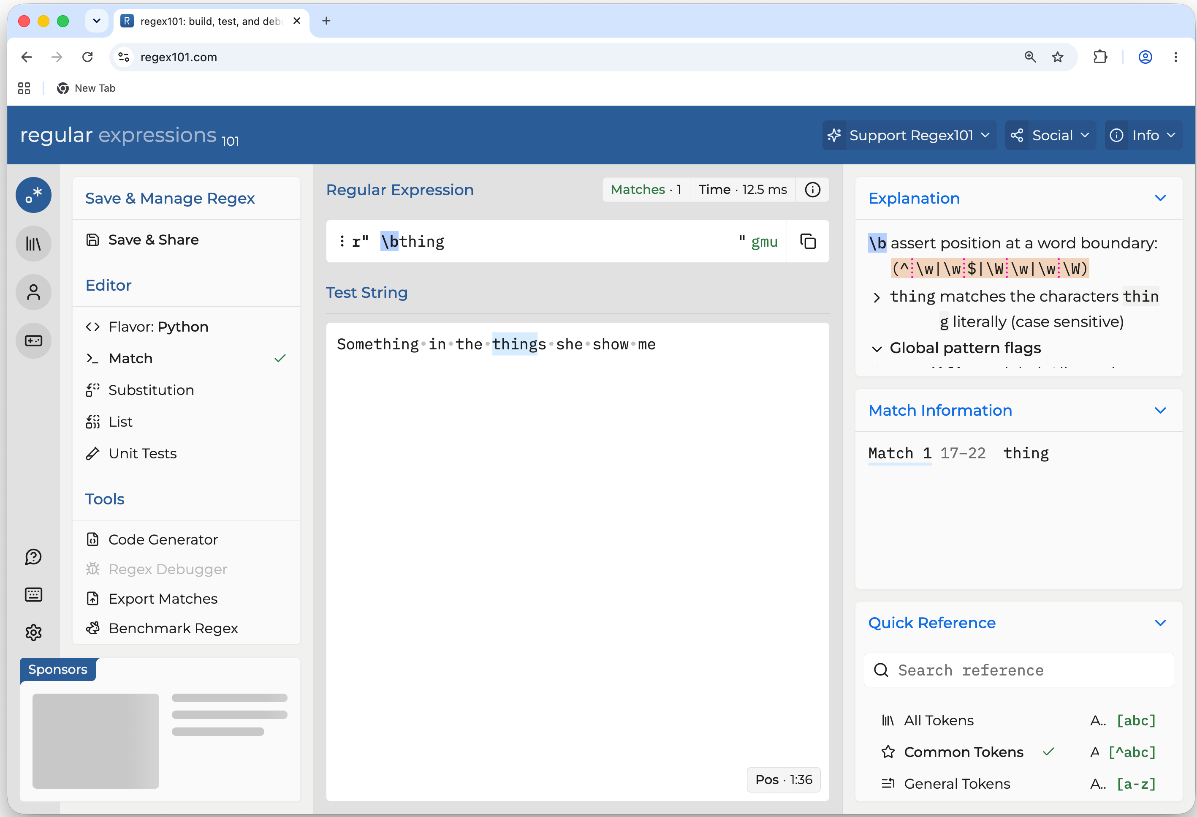
You can check your regexes interactively. A good one that's freely available online is https://regex101.com/, which displays each of the elements and explains the regex. Double-check that you're using the Python flavor:

Figure 1.2: An example using RegEx101
Note that the EXPLANATION box in the preceding image describes that \b matches a word boundary (the start or end of a word), and that thing matches literally these characters.
Regexes, in some cases, can be very slow, or even susceptible to what's called a regex denial-of-service attack, a string created to confuse a particular regex so that it takes an enormous amount of time. In the worst-case scenario, it can even block the computer. While automating tasks probably won't get you into those problems, keep an eye out in case a regex takes too long to process.
GenAI is quite keen on regexes and it will try to parse most text with regexes. This is generally a problem and it's a good idea to critically analyze any regex and double check if there's a simpler way to retrieve the same information. There are many tools that allow simpler parsing of common elements that can produce safer, more understandable code.
At the same time, GenAI can be very useful when producing regex if that's what's required.
The bottom line is that regexes can be difficult to maintain and to test that they produce the required effect. Take care with them.