Chapter 1. SAP Business One Query Users and Query Basics
This chapter will begin by identifying the target audience of this book, and will then go on to discuss the basic concepts and knowledge needed to use SQL query in SAP Business One. In the first section, you will be given a clear definition of the specific scope of the SQL and Query used in this book. The following section discusses the Data Dictionary and table links such as base tables versus target tables. The last section gives you a key concept to remember for building a good query by keeping it simple.
Who can benefit from using SQL Queries in SAP Business One?
It may not be easy to deduce the ideal reader of this book. In fact, there are many different groups of SAP Business One users who may need this tool.
To my knowledge, there is no standard organization chart for Small and Midsized enterprises. Most of them are different. You may often find one person that handles more than one role. In this sense all users, especially end users, may need this book as long as they can use SQL query with the basic knowledge required.
You may check the following list to see if anything applies to you:
- Do you need to check specific sales results over certain time periods, for certain areas or certain customers?
- Do you want to know who the top vendors from certain locations for certain materials are?
- Do you have dynamic updated version of your sales force performance in real time?
- Do you often check if approval procedures are exactly matching your expectations?
- Have you tried to start building your SQL query but could not get it done properly?
- Have you experienced writing SQL query but the results are not always correct or up to your expectations?
If the answer to any of the questions mentioned earlier is "yes", then you can certainly benefit from reading this book. It will answer each and every question mentioned earlier and give you the power to solve complicated problems.
If you are an SAP Business One consultant, you have probably mastered SQL query already. However, if that is not the case, this book would be a great help to extend your consulting power. It will probably become a mandatory skill in the future that any SAP Business One consultant should be able to use SQL query.
If you are an SAP Business One add-on developer, these skills will be good additions to your capabilities. You may find this book useful even in some other development work like coding or programming. Very often you need to embed SQL query to your codes to complete your Software Development Kit (SDK) project.
SAP Business One end user
If you are simply a normal SAP Business One end user, you may need this book more. This is because SQL query usage is best applied for the companies who have SAP Business One live data. Only you as the end users know better than anyone else what you are looking for to make Business Intelligence a daily routine job. It is very important for you to have an ability to create a query report so that you can map your requirement by query in a timely manner.
Non-SAP Business One users
To the other readers who are not SAP Business One users, you could still get some hints and tips from this book because the working and the problematic queries are both shown. Even without an SAP Business One user interface, you may still gain some useful concepts. In one query example of this book, I will show you that even without the actual data from my database to test the query due to localization limitation, the correct answer to the questioner can still be deduced.
No matter what your background is, you will find this book useful whenever you need to get certain data quickly and accurately.
SQL query and related terms
Before going into the details of SQL query, I would like to briefly introduce some basic database concepts because SQL is a database language for managing data in Relational Database Management Systems (RDBMS).
RDBMS is a Database Management System that is based on the relation model. Relational here is a key word for RDBMS. You will find that data is stored in the form of Tables and the relationship among the data is also stored in the form of tables for RDBMS.
Table is a key component within a database. One table or a group of tables represent one kind of data. For example, table OSLP within SAP Business One holds all Sales Employee Data. Tables are two-dimensional data storage place holders. You need to be familiar with their usage and their relationships with each other. If you are familiar with Microsoft Excel, the worksheet in Excel is a kind of two-dimensional table.
Table is also one of the most often used concepts in the book. Relationships between each table may be more important than tables themselves because without relation, nothing could be of any value. One important function within SAP Business One is allowing User Defined Table (UDT). All UDTs start with "@".
A field is the lowest unit holding data within a table. A table can have many fields. It is also called a column. Field and column are interchangeable. A table is comprised of records, and all records have the same structure with specific fields. One important concept in SAP Business One is User Defined Field (UDF). All UDFs start with U_.
SQL is often referred to as Structured Query Language. It is pronounced as S-Q-L or as the word "Sequel". There are many different revisions and extensions of SQL. The current revision is SQL: 2008, and the first major revision is SQL-92. Most of SQL extensions are built on top of SQL-92.
This book has very specific scope for the terms "SQL" and "query". Please read through this section carefully first if you find that the scope of the book is not right for your needs.
We have to limit the scope of the term SQL in this book. First of all, since SAP Business One is built on Microsoft SQL Server database, SQL here means Transact-SQL or T-SQL in brief. It is a Microsoft's/Sybase's extension of general meaning for SQL. Because we only use T-SQL throughout the book, SQL in this book will mean T-SQL unless it is clearly mentioned otherwise.
There are three main subsets of the SQL language:
- Data Control Language (DCL)
- Data Definition Language (DDL)
- Data Manipulation Language (DML)
Each set of the SQL language has a special purpose:
- DCL is used to control access to data in a database such as to grant or revoke specified users' rights to perform specified tasks.
- DDL is used to define data structures such as to create, alter, or drop tables.
- DML is used to retrieve and manipulate data in the table such as to insert, delete, and update data. Select, however, becomes a special statement belonging to this subset even though it is a read-only command that will not manipulate data at all.
Query is the most common operation in SQL. It could refer to all three SQL subsets. In this book, however, you will only learn the read-only part of the query. No Add, Delete, or Update SQL statement in DML will be discussed in the book since it is prohibited from SAP support policy for SAP Business One database integrity. All DCL or DDL SQL will also not be included because we neither control access to data in a database, nor define data structure for a database. You will find SELECT leading query only within the book. Read-only query SELECT has powerful functionality for finding useful information to meet your specific needs.
Note
You have to understand the risks of running any Add, Delete, or Update queries that could potentially alter system tables even if they are User Defined Fields. Only SELECT query is legitimate for SAP Business One system table.
RDBMS is a Database Management System that is based on the relation model. Relational here is a key word for RDBMS. You will find that data is stored in the form of Tables and the relationship among the data is also stored in the form of tables for RDBMS.
Table is a key component within a database. One table or a group of tables represent one kind of data. For example, table OSLP within SAP Business One holds all Sales Employee Data. Tables are two-dimensional data storage place holders. You need to be familiar with their usage and their relationships with each other. If you are familiar with Microsoft Excel, the worksheet in Excel is a kind of two-dimensional table.
Table is also one of the most often used concepts in the book. Relationships between each table may be more important than tables themselves because without relation, nothing could be of any value. One important function within SAP Business One is allowing User Defined Table (UDT). All UDTs start with "@".
A field is the lowest unit holding data within a table. A table can have many fields. It is also called a column. Field and column are interchangeable. A table is comprised of records, and all records have the same structure with specific fields. One important concept in SAP Business One is User Defined Field (UDF). All UDFs start with U_.
SQL is often referred to as Structured Query Language. It is pronounced as S-Q-L or as the word "Sequel". There are many different revisions and extensions of SQL. The current revision is SQL: 2008, and the first major revision is SQL-92. Most of SQL extensions are built on top of SQL-92.
This book has very specific scope for the terms "SQL" and "query". Please read through this section carefully first if you find that the scope of the book is not right for your needs.
We have to limit the scope of the term SQL in this book. First of all, since SAP Business One is built on Microsoft SQL Server database, SQL here means Transact-SQL or T-SQL in brief. It is a Microsoft's/Sybase's extension of general meaning for SQL. Because we only use T-SQL throughout the book, SQL in this book will mean T-SQL unless it is clearly mentioned otherwise.
There are three main subsets of the SQL language:
- Data Control Language (DCL)
- Data Definition Language (DDL)
- Data Manipulation Language (DML)
Each set of the SQL language has a special purpose:
- DCL is used to control access to data in a database such as to grant or revoke specified users' rights to perform specified tasks.
- DDL is used to define data structures such as to create, alter, or drop tables.
- DML is used to retrieve and manipulate data in the table such as to insert, delete, and update data. Select, however, becomes a special statement belonging to this subset even though it is a read-only command that will not manipulate data at all.
Query is the most common operation in SQL. It could refer to all three SQL subsets. In this book, however, you will only learn the read-only part of the query. No Add, Delete, or Update SQL statement in DML will be discussed in the book since it is prohibited from SAP support policy for SAP Business One database integrity. All DCL or DDL SQL will also not be included because we neither control access to data in a database, nor define data structure for a database. You will find SELECT leading query only within the book. Read-only query SELECT has powerful functionality for finding useful information to meet your specific needs.
Note
You have to understand the risks of running any Add, Delete, or Update queries that could potentially alter system tables even if they are User Defined Fields. Only SELECT query is legitimate for SAP Business One system table.
Table is a key component within a database. One table or a group of tables represent one kind of data. For example, table OSLP within SAP Business One holds all Sales Employee Data. Tables are two-dimensional data storage place holders. You need to be familiar with their usage and their relationships with each other. If you are familiar with Microsoft Excel, the worksheet in Excel is a kind of two-dimensional table.
Table is also one of the most often used concepts in the book. Relationships between each table may be more important than tables themselves because without relation, nothing could be of any value. One important function within SAP Business One is allowing User Defined Table (UDT). All UDTs start with "@".
A field is the lowest unit holding data within a table. A table can have many fields. It is also called a column. Field and column are interchangeable. A table is comprised of records, and all records have the same structure with specific fields. One important concept in SAP Business One is User Defined Field (UDF). All UDFs start with U_.
SQL is often referred to as Structured Query Language. It is pronounced as S-Q-L or as the word "Sequel". There are many different revisions and extensions of SQL. The current revision is SQL: 2008, and the first major revision is SQL-92. Most of SQL extensions are built on top of SQL-92.
This book has very specific scope for the terms "SQL" and "query". Please read through this section carefully first if you find that the scope of the book is not right for your needs.
We have to limit the scope of the term SQL in this book. First of all, since SAP Business One is built on Microsoft SQL Server database, SQL here means Transact-SQL or T-SQL in brief. It is a Microsoft's/Sybase's extension of general meaning for SQL. Because we only use T-SQL throughout the book, SQL in this book will mean T-SQL unless it is clearly mentioned otherwise.
There are three main subsets of the SQL language:
- Data Control Language (DCL)
- Data Definition Language (DDL)
- Data Manipulation Language (DML)
Each set of the SQL language has a special purpose:
- DCL is used to control access to data in a database such as to grant or revoke specified users' rights to perform specified tasks.
- DDL is used to define data structures such as to create, alter, or drop tables.
- DML is used to retrieve and manipulate data in the table such as to insert, delete, and update data. Select, however, becomes a special statement belonging to this subset even though it is a read-only command that will not manipulate data at all.
Query is the most common operation in SQL. It could refer to all three SQL subsets. In this book, however, you will only learn the read-only part of the query. No Add, Delete, or Update SQL statement in DML will be discussed in the book since it is prohibited from SAP support policy for SAP Business One database integrity. All DCL or DDL SQL will also not be included because we neither control access to data in a database, nor define data structure for a database. You will find SELECT leading query only within the book. Read-only query SELECT has powerful functionality for finding useful information to meet your specific needs.
Note
You have to understand the risks of running any Add, Delete, or Update queries that could potentially alter system tables even if they are User Defined Fields. Only SELECT query is legitimate for SAP Business One system table.
A field is the lowest unit holding data within a table. A table can have many fields. It is also called a column. Field and column are interchangeable. A table is comprised of records, and all records have the same structure with specific fields. One important concept in SAP Business One is User Defined Field (UDF). All UDFs start with U_.
SQL is often referred to as Structured Query Language. It is pronounced as S-Q-L or as the word "Sequel". There are many different revisions and extensions of SQL. The current revision is SQL: 2008, and the first major revision is SQL-92. Most of SQL extensions are built on top of SQL-92.
This book has very specific scope for the terms "SQL" and "query". Please read through this section carefully first if you find that the scope of the book is not right for your needs.
We have to limit the scope of the term SQL in this book. First of all, since SAP Business One is built on Microsoft SQL Server database, SQL here means Transact-SQL or T-SQL in brief. It is a Microsoft's/Sybase's extension of general meaning for SQL. Because we only use T-SQL throughout the book, SQL in this book will mean T-SQL unless it is clearly mentioned otherwise.
There are three main subsets of the SQL language:
- Data Control Language (DCL)
- Data Definition Language (DDL)
- Data Manipulation Language (DML)
Each set of the SQL language has a special purpose:
- DCL is used to control access to data in a database such as to grant or revoke specified users' rights to perform specified tasks.
- DDL is used to define data structures such as to create, alter, or drop tables.
- DML is used to retrieve and manipulate data in the table such as to insert, delete, and update data. Select, however, becomes a special statement belonging to this subset even though it is a read-only command that will not manipulate data at all.
Query is the most common operation in SQL. It could refer to all three SQL subsets. In this book, however, you will only learn the read-only part of the query. No Add, Delete, or Update SQL statement in DML will be discussed in the book since it is prohibited from SAP support policy for SAP Business One database integrity. All DCL or DDL SQL will also not be included because we neither control access to data in a database, nor define data structure for a database. You will find SELECT leading query only within the book. Read-only query SELECT has powerful functionality for finding useful information to meet your specific needs.
Note
You have to understand the risks of running any Add, Delete, or Update queries that could potentially alter system tables even if they are User Defined Fields. Only SELECT query is legitimate for SAP Business One system table.
SQL is often referred to as Structured Query Language. It is pronounced as S-Q-L or as the word "Sequel". There are many different revisions and extensions of SQL. The current revision is SQL: 2008, and the first major revision is SQL-92. Most of SQL extensions are built on top of SQL-92.
This book has very specific scope for the terms "SQL" and "query". Please read through this section carefully first if you find that the scope of the book is not right for your needs.
We have to limit the scope of the term SQL in this book. First of all, since SAP Business One is built on Microsoft SQL Server database, SQL here means Transact-SQL or T-SQL in brief. It is a Microsoft's/Sybase's extension of general meaning for SQL. Because we only use T-SQL throughout the book, SQL in this book will mean T-SQL unless it is clearly mentioned otherwise.
There are three main subsets of the SQL language:
- Data Control Language (DCL)
- Data Definition Language (DDL)
- Data Manipulation Language (DML)
Each set of the SQL language has a special purpose:
- DCL is used to control access to data in a database such as to grant or revoke specified users' rights to perform specified tasks.
- DDL is used to define data structures such as to create, alter, or drop tables.
- DML is used to retrieve and manipulate data in the table such as to insert, delete, and update data. Select, however, becomes a special statement belonging to this subset even though it is a read-only command that will not manipulate data at all.
Query is the most common operation in SQL. It could refer to all three SQL subsets. In this book, however, you will only learn the read-only part of the query. No Add, Delete, or Update SQL statement in DML will be discussed in the book since it is prohibited from SAP support policy for SAP Business One database integrity. All DCL or DDL SQL will also not be included because we neither control access to data in a database, nor define data structure for a database. You will find SELECT leading query only within the book. Read-only query SELECT has powerful functionality for finding useful information to meet your specific needs.
Note
You have to understand the risks of running any Add, Delete, or Update queries that could potentially alter system tables even if they are User Defined Fields. Only SELECT query is legitimate for SAP Business One system table.
We have to limit the scope of the term SQL in this book. First of all, since SAP Business One is built on Microsoft SQL Server database, SQL here means Transact-SQL or T-SQL in brief. It is a Microsoft's/Sybase's extension of general meaning for SQL. Because we only use T-SQL throughout the book, SQL in this book will mean T-SQL unless it is clearly mentioned otherwise.
There are three main subsets of the SQL language:
- Data Control Language (DCL)
- Data Definition Language (DDL)
- Data Manipulation Language (DML)
Each set of the SQL language has a special purpose:
- DCL is used to control access to data in a database such as to grant or revoke specified users' rights to perform specified tasks.
- DDL is used to define data structures such as to create, alter, or drop tables.
- DML is used to retrieve and manipulate data in the table such as to insert, delete, and update data. Select, however, becomes a special statement belonging to this subset even though it is a read-only command that will not manipulate data at all.
Query is the most common operation in SQL. It could refer to all three SQL subsets. In this book, however, you will only learn the read-only part of the query. No Add, Delete, or Update SQL statement in DML will be discussed in the book since it is prohibited from SAP support policy for SAP Business One database integrity. All DCL or DDL SQL will also not be included because we neither control access to data in a database, nor define data structure for a database. You will find SELECT leading query only within the book. Read-only query SELECT has powerful functionality for finding useful information to meet your specific needs.
Note
You have to understand the risks of running any Add, Delete, or Update queries that could potentially alter system tables even if they are User Defined Fields. Only SELECT query is legitimate for SAP Business One system table.
There are three main subsets of the SQL language:
- Data Control Language (DCL)
- Data Definition Language (DDL)
- Data Manipulation Language (DML)
Each set of the SQL language has a special purpose:
- DCL is used to control access to data in a database such as to grant or revoke specified users' rights to perform specified tasks.
- DDL is used to define data structures such as to create, alter, or drop tables.
- DML is used to retrieve and manipulate data in the table such as to insert, delete, and update data. Select, however, becomes a special statement belonging to this subset even though it is a read-only command that will not manipulate data at all.
Query is the most common operation in SQL. It could refer to all three SQL subsets. In this book, however, you will only learn the read-only part of the query. No Add, Delete, or Update SQL statement in DML will be discussed in the book since it is prohibited from SAP support policy for SAP Business One database integrity. All DCL or DDL SQL will also not be included because we neither control access to data in a database, nor define data structure for a database. You will find SELECT leading query only within the book. Read-only query SELECT has powerful functionality for finding useful information to meet your specific needs.
Note
You have to understand the risks of running any Add, Delete, or Update queries that could potentially alter system tables even if they are User Defined Fields. Only SELECT query is legitimate for SAP Business One system table.
Query is the most common operation in SQL. It could refer to all three SQL subsets. In this book, however, you will only learn the read-only part of the query. No Add, Delete, or Update SQL statement in DML will be discussed in the book since it is prohibited from SAP support policy for SAP Business One database integrity. All DCL or DDL SQL will also not be included because we neither control access to data in a database, nor define data structure for a database. You will find SELECT leading query only within the book. Read-only query SELECT has powerful functionality for finding useful information to meet your specific needs.
Note
You have to understand the risks of running any Add, Delete, or Update queries that could potentially alter system tables even if they are User Defined Fields. Only SELECT query is legitimate for SAP Business One system table.
In order to create working SQL queries, you not only need to know how to write it, but also need to have a clear view regarding the relationship between tables and where to find the information required. As you know, SAP Business One is built on Microsoft SQL Server. Data dictionary is a great tool for creating SQL queries. Before we start, a good Data Dictionary is essential for the database. Fortunately, there is a very good reference called SAP Business One Database Tables Reference readily available through SAP Business One SDK help Centre. You can find the details in the following section.
SAP Business One—Database tables reference
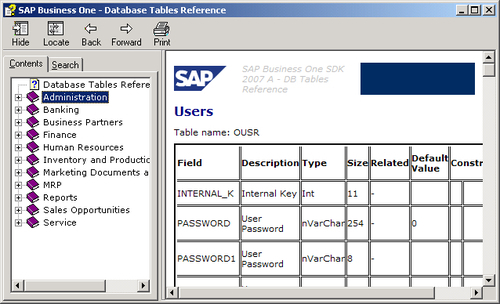
The database tables reference file named REFDB.CHM is the one we are looking for. SDK is usually installed on the same server as the SAP Business One database server. Normally, the file path is: X:\Program Files\SAP\SAP Business One SDK\Help. Here, "X" means the drive where your SAP Business One SDK is installed. The help file looks like this:
In this help file, we will find the same categories as the SAP Business One menu with all 11 modules. The tables related to each module are listed one by one. There are tree structures in the help file if the header tables have row tables. Each table provides a list of all the fields in the table along with their description, type, size, related tables, default value, and constraints.
Naming convention of tables for SAP Business One
To help you understand the previous mentioned data dictionary quickly, we will be going through the naming conventions for the table in SAP Business One.
Most tables for SAP Business One have four letters. The only exceptions are number-ending tables, if the numbers are greater than nine. Those tables will have five letters. To understand table names easily, there is a three letter abbreviation in SAP Business One. Some of the commonly used abbreviations are listed as follows:
- ADM: Administration
- ATC: Attachments
- CPR: Contact Persons
- CRD: Business Partners
- DLN: Delivery Notes
- HEM: Employees
- INV: Sales Invoices
- ITM: Items
- ITT: Product Trees (Bill of Materials)
- OPR: Sales Opportunities
- PCH: Purchase Invoices
- PDN: Goods Receipt PO
- POR: Purchase Orders
- QUT: Sales Quotations
- RDR: Sales Orders
- RIN: Sales Credit Notes
- RPC: Purchase Credit Notes
- SLP: Sales Employees
- USR: Users
- WOR: Production Orders
- WTR: Stock Transfers
All tables starting with "O" refer to master tables. O here represents Object. For example:
- OITM: Items Master
- OCRD: Business Partners Master
- OSLP: Sales Employee
Most tables starting with "A" may mean historical log tables. A here represents Archive. For example:
- AITM: Items—History
- ACRD: Business Partners—History
- AUSR: Archive Users—History
These are special O tables with the exact same structure. They can be tables related to Sales or Purchase. These are called Marketing Documents. These also include most Inventory transaction tables. Some examples are:
- OINV: A/R Invoice Header
- OPCH: A/P Invoice Header
- OIGN: Goods Receipt Header
All tables ending with a number refer to document line detail tables or subtables for the master table. Numbers here could refer to different properties of the header tables.
- INV1: A/R Invoice Row
- PCH1: A/P Invoice Row
- IGN1: Goods Receipt Row
- INV2: A/R Invoice—Row Expense
Some specific tables very important for query building are listed here:
- OJDT-Journal Entry: This table includes all financial journal entries no matter whether they are automatically posted or manually posted.
- OINM-Warehouse Journal: This table includes all inventory-related transactions. It is a single point to check everything in relation to your inventory (or stock). It becomes a view in the new version. This view must be queried very carefully.
- ADOC-Document History: This table includes all document history. However, it is wrongly named in the documentation, "Invoice History" table in the help file.
SAP Business One—Database tables reference
The database tables reference file named REFDB.CHM is the one we are looking for. SDK is usually installed on the same server as the SAP Business One database server. Normally, the file path is: X:\Program Files\SAP\SAP Business One SDK\Help. Here, "X" means the drive where your SAP Business One SDK is installed. The help file looks like this:
In this help file, we will find the same categories as the SAP Business One menu with all 11 modules. The tables related to each module are listed one by one. There are tree structures in the help file if the header tables have row tables. Each table provides a list of all the fields in the table along with their description, type, size, related tables, default value, and constraints.
Naming convention of tables for SAP Business One
To help you understand the previous mentioned data dictionary quickly, we will be going through the naming conventions for the table in SAP Business One.
Most tables for SAP Business One have four letters. The only exceptions are number-ending tables, if the numbers are greater than nine. Those tables will have five letters. To understand table names easily, there is a three letter abbreviation in SAP Business One. Some of the commonly used abbreviations are listed as follows:
- ADM: Administration
- ATC: Attachments
- CPR: Contact Persons
- CRD: Business Partners
- DLN: Delivery Notes
- HEM: Employees
- INV: Sales Invoices
- ITM: Items
- ITT: Product Trees (Bill of Materials)
- OPR: Sales Opportunities
- PCH: Purchase Invoices
- PDN: Goods Receipt PO
- POR: Purchase Orders
- QUT: Sales Quotations
- RDR: Sales Orders
- RIN: Sales Credit Notes
- RPC: Purchase Credit Notes
- SLP: Sales Employees
- USR: Users
- WOR: Production Orders
- WTR: Stock Transfers
All tables starting with "O" refer to master tables. O here represents Object. For example:
- OITM: Items Master
- OCRD: Business Partners Master
- OSLP: Sales Employee
Most tables starting with "A" may mean historical log tables. A here represents Archive. For example:
- AITM: Items—History
- ACRD: Business Partners—History
- AUSR: Archive Users—History
These are special O tables with the exact same structure. They can be tables related to Sales or Purchase. These are called Marketing Documents. These also include most Inventory transaction tables. Some examples are:
- OINV: A/R Invoice Header
- OPCH: A/P Invoice Header
- OIGN: Goods Receipt Header
All tables ending with a number refer to document line detail tables or subtables for the master table. Numbers here could refer to different properties of the header tables.
- INV1: A/R Invoice Row
- PCH1: A/P Invoice Row
- IGN1: Goods Receipt Row
- INV2: A/R Invoice—Row Expense
Some specific tables very important for query building are listed here:
- OJDT-Journal Entry: This table includes all financial journal entries no matter whether they are automatically posted or manually posted.
- OINM-Warehouse Journal: This table includes all inventory-related transactions. It is a single point to check everything in relation to your inventory (or stock). It becomes a view in the new version. This view must be queried very carefully.
- ADOC-Document History: This table includes all document history. However, it is wrongly named in the documentation, "Invoice History" table in the help file.
Naming convention of tables for SAP Business One
To help you understand the previous mentioned data dictionary quickly, we will be going through the naming conventions for the table in SAP Business One.
Most tables for SAP Business One have four letters. The only exceptions are number-ending tables, if the numbers are greater than nine. Those tables will have five letters. To understand table names easily, there is a three letter abbreviation in SAP Business One. Some of the commonly used abbreviations are listed as follows:
- ADM: Administration
- ATC: Attachments
- CPR: Contact Persons
- CRD: Business Partners
- DLN: Delivery Notes
- HEM: Employees
- INV: Sales Invoices
- ITM: Items
- ITT: Product Trees (Bill of Materials)
- OPR: Sales Opportunities
- PCH: Purchase Invoices
- PDN: Goods Receipt PO
- POR: Purchase Orders
- QUT: Sales Quotations
- RDR: Sales Orders
- RIN: Sales Credit Notes
- RPC: Purchase Credit Notes
- SLP: Sales Employees
- USR: Users
- WOR: Production Orders
- WTR: Stock Transfers
All tables starting with "O" refer to master tables. O here represents Object. For example:
- OITM: Items Master
- OCRD: Business Partners Master
- OSLP: Sales Employee
Most tables starting with "A" may mean historical log tables. A here represents Archive. For example:
- AITM: Items—History
- ACRD: Business Partners—History
- AUSR: Archive Users—History
These are special O tables with the exact same structure. They can be tables related to Sales or Purchase. These are called Marketing Documents. These also include most Inventory transaction tables. Some examples are:
- OINV: A/R Invoice Header
- OPCH: A/P Invoice Header
- OIGN: Goods Receipt Header
All tables ending with a number refer to document line detail tables or subtables for the master table. Numbers here could refer to different properties of the header tables.
- INV1: A/R Invoice Row
- PCH1: A/P Invoice Row
- IGN1: Goods Receipt Row
- INV2: A/R Invoice—Row Expense
Some specific tables very important for query building are listed here:
- OJDT-Journal Entry: This table includes all financial journal entries no matter whether they are automatically posted or manually posted.
- OINM-Warehouse Journal: This table includes all inventory-related transactions. It is a single point to check everything in relation to your inventory (or stock). It becomes a view in the new version. This view must be queried very carefully.
- ADOC-Document History: This table includes all document history. However, it is wrongly named in the documentation, "Invoice History" table in the help file.
Most tables for SAP Business One have four letters. The only exceptions are number-ending tables, if the numbers are greater than nine. Those tables will have five letters. To understand table names easily, there is a three letter abbreviation in SAP Business One. Some of the commonly used abbreviations are listed as follows:
- ADM: Administration
- ATC: Attachments
- CPR: Contact Persons
- CRD: Business Partners
- DLN: Delivery Notes
- HEM: Employees
- INV: Sales Invoices
- ITM: Items
- ITT: Product Trees (Bill of Materials)
- OPR: Sales Opportunities
- PCH: Purchase Invoices
- PDN: Goods Receipt PO
- POR: Purchase Orders
- QUT: Sales Quotations
- RDR: Sales Orders
- RIN: Sales Credit Notes
- RPC: Purchase Credit Notes
- SLP: Sales Employees
- USR: Users
- WOR: Production Orders
- WTR: Stock Transfers
All tables starting with "O" refer to master tables. O here represents Object. For example:
- OITM: Items Master
- OCRD: Business Partners Master
- OSLP: Sales Employee
Most tables starting with "A" may mean historical log tables. A here represents Archive. For example:
- AITM: Items—History
- ACRD: Business Partners—History
- AUSR: Archive Users—History
These are special O tables with the exact same structure. They can be tables related to Sales or Purchase. These are called Marketing Documents. These also include most Inventory transaction tables. Some examples are:
- OINV: A/R Invoice Header
- OPCH: A/P Invoice Header
- OIGN: Goods Receipt Header
All tables ending with a number refer to document line detail tables or subtables for the master table. Numbers here could refer to different properties of the header tables.
- INV1: A/R Invoice Row
- PCH1: A/P Invoice Row
- IGN1: Goods Receipt Row
- INV2: A/R Invoice—Row Expense
Some specific tables very important for query building are listed here:
- OJDT-Journal Entry: This table includes all financial journal entries no matter whether they are automatically posted or manually posted.
- OINM-Warehouse Journal: This table includes all inventory-related transactions. It is a single point to check everything in relation to your inventory (or stock). It becomes a view in the new version. This view must be queried very carefully.
- ADOC-Document History: This table includes all document history. However, it is wrongly named in the documentation, "Invoice History" table in the help file.
All tables starting with "O" refer to master tables. O here represents Object. For example:
- OITM: Items Master
- OCRD: Business Partners Master
- OSLP: Sales Employee
Most tables starting with "A" may mean historical log tables. A here represents Archive. For example:
- AITM: Items—History
- ACRD: Business Partners—History
- AUSR: Archive Users—History
These are special O tables with the exact same structure. They can be tables related to Sales or Purchase. These are called Marketing Documents. These also include most Inventory transaction tables. Some examples are:
- OINV: A/R Invoice Header
- OPCH: A/P Invoice Header
- OIGN: Goods Receipt Header
All tables ending with a number refer to document line detail tables or subtables for the master table. Numbers here could refer to different properties of the header tables.
- INV1: A/R Invoice Row
- PCH1: A/P Invoice Row
- IGN1: Goods Receipt Row
- INV2: A/R Invoice—Row Expense
Some specific tables very important for query building are listed here:
- OJDT-Journal Entry: This table includes all financial journal entries no matter whether they are automatically posted or manually posted.
- OINM-Warehouse Journal: This table includes all inventory-related transactions. It is a single point to check everything in relation to your inventory (or stock). It becomes a view in the new version. This view must be queried very carefully.
- ADOC-Document History: This table includes all document history. However, it is wrongly named in the documentation, "Invoice History" table in the help file.
Most tables starting with "A" may mean historical log tables. A here represents Archive. For example:
- AITM: Items—History
- ACRD: Business Partners—History
- AUSR: Archive Users—History
These are special O tables with the exact same structure. They can be tables related to Sales or Purchase. These are called Marketing Documents. These also include most Inventory transaction tables. Some examples are:
- OINV: A/R Invoice Header
- OPCH: A/P Invoice Header
- OIGN: Goods Receipt Header
All tables ending with a number refer to document line detail tables or subtables for the master table. Numbers here could refer to different properties of the header tables.
- INV1: A/R Invoice Row
- PCH1: A/P Invoice Row
- IGN1: Goods Receipt Row
- INV2: A/R Invoice—Row Expense
Some specific tables very important for query building are listed here:
- OJDT-Journal Entry: This table includes all financial journal entries no matter whether they are automatically posted or manually posted.
- OINM-Warehouse Journal: This table includes all inventory-related transactions. It is a single point to check everything in relation to your inventory (or stock). It becomes a view in the new version. This view must be queried very carefully.
- ADOC-Document History: This table includes all document history. However, it is wrongly named in the documentation, "Invoice History" table in the help file.
These are special O tables with the exact same structure. They can be tables related to Sales or Purchase. These are called Marketing Documents. These also include most Inventory transaction tables. Some examples are:
- OINV: A/R Invoice Header
- OPCH: A/P Invoice Header
- OIGN: Goods Receipt Header
All tables ending with a number refer to document line detail tables or subtables for the master table. Numbers here could refer to different properties of the header tables.
- INV1: A/R Invoice Row
- PCH1: A/P Invoice Row
- IGN1: Goods Receipt Row
- INV2: A/R Invoice—Row Expense
Some specific tables very important for query building are listed here:
- OJDT-Journal Entry: This table includes all financial journal entries no matter whether they are automatically posted or manually posted.
- OINM-Warehouse Journal: This table includes all inventory-related transactions. It is a single point to check everything in relation to your inventory (or stock). It becomes a view in the new version. This view must be queried very carefully.
- ADOC-Document History: This table includes all document history. However, it is wrongly named in the documentation, "Invoice History" table in the help file.
All tables ending with a number refer to document line detail tables or subtables for the master table. Numbers here could refer to different properties of the header tables.
- INV1: A/R Invoice Row
- PCH1: A/P Invoice Row
- IGN1: Goods Receipt Row
- INV2: A/R Invoice—Row Expense
Some specific tables very important for query building are listed here:
- OJDT-Journal Entry: This table includes all financial journal entries no matter whether they are automatically posted or manually posted.
- OINM-Warehouse Journal: This table includes all inventory-related transactions. It is a single point to check everything in relation to your inventory (or stock). It becomes a view in the new version. This view must be queried very carefully.
- ADOC-Document History: This table includes all document history. However, it is wrongly named in the documentation, "Invoice History" table in the help file.
Some specific tables very important for query building are listed here:
- OJDT-Journal Entry: This table includes all financial journal entries no matter whether they are automatically posted or manually posted.
- OINM-Warehouse Journal: This table includes all inventory-related transactions. It is a single point to check everything in relation to your inventory (or stock). It becomes a view in the new version. This view must be queried very carefully.
- ADOC-Document History: This table includes all document history. However, it is wrongly named in the documentation, "Invoice History" table in the help file.
Table links—the key for the right query
Table links are fundamental for query building. You will see some different links in this section, but the most common links will be discussed in the next section because there are too many and they are used too often.
To understand table links, you need to know more about table structures.
Every table has a primary key. Some of the tables have foreign keys too. All those keys are used for the index. Docentry is a typical primary key to link OXXX with XXXn document tables. For example, Docentry is a common key field to link OPOR with POR1, POR2 to POR12.
A primary key can be one or more fields. For a simple table one key field would be good enough. For a complicated table, two or more fields for primary key are not rare.
A primary key has to be unique within the same table. This key will not allow NULL value—that is, an empty field or a field with no data.
A foreign key is usually used to link to some other table's primary key. This field will be updated whenever the other table record has changed.
Although, you could link any fields between tables, if the field is not NULL, you should try to use key link wherever possible in order to increase the database performance.
Example of table links within SAP Business One
To be clearer about the link, here are a few table link examples:
- OITM-Items table and ITM1-Items Prices table:
These two tables are linked through ItemCode field. Both tables have the same field name to link. It is not one-to-one but one-to-many relationships. One Item Code in item master may have more than one item price associated.
- OITT-Product Tree table and ITT1-Product Tree Child Items:
These two tables are linked through Code field in OITT and Father field in ITT1. These tables are used for Bill of Materials.
- OCRD-Business Partner table and OSLP-Sales Employee table:
These two tables are linked through the same name field SlpCode. In the second table, SlpCode is the primary key for OSLP. On the other hand, it is a foreign key in the first table OCRD.
Every table has a primary key. Some of the tables have foreign keys too. All those keys are used for the index. Docentry is a typical primary key to link OXXX with XXXn document tables. For example, Docentry is a common key field to link OPOR with POR1, POR2 to POR12.
A primary key can be one or more fields. For a simple table one key field would be good enough. For a complicated table, two or more fields for primary key are not rare.
A primary key has to be unique within the same table. This key will not allow NULL value—that is, an empty field or a field with no data.
A foreign key is usually used to link to some other table's primary key. This field will be updated whenever the other table record has changed.
Although, you could link any fields between tables, if the field is not NULL, you should try to use key link wherever possible in order to increase the database performance.
Example of table links within SAP Business One
To be clearer about the link, here are a few table link examples:
- OITM-Items table and ITM1-Items Prices table:
These two tables are linked through ItemCode field. Both tables have the same field name to link. It is not one-to-one but one-to-many relationships. One Item Code in item master may have more than one item price associated.
- OITT-Product Tree table and ITT1-Product Tree Child Items:
These two tables are linked through Code field in OITT and Father field in ITT1. These tables are used for Bill of Materials.
- OCRD-Business Partner table and OSLP-Sales Employee table:
These two tables are linked through the same name field SlpCode. In the second table, SlpCode is the primary key for OSLP. On the other hand, it is a foreign key in the first table OCRD.
A foreign key is usually used to link to some other table's primary key. This field will be updated whenever the other table record has changed.
Although, you could link any fields between tables, if the field is not NULL, you should try to use key link wherever possible in order to increase the database performance.
Example of table links within SAP Business One
To be clearer about the link, here are a few table link examples:
- OITM-Items table and ITM1-Items Prices table:
These two tables are linked through ItemCode field. Both tables have the same field name to link. It is not one-to-one but one-to-many relationships. One Item Code in item master may have more than one item price associated.
- OITT-Product Tree table and ITT1-Product Tree Child Items:
These two tables are linked through Code field in OITT and Father field in ITT1. These tables are used for Bill of Materials.
- OCRD-Business Partner table and OSLP-Sales Employee table:
These two tables are linked through the same name field SlpCode. In the second table, SlpCode is the primary key for OSLP. On the other hand, it is a foreign key in the first table OCRD.
Example of table links within SAP Business One
To be clearer about the link, here are a few table link examples:
- OITM-Items table and ITM1-Items Prices table:
These two tables are linked through ItemCode field. Both tables have the same field name to link. It is not one-to-one but one-to-many relationships. One Item Code in item master may have more than one item price associated.
- OITT-Product Tree table and ITT1-Product Tree Child Items:
These two tables are linked through Code field in OITT and Father field in ITT1. These tables are used for Bill of Materials.
- OCRD-Business Partner table and OSLP-Sales Employee table:
These two tables are linked through the same name field SlpCode. In the second table, SlpCode is the primary key for OSLP. On the other hand, it is a foreign key in the first table OCRD.
Base tables versus target tables
Base tables and target tables are special linked tables within SAP Business One. They are the most often used linked tables for SQL queries too.
You may find most of them related to "Sales-A/R" and "Purchase-A/P" documents or so-called "Marketing Documents".
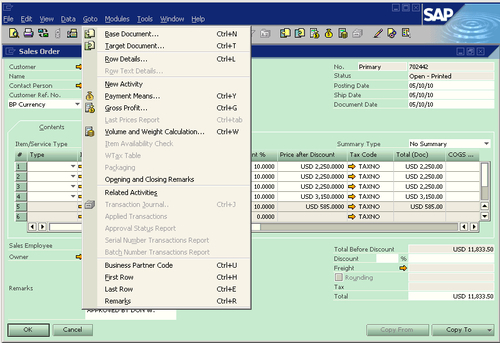
Marketing documents may not have base tables or target tables. From the previous screenshot, you could clearly find that the Base Document and Target Document are available to this Sales Order. To get the Base Document, you may click on the "left arrow icon" or use the shortcut key Ctrl+N. To get the Target Document, you may click on the "right arrow icon" or use the shortcut key Ctrl+T. Only when the base table or target table is available to the current document, will you find the menu items and icons in active status. Otherwise, both icons and menu items are grayed out.
From the terms "Base" and "Target", it is clear that the target table can be based upon the base table.
One table could be based on different types of tables:
From this demonstration, you could get a clear picture about the relationship between Base Document (table) and Target Document (table). A specific pair of Purchase Order and Good Receipt PO tables is shown here. This concept applies to all document type tables. Here is a list of commonly used base-target pairs; they are not inclusive. You may find more, but the following are the most frequently used ones:
I have omitted the details for the link. Actually, you will find that all the links exist on the first child table or so-called row table for the header table, such as QUT1 instead of OQUT.
The linking fields are very clear. For example:
- BaseEntry in the target table refers to the base table's DocEntry
- BaseType refers to the types of the base table
- BaseRef is usually linked to DocNum field in the base table
- BaseLine will be the line number in the base line table
- TargetEntry in the base table refers to the target table's DocEntry
- TargetType refers to the types of the target table
Keeping it simple—The key to build a good query
Before you go on to the next chapter, an important concept needs to be kept in mind:
Note
Keep it simple is the key to success to create queries efficiently.
Simplicity is in need everywhere in the current changing world. Wherever you make things complicated, you may find yourself in an awkward position to compete with others.
My slogan is: simple, simpler, the simplest.
I have a habit in query building: the last step for any new query would be checking to see if it is the simplest one. In this way, "keep it simple" would not only be kept in the already built query, but also helps new queries to be the simplest in the beginning.
By keeping a query as simple as possible, it will ensure that the system performance is not affected. It will also be a great help to the troubleshooting process. A short checklist for simplicity is as follows:
- Other queries: Are there any other queries doing a similar job, and if yes, why does the new query need to be built?
- Tables: Are there any tables that have not been used for the query?
- Fields: Are there any fields that have not been used for the query?
- Conditions: Are there any condition overlaps?
The list can be much longer. The meaning behind it is clear: there is a never ending battle to get rid of complications.
When you try this method and it becomes a routine, you will find that query building becomes an enjoyable process.
In this chapter, you have been identified to be an appropriate reader who needs this information, supposing that you read through the beginning chapter and still want to read more.
You have been given all the basic concepts such as RDBMS, Table, SQL, T-SQL, SQL Subsets, and Query. You also get the idea of what the strict meanings of "SQL" and "Query" are within this book.
By going deeper into discussing table relationships, you gained a bigger picture of SAP Business One's database structure and tables' naming conventions. You also learned about base tables versus target tables in SAP Business One.
The "Keep it simple" principle has been emphasized in the last section of the chapter. You are advised to use it whenever you practice your own queries.
The next chapter will introduce you to the Query Generator and Query Wizard tools, so that you can start hands-on in building SQL query as soon as possible, if you have not yet done so.





 Free Chapter