Sign In Start Free Trial
Account

Add to playlist

Create a Playlist

Modal Close icon
You need to login to use this feature.
  • Book Overview & Buying Microsoft Dynamics CRM 2011 Cookbook
  • Table Of Contents Toc
Microsoft Dynamics CRM 2011 Cookbook

Microsoft Dynamics CRM 2011 Cookbook

By : Dipankar Bhattacharya
3.8 (4)
close
close
Microsoft Dynamics CRM 2011 Cookbook

Microsoft Dynamics CRM 2011 Cookbook

3.8 (4)
By: Dipankar Bhattacharya

Overview of this book

Without a comprehensive understanding of deployment scenarios and steps, it is really difficult to install and maintain Dynamics CRM 2011 within complex IT infrastructures. Done badly, it can cause serious future maintenance and optimization issues. Administration of CRM systems is equally complex and important; unless efficiently done, it can create fuss in the system and potentially bring down end user satisfaction. Configuration and customization of the system has to be done very carefully too so that it can meet the functional needs appropriately.“Microsoft Dynamics CRM 2011 Cookbook" is a hands-on guide, providing clear, step-by-step instructions to deploy, maintain, optimize, and administer Dynamics CRM 2011 along with advanced configuration and customization processes, to give us a strong advantage in creating successful CRM applications.This book introduces Dynamics CRM 2011 by describing the important aspects of the system. It will take you through a number of clear and practical recipes from successful deployment, hassle-free maintenance, and effective administration to advanced level configuration and customization techniques.You will learn from a range of deployment and maintenance topics such as how to configure CRM to use claim-based authentication using AD FS, how to enable tracing in CRM servers, how to recover from server failures, and how to optimize server performance. This book will also discuss how to schedule Data Duplication detection jobs, enable auditing, export and import managed/unmanaged solutions, create 1:N, N:1, or N:N relationships between entities, configuring role based forms, adding a new button in the ribbon, SharePoint integration with CRM, and configuring a dialog or workflow.You will learn everything you need to know, from deployment, administration, and maintenance to configuration, integration, and customization for your Dynamics CRM 2011 application.
Table of Contents (12 chapters)
close
close
11
Index

Installing a Dynamics CRM language pack

Dynamics CRM 2011 supports multiple languages. In this recipe, we will discuss how to apply additional language packs after Dynamics CRM 2011 (base language version) has been installed.

Getting ready

The user account that will be used to run the language pack should have local administrative rights on the machine. The language pack for Microsoft Dynamics CRM 2011 enables users to change the CRM user interface language or Help Text . It is important to note that the language pack must be installed on both Microsoft Dynamics CRM 2011 Server as well as client machines that are using Microsoft Dynamics CRM for Outlook. The supported languages are as follows:

Arabic

Dutch

Hungarian

Portuguese (Portugal)

Basque

English

Italian

Romanian

Bulgarian

Estonian

Japanese

Russian

Catalan

Finnish

Kazakh

Slovak

Chinese (Hong Kong SAR)

French

Korean

Slovenian

Chinese (Simplified)

Galician

Latvian

Spanish

Chinese (Traditional)

German

Lithuanian

Swedish

Croatian

Greek

Norwegian

Thai

Czech

Hebrew

Polish

Turkish

Danish

Hindi

Portuguese (Brazil)

Ukrainian

Note

For users who are running Microsoft Dynamics CRM for Microsoft Office Outlook, in addition to installing the language pack on the computer running Microsoft Dynamics CRM Server 2011, the same language pack has to be installed on the computer where Microsoft Dynamics CRM for Outlook is installed.

How to do it…

The language pack deployment has the following two steps:

  1. Installing the language pack
  2. Provisioning the language pack

The following steps are required to be followed to install the Dynamics CRM language pack:

  1. Log on to the computer where Microsoft Dynamics CRM Server 2011 or Microsoft Dynamics CRM for Outlook is installed.

    Download Microsoft Dynamics CRM 2011 Language Pack from the Microsoft website (http://www.microsoft.com/en-us/download/details.aspx?id=27819). Before downloading, we should select the correct language in the Change Language drop-down list. If download is not permitted on this machine, it can be downloaded elsewhere and then copied onto this machine.

    To run the installer, the logged-in user must have administrator privileges on the computer and either full or administrator privileges on Microsoft Dynamics CRM.

  2. After downloading the package, start the installation by double-clicking on the downloaded EXE file. The first step would be to specify the location to which the package content will be unzipped.
  3. Post unzipping, locate the language pack files and then double-click on the MUISetup_<loc_code>_<proc_type>.msi file, where <loc_ code> is the locale code for the language pack being installed (for example, 1033 for English or 3082 for Spanish), and <proc_type> specifies the type of processor the server is running on (for example, "amd64").
  4. On the End User License Agreement page, click on I accept the terms in the license agreement, and then click on Install.
  5. Installation continues; once done, please click on Finish.

To provision the language pack in the Microsoft Dynamics CRM deployment, perform the following steps:

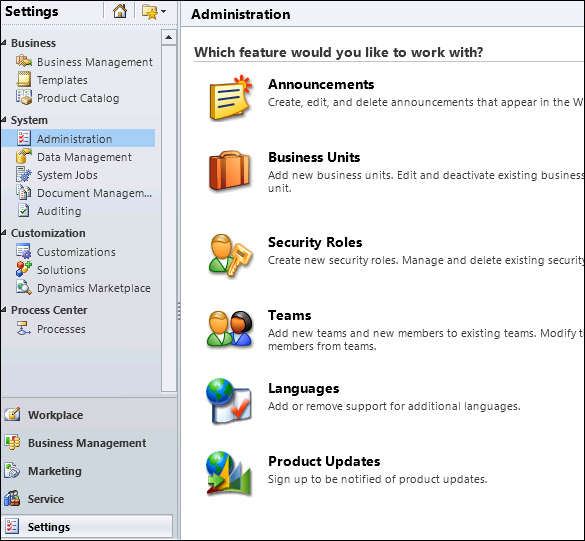
  1. After installation, log in to the Dynamics CRM application with system administrator security privileges. Navigate to Settings | System | Administration | Languages as shown in the following screenshot:
    How to do it…
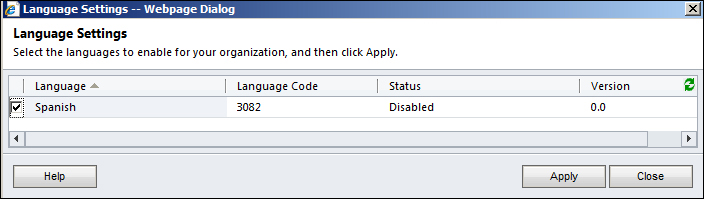
  2. This will launch a new web dialog, where the language (in this example, Spanish) can be selected:
    How to do it…
  3. Then, click on the Apply button to enable the language pack. A confirmation dialog (Confirm Language Change) will appear; please click on OK and continue.
  4. Once done, the language pack's Status field must change to Enabled.
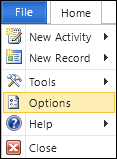
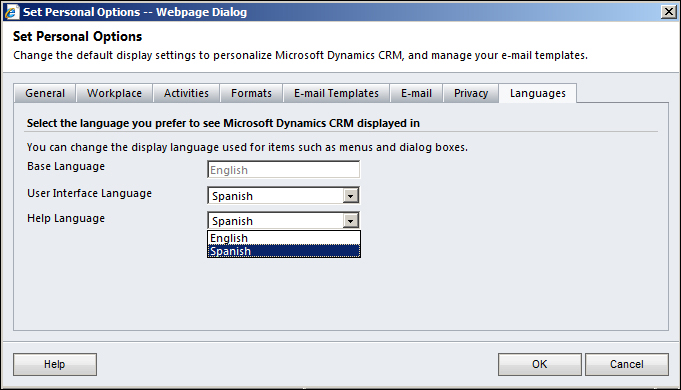
  5. The previous step only enables the language. Now the language change at the user interface level has to be effected. This can be done by navigating to File | Options for every user login:
    How to do it…
  6. In the options window, navigate to the Languages tab. Change the User Interface Language and Help Language fields to the newly enabled language (in this case, Spanish):
    How to do it…
  7. Click on the OK button to apply the changes.

How it works…

The language pack installs a translation package of the labels, text, and help content of the Dynamics CRM user interface. While the base language defines the default Dynamics CRM UI language, the language packs further installed can provide flexibility to users to select another language of their choice. This is often a very important feature of Dynamics CRM when there is a use case of deploying Dynamics CRM for a multilingual user base.

In Microsoft Dynamics CRM for Outlook, the user language settings only apply to Microsoft Dynamics CRM for Outlook features, such as the user interface display of the CRM menu; they do not affect other areas of Microsoft Office Outlook.

CONTINUE READING
83
Tech Concepts
36
Programming languages
73
Tech Tools
Icon Unlimited access to the largest independent learning library in tech of over 8,000 expert-authored tech books and videos.
Icon Innovative learning tools, including AI book assistants, code context explainers, and text-to-speech.
Icon 50+ new titles added per month and exclusive early access to books as they are being written.
Microsoft Dynamics CRM 2011 Cookbook
notes
bookmark Notes and Bookmarks search Search in title playlist Add to playlist font-size Font size

Change the font size

margin-width Margin width

Change margin width

day-mode Day/Sepia/Night Modes

Change background colour

Close icon Search
Country selected

Close icon Your notes and bookmarks

Confirmation

Modal Close icon
claim successful

Buy this book with your credits?

Modal Close icon
Are you sure you want to buy this book with one of your credits?
Close
YES, BUY

Submit Your Feedback

Modal Close icon
Modal Close icon
Modal Close icon