-
Book Overview & Buying
-
Table Of Contents
-
Feedback & Rating
OpenJDK Cookbook
By :
Windows is the most commonly used OS in the world, and many developers are using it as their primary system. Despite its popularity, Windows doesn't have such strong support by the OpenJDK development community, and installation of the product is not as easy as in Linux. This recipe will cover the steps required to install OpenJDK on Windows.
This recipe provides an easy but decentralized way to install programs, although the most recent versions provide package repositories of their own. However, on Windows, the only official way to install an up-to-date OpenJDK is to build it from source.
To follow this recipe, we will need an installed Windows system. Windows 7 or Windows 8 will be best, because Windows XP is already officially discontinued by Microsoft.
There is an official build of OpenJDK on Windows, but it exists for referential purposes only. It is official and easy to install, but it doesn't have any security updates or improvements. However, there are unofficial builds, maintained by Alex Casco. We will try to install OpenJDK in both ways:
Though the OpenJDK source code is licensed by an open license, this official build is licensed by the Oracle Binary Code license and by GPLv2. If you want to keep your OpenJDK open source, please use one licensed by GPLv2.
C:/OpenJDK.cmd, and click on the Run button.C:\OpenJDK\bin\java.exe -version
It will output the Java version information. The output should look like this:
openjdk version 1.7.0 OpenJDK Runtime Environment <build 1.7.0-b146> OpenJDK Client VM <build 21.0-b16, mixed mode>
Congratulations! We've just installed the OpenJDK official binary.
The reference implementation is the only available official binary build of OpenJDK. But it lacks security and is used only for reference purposes. It is a simple archive that needs to be unpacked to use it.
To bypass this unpleasantness and give Windows users an opportunity to install OpenJDK as a binary without building it from source, one of the OpenJDK contributors established a completely unofficial but very useful OpenJDK build set for various platforms.
Moreover, this binary build, unlike the official one, is open source and licensed over GPL. So we can use it even in a completely open source environment without adding any proprietary pieces that will possibly get us in trouble.
You will find an installer for Mac in those unofficial builds as well.
Though an official reference binary is outdated, there is an unofficial project that provides OpenJDK builds from sources that are up to date.
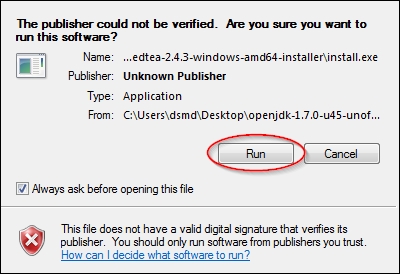
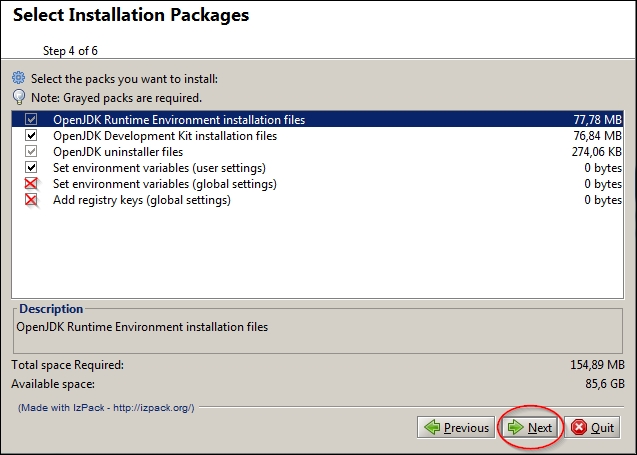
Now we will install OpenJDK 7 from unofficial builds:
install.exe.

Although the simplest way to install OpenJDK is to unpack binaries, manually or in an automatic fashion, there is no doubt that working with the source code will give us more flexibility at all possible levels.
To know more, read the following chapters:
Change the font size
Change margin width
Change background colour