Sign In Start Free Trial
Account

Add to playlist

Create a Playlist

Modal Close icon
You need to login to use this feature.
  • Book Overview & Buying Android Security Cookbook
  • Table Of Contents Toc
Android Security Cookbook

Android Security Cookbook

By : Makan
4.8 (6)
close
close
Android Security Cookbook

Android Security Cookbook

4.8 (6)
By: Makan

Overview of this book

Android Security Cookbook discusses many common vulnerabilities and security related shortcomings in Android applications and operating systems. The book breaks down and enumerates the processes used to exploit and remediate these vulnerabilities in the form of detailed recipes and walkthroughs. The book also teaches readers to use an Android Security Assessment Framework called Drozer and how to develop plugins to customize the framework. Other topics covered include how to reverse-engineer Android applications to find common vulnerabilities, and how to find common memory corruption vulnerabilities on ARM devices. In terms of application protection this book will show various hardening techniques to protect application components, the data stored, secure networking. In summary, Android Security Cookbook provides a practical analysis into many areas of Android application and operating system security and gives the reader the required skills to analyze the security of their Android devices.
Table of Contents (11 chapters)
close
close
10
Index

Emulating Android

The Android SDK comes with a pretty neat tool called the emulator, which allows you to emulate the Android devices. The emulator is shipped with some of the most popular handsets and lets you create an emulated handset of your own. Using this tool, you can flash new kernels, mess around with the platform and, of course, debug apps and test your Android malware and application exploits. Throughout the book we will use this tool quite a bit, so, it's important that you get to know the Android emulator.

The emulator is pretty straightforward to use. When you want to launch a device, all you need to do is open the Android Virtual Device (AVD) tool either from your SDK folder or straight from Eclipse. Then, you can either set up a new device with its own memory card, CPU, and screen size as well as other custom features or you can select one of the preconfigured devices from a list. In this section, I'm going to cover exactly these things.

Just a quick disclaimer: the following screenshots were taken on a Windows 7 machine, but the AVD manager and device emulator work exactly the same on both Windows and Linux platforms, so Linux users will also be able to follow the walkthrough.

How to do it...

To emulate a device from Eclipse, use the following steps:

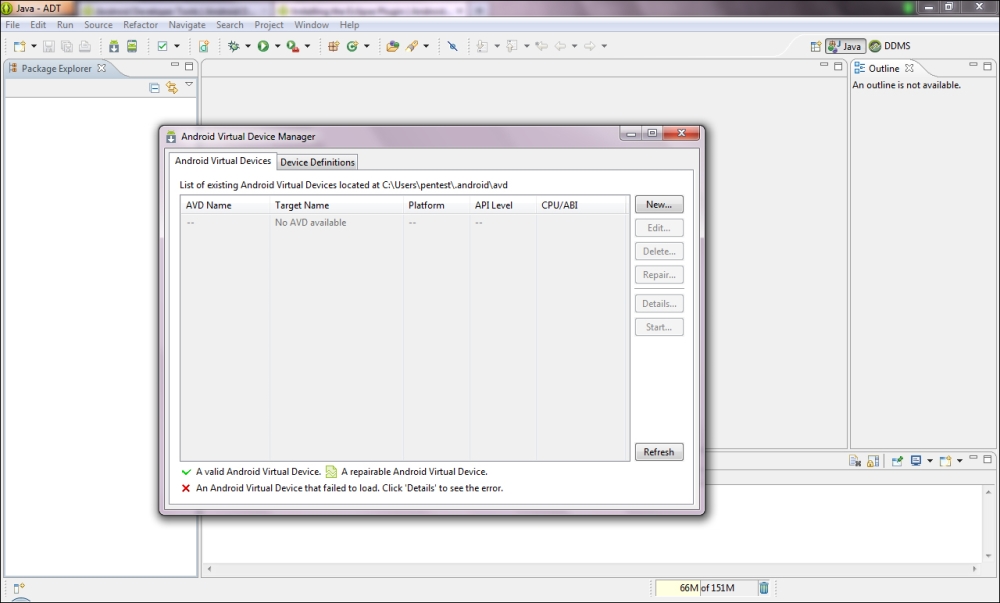
  1. Click on the AVD manager icon on your toolbar.
    How to do it...
  2. The AVD will pop up. You can either select a preconfigured featured device or you can set up a device according to your own criteria. For this recipe, let's stick to configuring our own devices.
  3. Click on New….
    How to do it...
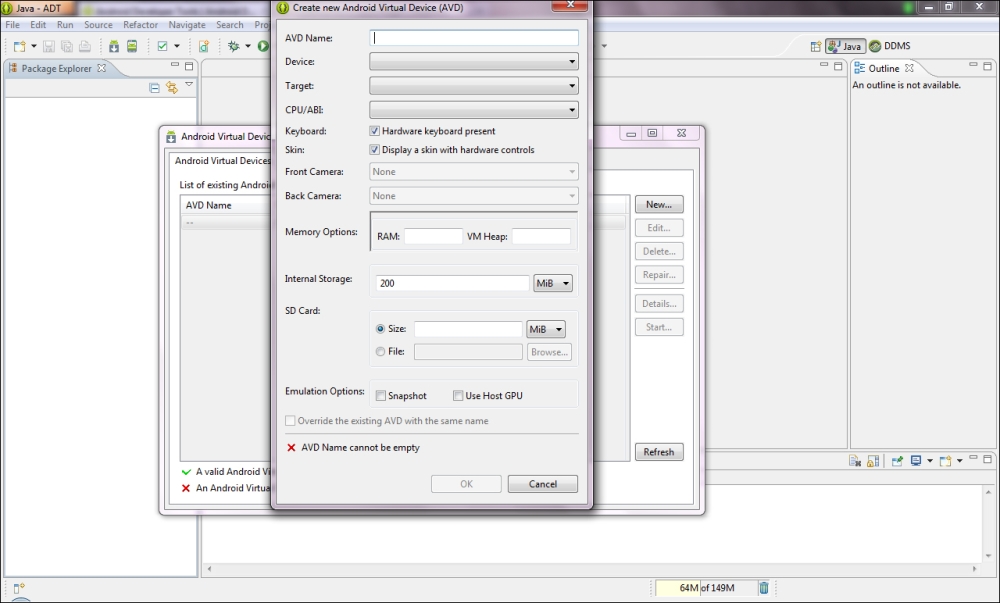
  4. The Create new Android Virtual Device (AVD) dialog box should pop up. You will need to fill in some metrics for the new virtual devices and give it a name. You can enter whatever you feel here as this recipe is just to get you to emulate your first device.
  5. Once you're done, click on OK. The new device should show up in the AVD dialog box.
  6. Click on the device you just created and click on Start….
    How to do it...

At this point, the AVD will prompt you for the screen-size options; the default values aren't too bad. Click on Launch when you're done, and in a few seconds your new AVD will start up.

How to do it...
CONTINUE READING
83
Tech Concepts
36
Programming languages
73
Tech Tools
Icon Unlimited access to the largest independent learning library in tech of over 8,000 expert-authored tech books and videos.
Icon Innovative learning tools, including AI book assistants, code context explainers, and text-to-speech.
Icon 50+ new titles added per month and exclusive early access to books as they are being written.
Android Security Cookbook
notes
bookmark Notes and Bookmarks search Search in title playlist Add to playlist font-size Font size

Change the font size

margin-width Margin width

Change margin width

day-mode Day/Sepia/Night Modes

Change background colour

Close icon Search
Country selected

Close icon Your notes and bookmarks

Confirmation

Modal Close icon
claim successful

Buy this book with your credits?

Modal Close icon
Are you sure you want to buy this book with one of your credits?
Close
YES, BUY

Submit Your Feedback

Modal Close icon
Modal Close icon
Modal Close icon