Sign In Start Free Trial
Account

Add to playlist

Create a Playlist

Modal Close icon
You need to login to use this feature.
  • Book Overview & Buying Learning iOS Penetration Testing
  • Table Of Contents Toc
Learning iOS Penetration Testing

Learning iOS Penetration Testing

By : Yermalkar
4.2 (12)
close
close
Learning iOS Penetration Testing

Learning iOS Penetration Testing

4.2 (12)
By: Yermalkar

Overview of this book

iOS has become one of the most popular mobile operating systems with more than 1.4 million apps available in the iOS App Store. Some security weaknesses in any of these applications or on the system could mean that an attacker can get access to the device and retrieve sensitive information. This book will show you how to conduct a wide range of penetration tests on iOS devices to uncover vulnerabilities and strengthen the system from attacks. Learning iOS Penetration Testing discusses the common vulnerabilities and security-related shortcomings in an iOS application and operating system, and will teach you to conduct static and dynamic analysis of iOS applications. This practical guide will help you uncover vulnerabilities in iOS phones and applications. We begin with basics of iOS security and dig deep to learn about traffic analysis, code analysis, and various other techniques. Later, we discuss the various utilities, and the process of reversing and auditing.
Table of Contents (11 chapters)
close
close
10
Index

Intercepting traffic over HTTPS

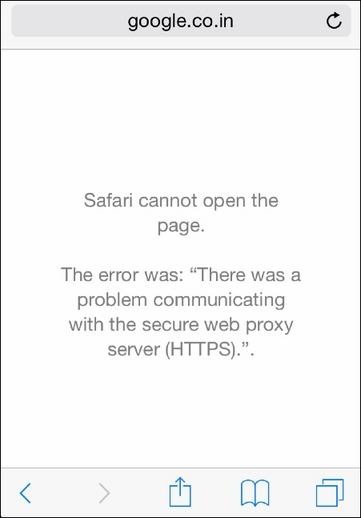
Now, with the previous setup, if we try to open any HTTPS site, we will simply be unable to open it due to the invalid SSL certificate, as shown in the following screenshot:

Intercepting traffic over HTTPS

Here, we need to first generate Burp Suite CA certificate on the local system and then install it on iDevice.

Let's follow the given steps to intercept an iOS application's HTTPS traffic:

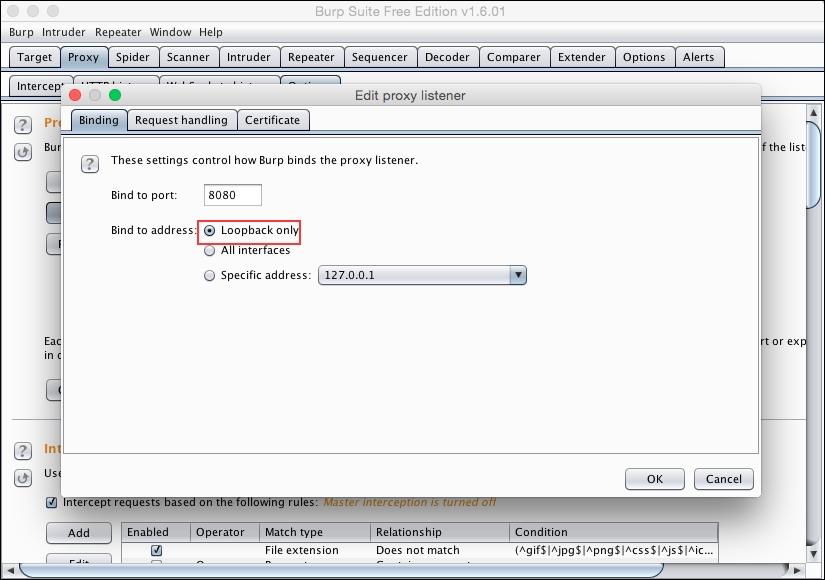
  1. Set the Burp Suite in order to listen on the loopback address only. It will intercept our base system's network traffic:
    Intercepting traffic over HTTPS
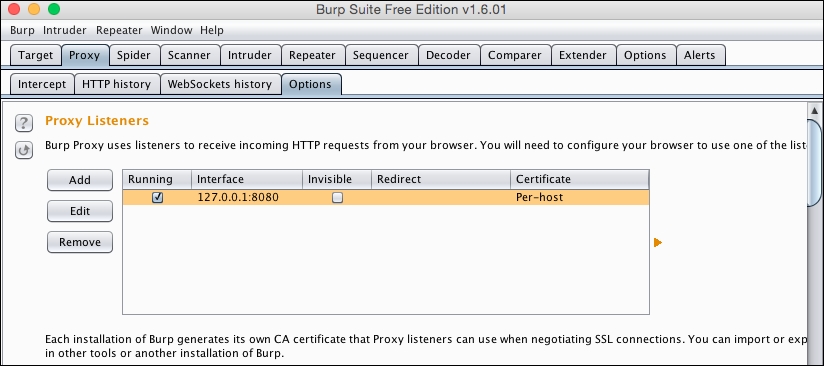
  2. Now, Burp Suite proxy is ready to listen traffic coming only from 127.0.0.1:
    Intercepting traffic over HTTPS
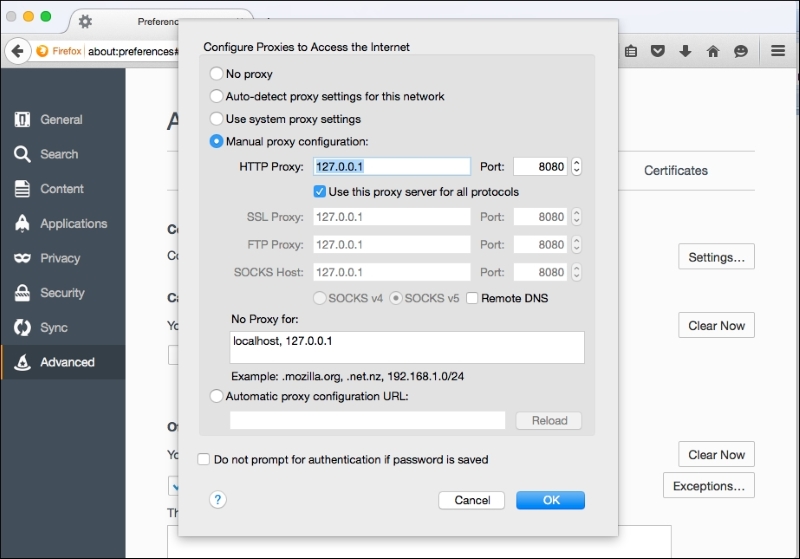
  3. Open the Mozilla Firefox browser and set the HTTP Proxy configuration as 127.0.0.1 and Port as 8080:
    Intercepting traffic over HTTPS
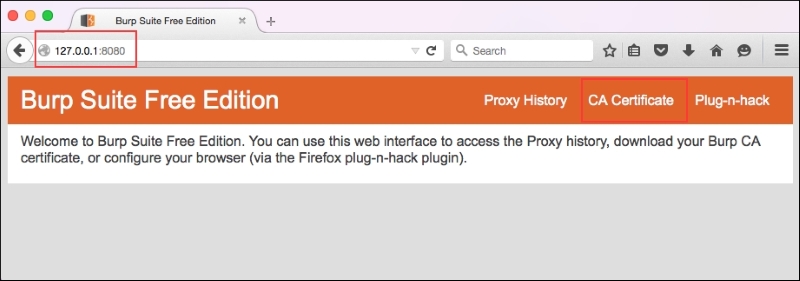
  4. Open your browser and access the 127.0.0.1:8080 address, download CA Certificate on your local system, and export it to iDevice. You can generally send it by an e-mail:
    Intercepting traffic over HTTPS
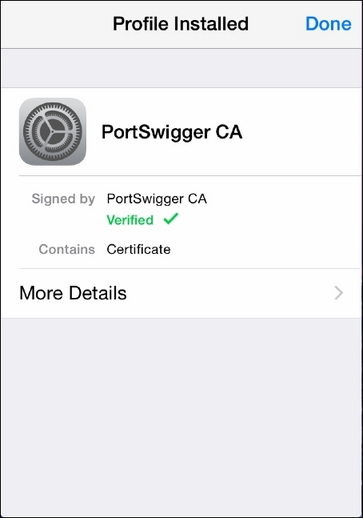
  5. Once you install the certificate on iDevice, you will observe the Verified sign on the certificate:
    Intercepting traffic over HTTPS

    Note

    Make sure that you are using...

CONTINUE READING
83
Tech Concepts
36
Programming languages
73
Tech Tools
Icon Unlimited access to the largest independent learning library in tech of over 8,000 expert-authored tech books and videos.
Icon Innovative learning tools, including AI book assistants, code context explainers, and text-to-speech.
Icon 50+ new titles added per month and exclusive early access to books as they are being written.
Learning iOS Penetration Testing
notes
bookmark Notes and Bookmarks search Search in title playlist Add to playlist font-size Font size

Change the font size

margin-width Margin width

Change margin width

day-mode Day/Sepia/Night Modes

Change background colour

Close icon Search
Country selected

Close icon Your notes and bookmarks

Confirmation

Modal Close icon
claim successful

Buy this book with your credits?

Modal Close icon
Are you sure you want to buy this book with one of your credits?
Close
YES, BUY

Submit Your Feedback

Modal Close icon
Modal Close icon
Modal Close icon