Sign In Start Free Trial
Account

Add to playlist

Create a Playlist

Modal Close icon
You need to login to use this feature.
  • Book Overview & Buying Building E-commerce Sites with VirtueMart Cookbook
  • Table Of Contents Toc
Building E-commerce Sites with VirtueMart Cookbook

Building E-commerce Sites with VirtueMart Cookbook

By : John Horton
4 (1)
close
close
Building E-commerce Sites with VirtueMart Cookbook

Building E-commerce Sites with VirtueMart Cookbook

4 (1)
By: John Horton

Overview of this book

VirtueMart is a premier eCommerce solution powered by Joomla!In Building E-commerce Sites with VirtueMart Cookbook you will learn how to create a full-functioning and attractive eCommerce solution with VirtueMart. You will be shown how to install and configure VirtueMart, how to set-up and run your store day-to-day as well as configure and customize the look and feel of your store. With this book by your side, you will be able to overcome as problems setting up, administrating and customizing your eCommerce store! This book finishes with blueprint projects meaning that getting started with VirtueMart is even easier for the novice and aspiring site builder or developer. If you have always wanted to create a professional-looking store, but are worried about the complexity and difficulty involved, then this book is for you! With numerous recipes, practical tips and solutions Building E-commerce Sites with VirtueMart Cookbook will take you through every step required to achieve eCommerce success.
Table of Contents (12 chapters)
close
close
10
A. Apps, VirtueMart, and Joomla! Resources
11
Index

Installing the Android Development Tools plugin

The plugin is what makes Eclipse hook up with the Android SDK. Just one more set of mind numbing install screens and we will be ready to do something more fun, I promise.

Getting ready

Close down all programs on your PC and be to ready to install the plugin. We will get Eclipse to connect to the download site and then install the ADT plugin into itself.

How to do it...

This step is nice and simple. Just follow along the following steps:

  1. Start Eclipse by going to C:\Android\Eclipse and double click on eclipse.exe.
  2. Click on Help | Install New Software.
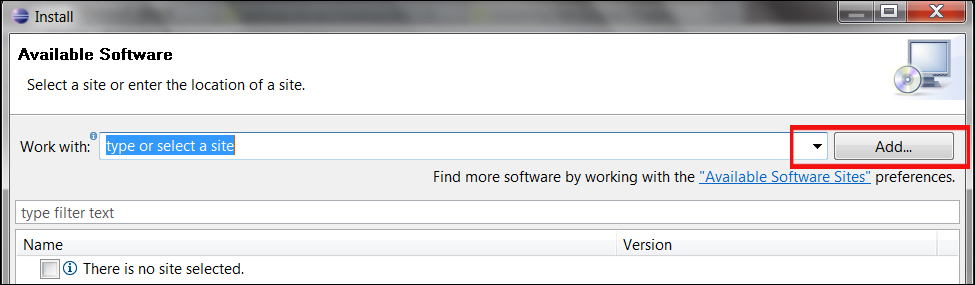
  3. The Available Software dialog will pop up. In the top right click on the Add… button as shown in the following screenshot:
    How to do it...
  4. In the next pop up enter ADT Plugin in the Name field and enter the URL https://dl-ssl.google.com/android/eclipse/ in the Location field. As shown in the following screenshot:
    How to do it...
  5. Now click on the OK button.
  6. In the Available Software dialog, check the checkbox next to Developer Tools...
CONTINUE READING
83
Tech Concepts
36
Programming languages
73
Tech Tools
Icon Unlimited access to the largest independent learning library in tech of over 8,000 expert-authored tech books and videos.
Icon Innovative learning tools, including AI book assistants, code context explainers, and text-to-speech.
Icon 50+ new titles added per month and exclusive early access to books as they are being written.
Building E-commerce Sites with VirtueMart Cookbook
notes
bookmark Notes and Bookmarks search Search in title playlist Add to playlist font-size Font size

Change the font size

margin-width Margin width

Change margin width

day-mode Day/Sepia/Night Modes

Change background colour

Close icon Search
Country selected

Close icon Your notes and bookmarks

Confirmation

Modal Close icon
claim successful

Buy this book with your credits?

Modal Close icon
Are you sure you want to buy this book with one of your credits?
Close
YES, BUY

Submit Your Feedback

Modal Close icon
Modal Close icon
Modal Close icon