-
Book Overview & Buying
-
Table Of Contents
-
Feedback & Rating
LESS WEB DEVELOPMENT COOKBOOK
By :
The client-side compiler less.js can be downloaded from http://lesscss.org/. You can use less.js in the browser, which is a great tool to get you started with Less, although it should only be used for development. For production usage, you should use precompiling. Precompiling with the Node.js compiler will be discussed in the Installing the lessc compiler with npm recipe.
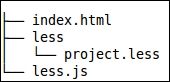
You can download the latest version of less.js from http://lesscss.org/ and copy this file into your working directory. You will also have to create the index.html and project.less files in the working directory. You can edit these files with any text editor of your choice.
You will have the following folder and file structure:

You will also need a modern web browser to inspect the results of your work.
It is not necessary to have a web server running. Navigating to the index.html file on your hard drive with your browser will be enough. However, this won't work for all browsers, so use Mozilla Firefox to be sure when you do not have a web server running. The examples in this book use http://localhost/map/ and can be replaced with the path similar to file:///map/ or c:\map\, depending on your situation.
index.html file. The index.html file should contain a valid HTML5 code and have references to the project.less and less.js files. After you edit it, the HTML file will look as follows:<!DOCTYPE html>
<html>
<head>
<meta charset="utf-8">
<link rel="stylesheet/less" type="text/css" href="project.less">
<script src="less.js" type="text/javascript"></script>
</head>
<body>
<header>the header</header>
<section>this is a paragraph</section>
<footer>the footer</footer>
</body>
</html>project.less file to give each element a different font color:header {
color: blue;
}
section {
color: green;
}
footer {
color: purple;
}index.html file in your web browser.The less.js compiler compiles the Less code in the project.less file linked with the following HTML code:
<link rel="stylesheet/less" type="text/css" href="project.less" />
Note that without setting the rel="stylesheet/less" attribute, the compiler does not recognize your code.
The reference to the less.js compiler should be included after the reference to the project.less file in the preceding code as follows:
<script src="less.js" type="text/javascript"></script>
Other Less files can be imported into project.less with the @import directive. All imports are compiled into CSS code. Also note that when using the server-side compiler, all of the compiled CSS code will be saved to the same file. The preceding code differs from the situation of linking more than one .less style sheet. When linking multiple .less style sheets, each file will be compiled independently and will not use variables and mixins defined in the other files.
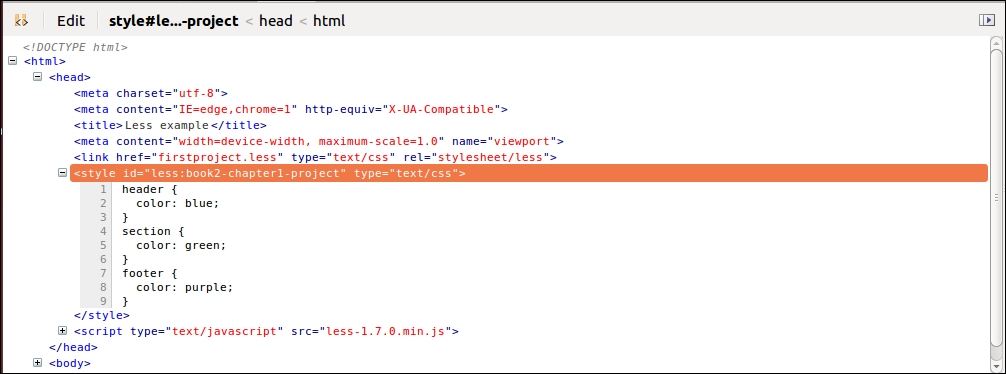
The compiled CSS code will be injected into the HTML document and style your HTML elements according to normal CSS rules. When using Firefox's or Google Chrome's developer tools to inspect your source, you will find the compiled code as follows:

The less.js file also has a watch function that checks your files for changes and reloads your browser views automatically when changes are found. It is pretty simple to use—add #!watch after the URL you want to open, which in this case means appending #!watch after index.html, and then reload the browser window.
You can configure the less.js compiler by adding a less = {}; JavaScript object to your code using the following code:
<link rel="stylesheet/less" type="text/css" href="less/styles.less" />
<script type="text/javascript">less = { env: 'development' };</script>
<script src="less.js" type="text/javascript"></script>In the preceding code, less is a global object used to parse the env: 'development' settings to less.js. Please refer to http://lesscss.org/#client-side-usage-browser-options to learn more about the settings that can be used with the less.js compiler.
Alternatively, these options can be set as data attributes on the script and link tags, as can be seen in the following example code from the Less website:
<script src="less.js" data-poll="1000" data-relative-urls="false"></script> <link data-dump-line-numbers="all" data-global-vars='{ myvar: "#ddffee", mystr: "\"quoted\"" }' rel="stylesheet/less" type="text/css" href="less/styles.less">In this recipe, a local copy of the less.js compiler was used. Alternatively, you can also load the less.js compiler from content delivery network (CDN) or build it with Bower. To load less.js from CDN, you will have to add the following code to your index.html file:
<script src="//cdnjs.cloudflare.com/ajax/libs/less.js/2.x.x/less.min.js"></script>
If you aren't aware, Bower is a package manager for the Web. You can install Bower by running the following command in your console:
npm install bower
You can then run the following command to build less.js with Bower:
bower install less
Change the font size
Change margin width
Change background colour