-
Book Overview & Buying
-
Table Of Contents
LESS WEB DEVELOPMENT COOKBOOK
By :
Less allows you to use variables. You can assign a variable a value, which will be called a declaration. After a variable is declared, you can use the variable anywhere in your code to reference its value. Variables allow you to specify widely used values in a single place and then reuse them throughout your code. Defining once also means you have to edit it once when you want to change its value.
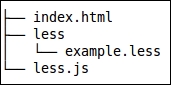
Open your text editor and create a file named example.less. Variables will start with @ and will have a name with examples, including @color, @size, and @tree. To write the name, you are allowed to use any alphanumeric characters, underscores, and dashes. Using this as an elaborate example, @this-is-variable-name-with-35-chars is a valid variable name.
index.html, as follows:<!DOCTYPE html>
<html>
<head>
<meta charset="utf-8">
<title>Use variables in Less</title>
<link rel="stylesheet/less" type="text/css" href="example.less">
<script src="less.js" type="text/javascript"></script>
</head>
<body>
<h1>Color your page with variables</h1>
<p>Hello Less</p>
<button>Click here</button>
</body>
</html>example.less file, which should contain the following code:@base-color: red;
h1 {
color: @base-color;
}
p{
color: @base-color;
}
button {
color: @base-color;
}
index.html in your browser.@base-color: red; to @base-color: green; and reload your browser.As you can now see, changing the font color of the h1, p, and button text is easy as you change @base-color only once. The only thing you need to do is change the single line of the code: @base-color: red;. In the Downloading, installing, and integrating less.js recipe, you can read how to use the watch function of less.js to reload your browser automatically after changing and saving the example.less file.
Variables in Less are defined as the equivalent to statics in other programming languages. You assign a value to a variable once and use it everywhere in your code. To think of it in another way, this is like defining the value of the gravitational constant (for the force of gravity) or pi in your code. Both these values become constants once they are declared and so do not change at runtime. In fact, you can still change or redeclare them in Less, as explained in the There's more… section of this recipe.
You can assign any valid Less (or CSS) property value to a variable. Valid property values include the numbers, strings, lists, CSV lists, and escaped values. Strings and numbers can be used together to define values with units. For instance, the following code will show you a declaration for a length in pixels:
@length: 100px;
Other examples of valid variable declarations can be found in the following code:
@color: red;
@list: a b c d;
@csv-list: a, b, c, d;
@escaped-value: ~""dark@{color}";Less uses the last declaration wins and lazy loading rules, which play an important role and make redeclaration of a variable suitable for customization.
Change the font size
Change margin width
Change background colour