Sign In Start Free Trial
Account

Add to playlist

Create a Playlist

Modal Close icon
You need to login to use this feature.
  • Book Overview & Buying LESS WEB DEVELOPMENT COOKBOOK
  • Table Of Contents Toc
  • Feedback & Rating feedback
LESS WEB DEVELOPMENT COOKBOOK

LESS WEB DEVELOPMENT COOKBOOK

By : Jobsen, Meyghani
5 (1)
close
close
LESS WEB DEVELOPMENT COOKBOOK

LESS WEB DEVELOPMENT COOKBOOK

5 (1)
By: Jobsen, Meyghani

Overview of this book

Aimed at those who want to overcome the limitations of CSS, through this book you will begin to harness the efficiency of Less by building advanced, responsive, and modern websites. Experienced web developers, students, and even web designers will find this guide very useful as they enhance their CSS skills.
Table of Contents (13 chapters)
close
close
12
Index

Setting the properties of CSS styles with mixins

In Less, mixins hold a set of properties that can be reused for different rulesets. The properties of a mixin are included in the ruleset. The mixin itself does not generate output to the final CSS. They look like normal classes (or an ID ruleset, starting with #). Although they are optional, most mixin declarations end with parentheses, which prevent the mixins from compiling into the source. A mixin with parentheses is called a parametric mixin. You can read more about parametric mixins in the Using parametric mixins recipe in Chapter 3, Using Variables and Mixins.

Getting ready

Open your text editor and create a file named mixins.less. In this file, define a mixin for rounded corners, as follows:

.rounded-corners() {
  border-radius: 5px;
}

You will also need an index.html file containing some HTML elements to which you can give rounded corners.

How to do it…

  1. You first need to create a valid HTML5 document named index.html with the following elements:
    <header>the header</header>
    <p>this is a paragraph</p>
    <footer>the footer</footer>

    Make sure the head section of your index.html file also contains the following code:

      <link rel="stylesheet/less" type="text/css" href="project.less">
      <script src="less.js" type="text/javascript"></script>

    Note that the preceding code references a Less file called project.less instead of mixins.less

  2. After creating the index.html file, you can start writing your Less code, which will give the HTML elements rounded corners. Since mixins can be reused, it will be a good practice to write them in a separated file, enabling you to import the mixins in your other projects too.
  3. Now, create your project.less file. This file imports the mixin(s) from the mixins.less file using the following code:
    @import "mixins.less";
  4. After creating the files, visit the mixins.less file. Here, write the following code:
    .rounded-corners() {
      border-radius: 5px;
    }
  5. Following this edit, you can give an HTML element rounded corners by adding the rounded-corners() mixin call to its property list. Finally, your project.less file will look as shown in the following code:
    @import "mixins.less";
    
    @header-background-color: red;
    @paragraph-background-color: orange;
    @footer-background-color: green;
    
    header {
      .rounded-corners();
      background-color: @header-background-color;
      color: contrast(@header-background-color);
    }
    p {
      .rounded-corners();
      background-color: @paragraph-background-color;
      color: contrast(@paragraph-background-color);
    }
    footer {
      .rounded-corners();
      background-color: @footer-background-color;
      color: contrast(@footer-background-color);
    }

How it works…

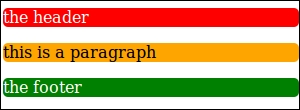
Every element has a background-color and color property set to make the rounded corners visible and the fonts readable. The color property is set with the built-in contrast function. You can read more about the built-in functions in the Using the built-in functions of Less recipe. When you open the index.html file, it looks like the following screenshot:

How it works…

Less allows you to copy the properties of a class to another by simply adding the class to the property list. Consider the following example Less code:

.class1
{
  property1: value1;
}
.class 2
{
  .class1
  property2: value2;
}

The preceding Less code will compile into the following CSS code:

.class1 { 
  property1: value1; 
} 
.class2 { 
  property1: value1; 
  property2: value2; 
} 

As you can see, the property1 property is added to the .class2 class, but .class1 has also been compiled into the source. With parentheses, the .class1 mixin is not compiled into the CSS source, so the following code will not be visible in the source:

.class1() { 
  property1: value1; 
} 

There's more…

In the example code of this recipe, you set a background-color and color property for each element again. While using parametric mixins, as described in the Using parametric mixins recipe in Chapter 3, Using Variables and Mixins, you can write a second mixin to set these properties. The roundedcorners() mixin can be called from this particular mixin. The second mixin will then look like the following Less code:

.colored-and-rounded(@background-color: red) {
  .rounded-corners();
  background-color: @background-color;
  color: contrast(@background-color);
}

The colored-and-rounded() mixin can be added to the mixins.less file. Your project.less file will then look as follows:

@import "mixins.less";

@header-background-color: red;
@paragraph-background-color: orange;
@footer-background-color: green;

header {
  .colored-and-rounded();
}
p {
  .colored-and-rounded();
}
footer {
  .colored-and-rounded();
}
Visually different images
CONTINUE READING
83
Tech Concepts
36
Programming languages
73
Tech Tools
Icon Unlimited access to the largest independent learning library in tech of over 8,000 expert-authored tech books and videos.
Icon Innovative learning tools, including AI book assistants, code context explainers, and text-to-speech.
Icon 50+ new titles added per month and exclusive early access to books as they are being written.
LESS WEB DEVELOPMENT COOKBOOK
notes
bookmark Notes and Bookmarks search Search in title playlist Add to playlist font-size Font size

Change the font size

margin-width Margin width

Change margin width

day-mode Day/Sepia/Night Modes

Change background colour

Close icon Search
Country selected

Close icon Your notes and bookmarks

Confirmation

Modal Close icon
claim successful

Buy this book with your credits?

Modal Close icon
Are you sure you want to buy this book with one of your credits?
Close
YES, BUY

Submit Your Feedback

Modal Close icon
Modal Close icon
Modal Close icon