-
Book Overview & Buying
-
Table Of Contents
Mastering PostCSS for Web Design
By :
At the beginning of this chapter, I mentioned that we would focus on creating our own preprocessor, right? Well, I have a little confession to make: we're not. Hold on, what gives?
Well, we will create a preprocessor…but we will also create a postprocessor too. Let me explain why—our alternative "option" allows us to create both at the same time. Our alternative option is PostCSS, which can be downloaded from https://github.com/postcss/postcss. PostCSS is used by some major companies, such as Twitter, Google, Bootstrap and CodePen, and even WordPress (in a limited capacity).
PostCSS was built as a Node.js module, so will work with any number of the existing plugins already available for Node.js—we will be using a number of these plugins throughout the book. Let's take a moment to explore some of the benefits of this tool.
What do we mean by PostCSS? In a nutshell, it can be used to refer to one of two things—the PostCSS core tool or the plugin ecosystem that is powered by the tool. On its own, it doesn't actually do a lot; once we start adding plugins, we can achieve a great deal. Let's explore what this means in practice:
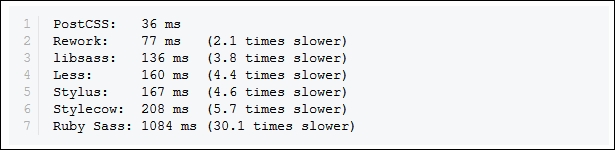
libsass, in order to compile code. The only dependency (as such) is Node.js—many developers will likely already have this installed.postcss-benchmark plugin (available from https://github.com/postcss/benchmark), which contained parsed code, nested rules, mixins, variables, and math, PostCSS came out a clear winner:
libsass library, right?Well, there are some considerations to using a custom processor; the key thing to remember is that PostCSS is neither a pre- nor post-processor, but more of a Swiss Army Knife of a toolbox that we can use to process our CSS code. Let's take a look at some of these drawbacks:
You already develop sites using a preprocessor such as SASS. You can compile code using a standalone processor, but normally prefer to use Node.js and Gulp to complete the task. Sound about right? What about making the move to using PostCSS?
No problem, we can include a section for processing CSS files using PostCSS. The key here is to not use PostCSS to perform the initial compilation, but to perform the post-processing, such as adding vendor prefixes or minifying the results. Once this is established, we can start to incorporate some of the plugins available for PostCSS that allow us to replicate functionality, such as from within SASS. Once we've adjusted existing code to use the format required by the plugins, we can then switch to using PostCSS, and begin to remove our dependency on using SASS.
At this point, it is worth spending a few minutes to help clear up some common misconceptions about PostCSS, although many associate it as being a preprocessor, or even a postprocessor, this isn't what was intended:
Okay, let's move on, I think it's time for less chat and more action, right? Let's get stuck in to producing something; there's no better time than now to get PostCSS installed and ready for use.
Before we do so, we just need to cover a couple of requirements. First, we need to set up a local web server. It's not critical, but gives a better effect. I personally use WAMP Server (for PC, from http://www.wampserver.com/en), otherwise, Mac users can try MAMP (http://www.mamp.info/en), or the cross-platform Apache web server (from http://www.apachefriends.org). In each case, default settings should be sufficient.
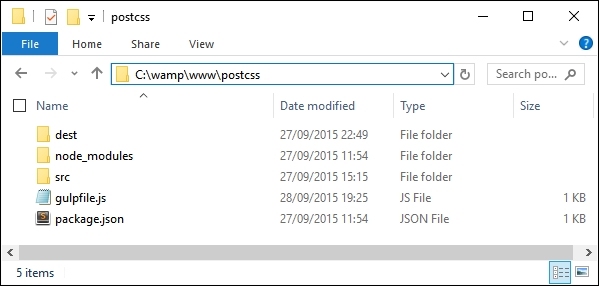
The second requirement is to set up a project area; assuming you have set up a WAMP as a local web server, go ahead and set up a folder called postcss in c:\wamp\www, as shown in this screenshot:

Right, with that out of the way, let's make a start on getting PostCSS installed!