Sign In Start Free Trial
Account

Add to playlist

Create a Playlist

Modal Close icon
You need to login to use this feature.
  • Book Overview & Buying Mastering PostCSS for Web Design
  • Table Of Contents Toc
Mastering PostCSS for Web Design

Mastering PostCSS for Web Design

By : Alex Libby
close
close
Mastering PostCSS for Web Design

Mastering PostCSS for Web Design

By: Alex Libby

Overview of this book

PostCSS is a tool that has quickly emerged as the future of existing preprocessors such as SASS and Less, mainly because of its power, speed, and ease of use. This comprehensive guide offers in-depth guidance on incorporating cutting-edge styles into your web page and at the same time maintaining the performance and maintainability of your code. The book will show how you can take advantage of PostCSS to simplify the entire process of stylesheet authoring. It covers various techniques to add dynamic and modern styling features to your web pages. As the book progresses, you will learn how to make CSS code more maintainable by taking advantage of the modular architecture of PostCSS. By the end of this book, you would have mastered the art of adding modern CSS effects to web pages by authoring high performing, maintainable stylesheets.
Table of Contents (16 chapters)
close
close
15
Index

Adding variable support to PostCSS

The beauty of PostCSS plugins is that most (if not all) can be installed using the same method as PostCSS itself, we can use the package manager of Node.js to handle the process.

We'll start with postcss-css-variables, which we will use to handle variable support; the source for this plugin is available from https://github.com/MadLittleMods/postcss-css-variables. Let's get it installed:

  1. Fire up a NodeJS command prompt, then change the working directory to our project area.
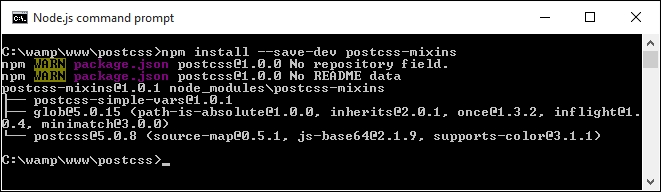
  2. At the command prompt, enter the following command, then press Enter:
    npm install --save-dev postcss-css-variables
    
  3. If all is well, we should see the results of the installation appear, as shown in this screenshot:
    Adding variable support to PostCSS

At this point, Node will have also added an entry to the package.json file for the new plugin. Perfect—we can now put it to good use and switch to using the plugin in place of using SASS. Let's take a look at how to achieve this, as part of the upcoming exercise...

CONTINUE READING
83
Tech Concepts
36
Programming languages
73
Tech Tools
Icon Unlimited access to the largest independent learning library in tech of over 8,000 expert-authored tech books and videos.
Icon Innovative learning tools, including AI book assistants, code context explainers, and text-to-speech.
Icon 50+ new titles added per month and exclusive early access to books as they are being written.
Mastering PostCSS for Web Design
notes
bookmark Notes and Bookmarks search Search in title playlist Add to playlist download Download options font-size Font size

Change the font size

margin-width Margin width

Change margin width

day-mode Day/Sepia/Night Modes

Change background colour

Close icon Search
Country selected

Close icon Your notes and bookmarks

Confirmation

Modal Close icon
claim successful

Buy this book with your credits?

Modal Close icon
Are you sure you want to buy this book with one of your credits?
Close
YES, BUY

Submit Your Feedback

Modal Close icon
Modal Close icon
Modal Close icon