Sign In Start Free Trial
Account

Add to playlist

Create a Playlist

Modal Close icon
You need to login to use this feature.
  • Book Overview & Buying Vue.js 2 and Bootstrap 4 Web Development
  • Table Of Contents Toc
Vue.js 2 and Bootstrap 4 Web Development

Vue.js 2 and Bootstrap 4 Web Development

By : Olga Filipova
3.7 (3)
close
close
Vue.js 2 and Bootstrap 4 Web Development

Vue.js 2 and Bootstrap 4 Web Development

3.7 (3)
By: Olga Filipova

Overview of this book

In this book, we will build a full stack web application right from scratch up to its deployment. We will start by building a small introduction application and then proceed to the creation of a fully functional, dynamic responsive web application called ProFitOro. In this application, we will build a Pomodoro timer combined with office workouts. Besides the Pomodoro timer and ProFitOro workouts will enable authentication and collaborative content management. We will explore topics such as Vue reactive data binding, reusable components, routing, and Vuex store along with its state, actions, mutations, and getters. We will create Vue applications using both webpack and Nuxt.js templates while exploring cool hot Nuxt.js features such as code splitting and server-side rendering. We will use Jest to test this application, and we will even revive some trigonometry from our secondary school! While developing the app, you will go through the new grid system of Bootstrap 4 along with Vue.js’ directives. We will connect Vuex store to the Firebase real-time database, data storage, and authentication APIs and use this data later inside the application’s reactive components. Finally, we will quickly deploy our application using the Firebase hosting mechanism.
Table of Contents (12 chapters)
close
close
11
Index

Creating a project in the Firebase console

If you still don't have a Google account but you really want to continue with this tutorial, then well, I am really sorry, but you will have to create one this time. Firebase is a service powered by Google, so a Google account is more than required.

If you already have your account, log in to the Firebase console:

https://console.firebase.google.com/.

Let's start by creating your new Firebase project. Click on the Add project button. Give it a meaningful name and select your country from the list. Once you are done, click on CREATE PROJECT:

Creating a project in the Firebase console

Create a project using the Firebase console

You're done! Now, you can use the Firebase-powered backend for your application, including a real-time database, authentication mechanism, hosting, and analytics.

Adding a first entry to the Firebase application database

Let's add the first database entry. Click on the Database tab on the left-hand side. You should see a dashboard similar to this one:

Adding a first entry to the Firebase application database

Real-time database on the Firebase project dashboard

Let's add an entry called messages and the very first message as a key-value object containing title, text, and timestamp by clicking on the plus sign:

Adding a first entry to the Firebase application database

Adding the first value to the Firebase real-time database

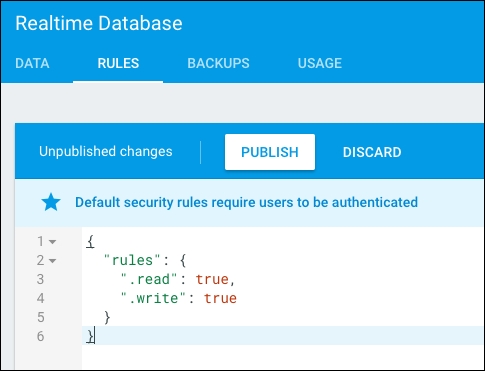
Click on the ADD button, and your database will persist the added entry. Add as many message entries as you wish or leave it like that. Now, for the sake of simplicity, let's change the rules of our database and make it readable and writable for everyone. Beware! Never do this for something in production for public usage. In this example, we just want to test some Firebase features, but your future applications must be smart and secure. Click on the RULES tab and type the following rules in the opened text area:

{
  "rules": {
    ".read": true,
    ".write": true
  }
}

So, your RULES tab now looks like this:

Adding a first entry to the Firebase application database

Rules tab after changing the rules

Click on the PUBLISH button and you're done! Now, it would be interesting to start using this data within our application. However, first we have to create this application and connect it to our project.

CONTINUE READING
83
Tech Concepts
36
Programming languages
73
Tech Tools
Icon Unlimited access to the largest independent learning library in tech of over 8,000 expert-authored tech books and videos.
Icon Innovative learning tools, including AI book assistants, code context explainers, and text-to-speech.
Icon 50+ new titles added per month and exclusive early access to books as they are being written.
Vue.js 2 and Bootstrap 4 Web Development
notes
bookmark Notes and Bookmarks search Search in title playlist Add to playlist download Download options font-size Font size

Change the font size

margin-width Margin width

Change margin width

day-mode Day/Sepia/Night Modes

Change background colour

Close icon Search
Country selected

Close icon Your notes and bookmarks

Confirmation

Modal Close icon
claim successful

Buy this book with your credits?

Modal Close icon
Are you sure you want to buy this book with one of your credits?
Close
YES, BUY

Submit Your Feedback

Modal Close icon
Modal Close icon
Modal Close icon