Sign In Start Free Trial
Account

Add to playlist

Create a Playlist

Modal Close icon
You need to login to use this feature.
  • Book Overview & Buying An Atypical ASP.NET Core 5 Design Patterns Guide
  • Table Of Contents Toc
An Atypical ASP.NET Core 5 Design Patterns Guide

An Atypical ASP.NET Core 5 Design Patterns Guide

By : Marcotte
3.5 (11)
close
close
An Atypical ASP.NET Core 5 Design Patterns Guide

An Atypical ASP.NET Core 5 Design Patterns Guide

3.5 (11)
By: Marcotte

Overview of this book

Design patterns are a set of solutions to many of the common problems occurring in software development. Knowledge of these design patterns helps developers and professionals to craft software solutions of any scale. ASP.NET Core 5 Design Patterns starts by exploring basic design patterns, architectural principles, dependency injection, and other ASP.NET Core mechanisms. You’ll explore the component scale as you discover patterns oriented toward small chunks of the software, and then move to application-scale patterns and techniques to understand higher-level patterns and how to structure the application as a whole. The book covers a range of significant GoF (Gangs of Four) design patterns such as strategy, singleton, decorator, facade, and composite. The chapters are organized based on scale and topics, allowing you to start small and build on a strong base, the same way that you would develop a program. With the help of use cases, the book will show you how to combine design patterns to display alternate usage and help you feel comfortable working with a variety of design patterns. Finally, you’ll advance to the client side to connect the dots and make ASP.NET Core a viable full-stack alternative. By the end of the book, you’ll be able to mix and match design patterns and have learned how to think about architecture and how it works.
Table of Contents (27 chapters)
close
close
1
Section 1: Principles and Methodologies
5
Section 2: Designing for ASP.NET Core
11
Section 3: Designing at Component Scale
15
Section 4: Designing at Application Scale
21
Section 5: Designing the Client Side
25
Acronyms Lexicon

Understanding the web – Request/Response

Before going any further, it is imperative to understand the basic concept of the web. The idea behind HTTP 1.X is that a client sends an HTTP request to a server, and then the server responds to that client. That can sound trivial if you have web development experience. However, it is one of the most important web programming concepts, irrespective of whether you are building web APIs, websites, or complex cloud applications.

Let's reduce an HTTP request lifetime to the following:

  1. The communication starts.
  2. The client sends a request to the server.
  3. The server receives the request.
  4. The server most likely does something (executes some code/logic).
  5. The server responds to the client.
  6. The communication ends.

After that cycle, the server is no longer aware of the client. Moreover, if the client sends another request, the server is not aware that it responded to a request earlier for that same client because HTTP is stateless.

There are mechanisms for creating a sense of persistence between requests in order for the server to become "aware" of its clients. The most well-known of these is probably cookies.

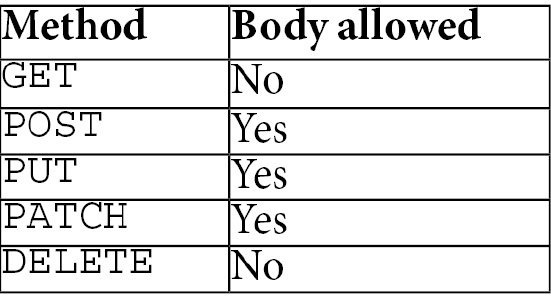
If we dig a little deeper, an HTTP request is composed of a header and an optional body. The most commonly used HTTP methods are GET and POST. Made popular by web APIs, we could also add PUT, DELETE, and PATCH to that list. Although not every HTTP method accepts a body, here is a list:

Here is an example of a GET request (without a body since that's not allowed for GET requests):

GET http://www.forevolve.com/ HTTP/1.1 Host: www.forevolve.com Connection: keep-alive Upgrade-Insecure-Requests: 1 User-Agent: Mozilla/5.0 (Windows NT 10.0; Win64; x64) AppleWebKit/537.36 (KHTML, like Gecko) Chrome/70.0.3538.110 Safari/537.36 Accept: text/html,application/xhtml+xml,application/xml;q=0.9,image/webp,image/apng,*/*;q=0.8 Accept-Encoding: gzip, deflate Accept-Language: en-US,en;q=0.9,fr-CA;q=0.8,fr;q=0.7 Cookie: ...

The HTTP header is composed of a list of key/value pairs representing metadata that a client wants to send to the server. In that case, I queried my blog using the GET method and Google Chrome attached some additional information to the request. I replaced the Cookie header's value with ... because cookies can be quite large and are irrelevant to this sample. Nonetheless, cookies are passed back and forth like any other HTTP header.

Important note about cookies

The client sends cookies, and the server returns them for every request-response cycle. That could kill your bandwidth or slow down your application if you pass too much information back and forth. I'm thinking of the good old Web Forms ViewState here.

When the server decides to respond to the request, it returns a header and an optional body as well, following the same principles as the request does. The first line indicates the status of the request; whether it was successful. In our case, the status code was 200, which indicates success. Each server can add more or less information to their response, as do you in your code.

Here is the response from the previous request:

HTTP/1.1 200 OK Server: GitHub.com Content-Type: text/html; charset=utf-8 Last-Modified: Wed, 03 Oct 2018 21:35:40 GMT ETag: W/"5bb5362c-f677"Access-Control-Allow-Origin: *Expires: Fri, 07 Dec 2018 02:11:07 GMT Cache-Control: max-age=600 Content-Encoding: gzip X-GitHub-Request-Id: 32CE:1953:F1022C:1350142:5C09D460 Content-Length: 10055 Accept-Ranges: bytes Date: Fri, 07 Dec 2018 02:42:05 GMT Via: 1.1 varnish Age: 35 Connection: keep-alive X-Served-By: cache-ord1737-ORD X-Cache: HIT X-Cache-Hits: 2 X-Timer: S1544150525.288285,VS0,VE0 Vary: Accept-Encoding X-Fastly-Request-ID: 98a36fb1b5642c8041b88ceace73f25caaf07746 HERE WAS THE BODY THAT WAS WAY TOO LONG TO PASTE; LOTS OF HTML!

Now that the browser has received the server's response, in the case of HTML pages, it starts rendering it. Then, for each resource, it sends another HTTP call to its URI and loads it. A resource is an external asset, such as an image, a JavaScript file, a CSS file, or a font.

Note

There are a limited number of parallel requests that a browser can send, which could lead to increased load time depending on the number of assets to load, their size, and the order in which they are sent to the browser. You may want to look into optimizing this.

After the response, the server is no longer aware of the client; the communication has ended. It is essential to understand that in order to create a pseudo state between each request, we need to use an external mechanism. That mechanism could be the session-state, or we could create a stateless application. I recommend going stateless whenever you can.

To conclude this subject, HTTP/2 is more efficient and supports streaming multiple assets using the same TCP connection. It also allows "server push," leading to a more stateful World Wide Web. If you find HTTP interesting, HTTP/2 is an excellent place to start digging deeper as well as the newest experimental HTTP/3.

CONTINUE READING
83
Tech Concepts
36
Programming languages
73
Tech Tools
Icon Unlimited access to the largest independent learning library in tech of over 8,000 expert-authored tech books and videos.
Icon Innovative learning tools, including AI book assistants, code context explainers, and text-to-speech.
Icon 50+ new titles added per month and exclusive early access to books as they are being written.
An Atypical ASP.NET Core 5 Design Patterns Guide
notes
bookmark Notes and Bookmarks search Search in title playlist Add to playlist download Download options font-size Font size

Change the font size

margin-width Margin width

Change margin width

day-mode Day/Sepia/Night Modes

Change background colour

Close icon Search
Country selected

Close icon Your notes and bookmarks

Confirmation

Modal Close icon
claim successful

Buy this book with your credits?

Modal Close icon
Are you sure you want to buy this book with one of your credits?
Close
YES, BUY

Submit Your Feedback

Modal Close icon
Modal Close icon
Modal Close icon