-
Book Overview & Buying
-
Table Of Contents
Zabbix 5 IT Infrastructure Monitoring Cookbook
By :
With the release of Zabbix 5, Zabbix also officially started support for the new Zabbix agent 2. Zabbix agent 2 brings some major improvements and is even written in another coding language, which is Golang instead of C. In this recipe, we will be exploring how to work with Zabbix agent 2 and explore some of the new features introduced by it.
You'll also need a Linux distribution of your choice running Zabbix agent 2.
To get started with Zabbix agent 2, all we need to do is install it to a (Linux) host that we want to monitor. Make sure you have an empty Linux (CentOS 8) host ready to monitor.
Let's see how to install Zabbix agent 2 and then move on to actually working with it.
Let's start by installing Zabbix agent 2 on the Linux host we want to monitor. I'll be using a CentOS 8 machine:
For RHEL-based systems:
rpm -Uvh https://repo.zabbix.com/zabbix/5.0/rhel/8/x86_64/zabbix-release-5.0-1.el8.noarch.rpm
For Debian-based systems:
wget https://repo.zabbix.com/zabbix/5.0/debian/pool/main/z/zabbix-release/zabbix-release_5.0-1+buster_all.deb dpkg -i zabbix-release_5.0-1+buster_all.deb
For RHEL-based systems:
dnf install zabbix-agent2
For Debian-based systems:
apt install zabbix-agent2
Congratulations, Zabbix agent 2 is now installed and ready to use.
Let's start by building a Zabbix agent with passive checks:
vim /etc/zabbix/zabbix_agent2.conf
In this file, we edit all the Zabbix agent configuration values we could need from the server side.
Server=127.0.0.1 Hostname=Zabbix server
Server to the IP of the Zabbix server that will monitor this passive agent. Change Hostname to the hostname of the monitored server.systemctl restart zabbix-agent2.service

Figure 2.1 – The Zabbix host creation page for host lar-book-agent
It's important to add the following:

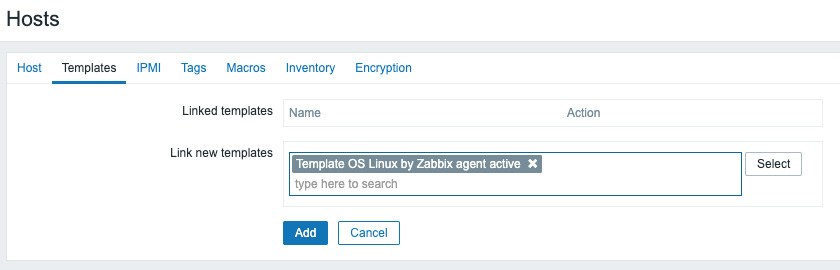
Figure 2.2 – The Zabbix host template page for host lar-book-agent

Figure 2.3 – The Zabbix configuration hosts page, host lar-book-agent
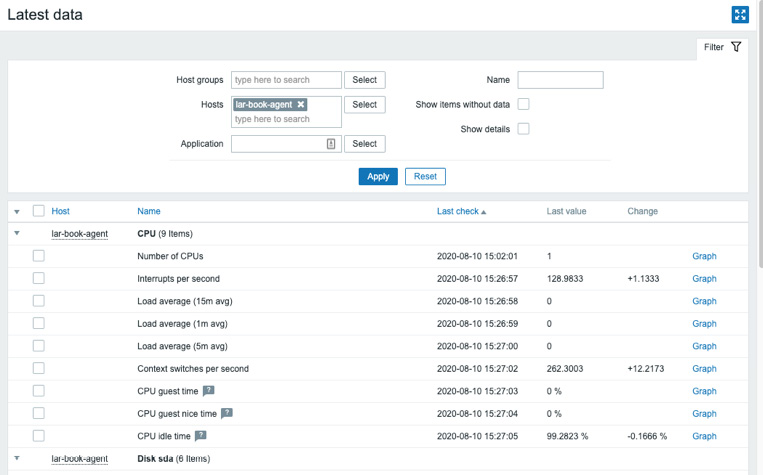
Figure 2.4 – The Zabbix latest data page for host lar-book-agent
Now let's check out how to configure the Zabbix agent with active checks. We need to change some values on the monitored Linux server host side:
vim /etc/zabbix/zabbix_agent2.conf
ServerActive=127.0.0.1
ServerActive to the IP of the Zabbix server that will monitor this passive agent and also change Hostname to lar-book-agent:Hostname=lar-book-agent
systemctl restart zabbix-agent2.service

Figure 2.5 – The Zabbix host configuration page for host lar-book-agent_passive
We are doing this because for an active Zabbix agent, the hostname in the file needs to match our Zabbix server.

Figure 2.6 – The Zabbix host configuration page for host lar-book-agent
Template OS Linux by Zabbix agent active:
Figure 2.7 – The Zabbix host template page for host lar-book-agent
Please note that the ZBX icon won't turn green for an active agent. But when we navigate to Monitoring | Hosts and check Latest data, we can see our active data coming in.
Tip
As you might have noticed just now, a Zabbix agent can run in both passive and active mode. Keep this in mind when creating your Zabbix agent templates, as you might want to combine the check types.
Now that we have configured our Zabbix agents and know how they should be set up, let's see how the different modes work.
The passive agent works by collecting data from our host with the Zabbix agent. Every time an item on our host reaches its interval, the Zabbix server asks the Zabbix agent what the value is now:
Figure 2.8 – Communication diagram between server and passive agent
The active agent works by sending data from the Zabbix agent to Zabbix server. Every time an item on our agent reaches its update interval, the agent will send the value to our server. We can also use this to send a notification to our server faster when something goes wrong:
Figure 2.9 – Communication diagram between server and active agent
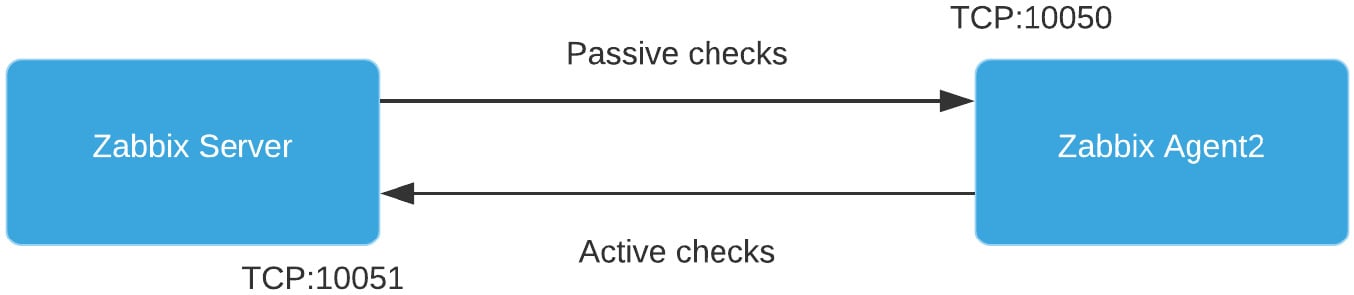
As mentioned, we can use both types of checks at the same time, giving us the freedom to configure every type of check we could possibly need. Our setup would then look like this:
Figure 2.10 – Communication diagram between server and both agent types
There's a lot of new stuff going on under the hood of Zabbix agent 2; if you're interested in learning more about the core of Zabbix agent 2, check out this cool blog post by Alexey Petrov: https://blog.zabbix.com/magic-of-new-zabbix-agent/8460/.