-
Book Overview & Buying
-
Table Of Contents
-
Feedback & Rating
Node.js Cookbook - Fifth Edition
By :
The fs module generally provides APIs that are modeled around Portable Operating System Interface (POSIX) functions. The fs module includes APIs that facilitate the reading of directories and file metadata.
In this recipe, we will create a small program that returns information about a file, using functions provided by the fs module.
$ mkdir fetching-metadata $ cd fetching-metadata
$ touch metadata.js $ touch file.txt
Using the files created in the Getting ready section, we will create a program that gives information about the file we pass to it as a parameter:
fs module:const fs = require('node:fs');process.argv[2]. Add the following line to your program:const file = process.argv[2];
printMetadata function:function printMetadata(file) {
const fileStats = fs.statSync(file);
console.log(fileStats);
}printMetadata function:printMetadata(file);
./file.txt argument. Run your program with the following:$ node metadata.js ./file.txt
Stats {
dev: 16777231,
mode: 33188,
nlink: 1,
uid: 501,
gid: 20,
rdev: 0,
blksize: 4096,
ino: 16402722,
size: 0,
blocks: 0,
atimeMs: 1697208041116.9521,
mtimeMs: 1697208041116.9521,
ctimeMs: 1697208041116.9521,
birthtimeMs: 1697208041116.9521,
atime: 2023-10-13T14:40:41.117Z,
mtime: 2023-10-13T14:40:41.117Z,
ctime: 2023-10-13T14:40:41.117Z,
birthtime: 2023-10-13T14:40:41.117Z
}You can try adding some random text to file.txt, saving the file, and then rerunning your program; observe that the size and mtime values have been updated.
$ node metadata.js ./not-a-file.txt node:fs:1658 const stats = binding.stat( ^ Error: ENOENT: no such file or directory, stat './not-a-file.txt'
The program throws an exception.
printMetadata function to this:function printMetadata(file) {
try {
const fileStats = fs.statSync(file);
console.log(fileStats);
} catch (err) {
console.error('Error reading file path:', file);
}
}$ node metadata.js ./not-a-file.txt Error reading file: ./not-a-file.txt
This time, you should see that the program handled the error rather than throwing an exception.
The process.argv property is a property on the global process object that returns an array containing the arguments that were passed to the Node.js process. The first element of the process.argv array, process.argv[0], is the path of the node binary that is running. The second element is the path of the file we’re executing – in this case, metadata.js. In the recipe, we passed the filename as the third command-line argument and, therefore, referenced it with process.argv[2].
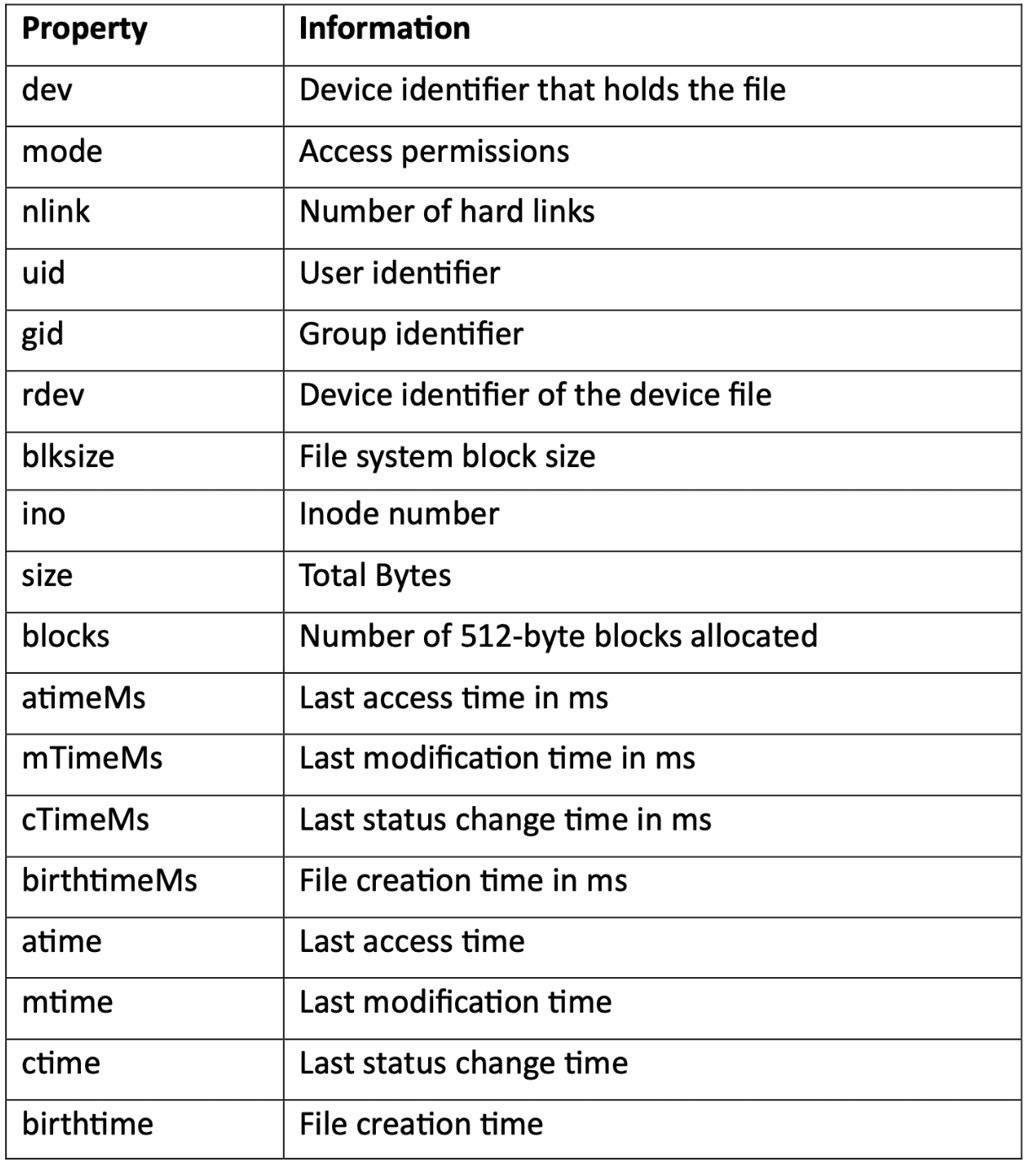
Next, we created a printMetadata() function that called statSync(file). The statSync() function is a synchronous function that returns information about the file path that is passed to it. The file path passed can be either a file or a directory. The information returned is in the form of a stats object. The following table lists the information returned on the stats object:
Table 2.1 – Table listing properties returned on the stats object
Important note
In this recipe, we used only the synchronous File System APIs. For most of the fs APIs, there are both synchronous and asynchronous versions of each function. Refer to the Working with files asynchronously section of the Working with files recipe for more information about using asynchronous File System APIs.
In the final steps of this recipe, we edited our printMetadata function to account for invalid file paths. We did this by wrapping the statSync function in a try/catch statement.
Next, we’ll look at how we can check file access and modify file permissions and how to examine a symbolic link (symlink).
It is recommended that if you’re attempting to read, write, or edit a file, you follow the approach of handling the error if the file is not found, as we did in the recipe.
However, if you simply wanted to check the existence of a file, you could use the fs.access() or fs.accessSync() APIs. Specifically, the fs.access() function tests the user’s permissions for accessing the file or directory passed to it. The function also allows an optional argument of mode to be passed to it, where you can request the function to do a specific access check using Node.js file access constants. A list of Node.js file access constants is available in the Node.js fs module API documentation: https://nodejs.org/api/fs.html#fs_file_access_constants. These enable you to check whether the Node.js process can read, write, or execute the file path provided.
Important note
There is a legacy API that is now deprecated, called fs.exists(). It is not recommended you use this function. The reason for deprecation was that the method’s interface was found to be error-prone and could lead to accidental race conditions. The fs.access() or fs.stat() APIs should be used instead.
The Node.js fs module provides APIs that can be used to alter the permissions on a given file. As with many of the other fs functions, there is both an asynchronous API, chmod(), and an equivalent synchronous API, chmodSync(). Both functions take a file path and mode as the first and second arguments, respectively. The chmod() function accepts a third parameter, which is the callback function to be executed upon completion.
Important note
The chmod command is used to change access permissions of file system objects on Unix and similar operating systems. If you’re unfamiliar with Unix file permissions, it is recommended you refer to the Unix manual pages (https://linux.die.net/man/1/chmod).
The mode argument can be either in the form of a numeric bitmask using a series of constants provided by the fs module or a sequence of three octal digits. The constants that can be used to create a bitmask to define user permissions are defined in the Node.js API documentation: https://nodejs.org/api/fs.html#fs_file_modes.
Imagine that you have a file that currently has the following permissions:
If we wanted to additionally grant write access to those in the same group, we could use the following Node.js code:
const fs = require('node:fs');
const file = './file.txt';
fs.chmodSync(
file,
fs.constants.S_IRUSR |
fs.constants.S_IWUSR |
fs.constants.S_IRGRP |
fs.constants.S_IWGRP |
fs.constants.S_IROTH
); As you can see, this code is quite verbose. Adding a complex series or permissions would require passing many constants to create a numeric bitmask. Alternatively, we can pass the chmodSync() function an octal representation of file permissions, as is commonplace when using the Unix chmod command on the command line.
We’re going to change the permissions using the equivalent of chmod 664 from the command line, but via Node.js:
const fs = require('fs');
const file = './file.txt';
fs.chmodSync(file, 0o664); Important note
Refer to https://mason.gmu.edu/~montecin/UNIXpermiss.htm for more detailed information on how Unix permissions work.
Windows file permissions: The Windows operating system does not have as refined file permissions as on Unix—it is only possible to denote a file as writeable or non-writeable.
A symlink is a special file that stores a reference to another file or directory. When the stat() or statSync() function from the Fetching metadata recipe is run on a symbolic link, the method will return information about the file the symbolic link is referencing rather than the symbolic link itself.
The Node.js fs module does, however, provide methods named lstat() and lstatSync() that inspect the symbolic link itself. The following steps will demonstrate how you can use these methods to inspect a symbolic link that we will create:
$ ln -s file.txt link-to-file
Now, you can use the Node.js Read-Eval-Print Loop (REPL) to test the lstatSync() function. The Node.js REPL is an interactive shell we can pass statements to, and it will evaluate them and return the result to the user.
node in your shell:$ node Welcome to Node.js v22.9.0. Type ".help" for more information. >
> console.log('Hello World!');
Hello World!
undefinedlstatSync command:> fs.lstatSync('link-to-file');
Stats {
dev: 16777224,
mode: 41453,
nlink: 1,
...
}Note that we did not need to explicitly import the Node.js fs module. The REPL automatically loads the core (built-in) Node.js modules so that they are available to be used. The REPL is a useful tool for testing out commands without having to create files.
Change the font size
Change margin width
Change background colour