Sign In Start Free Trial
Account

Add to playlist

Create a Playlist

Modal Close icon
You need to login to use this feature.
  • Book Overview & Buying Learning Drupal 6 Module Development
  • Table Of Contents Toc
Learning Drupal 6 Module Development

Learning Drupal 6 Module Development

4.3 (16)
close
close
Learning Drupal 6 Module Development

Learning Drupal 6 Module Development

4.3 (16)

Overview of this book

Table of Contents (14 chapters)
close
close
Learning Drupal 6 Module Development
Credits
About the Author
About the Reviewers
Preface

Developers' Tools


So far, we've looked at some of the preliminary concepts involved in Drupal development. To finish off this chapter, we will switch focus to development tools.

There are a few Drupal-specific tools that you might find helpful when creating your own modules. These tools are themselves provided by two modules, which can both can be obtained from the Drupal site.

Developer Module

The Devel Module provides several tools that are extremely useful for Drupal development, including cache management, SQL debugging tools, investigation tools, a module reinstaller, an API reference tool, and many more.

You can find out more about this module at the official website: http://drupal.org/project/devel.

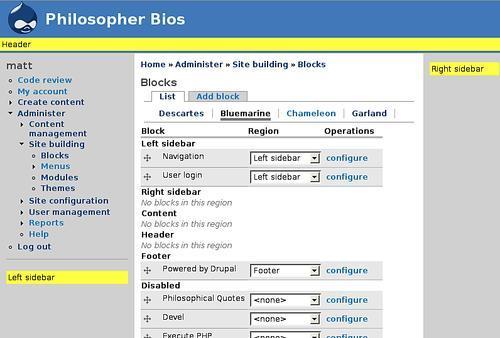
The main part of this module (the Devel module) provides these tools as items in a block. So after installing the module, you will need to go to Administer | Site building | Modules and enable the module, and then go to Administer | Site building | Blocks to tell Drupal where to display the new content.

This module also includes tools for building themes, a macro generator to simulate form data entry, and a tool to generate testing data. As the module continues to improve, new features will be added as well.

Any serious module developer will want to install the Devel module. In the writing of this book, it has proven an invaluable tool for reinstalling modules, clearing caches, and debugging difficult code.

Coder Module

As we shall see in this book, Drupal developers adhere to strict conventions in their code. The Coder Module is a tool designed to help you, the developer, locate and fix code that does not adhere to these conventions.

In addition to making sure code follows conventions, it also does some basic security auditing regarding how text is handled. This can be useful for spotting mistakes before they become security risks.

The Coder Module is also hosted on the official Drupal site: http://drupal.org/project/coder.

While it does not improve productivity in the same way that the Devel module does, Coder can help you generate clean and "Drupalish" code. Its strict syntax checking also occasionally turns up bugs.

Note

"Drupalish"

Drupal developers are fond of using the word Drupalish to refer to practices, styles, and approaches that mesh well with the Drupal philosophy. For example, Drupalish code adheres to coding guidelines and makes use of data structures common in Drupal (like nested associative arrays).

In addition to these modules, there is a wealth of information on the Drupal website about how to configure your favorite development environment (including Emacs, VI, FireBug, and Eclipse PDT) for Drupal development: http://drupal.org/node/147789.

CONTINUE READING
83
Tech Concepts
36
Programming languages
73
Tech Tools
Icon Unlimited access to the largest independent learning library in tech of over 8,000 expert-authored tech books and videos.
Icon Innovative learning tools, including AI book assistants, code context explainers, and text-to-speech.
Icon 50+ new titles added per month and exclusive early access to books as they are being written.
Learning Drupal 6 Module Development
notes
bookmark Notes and Bookmarks search Search in title playlist Add to playlist font-size Font size

Change the font size

margin-width Margin width

Change margin width

day-mode Day/Sepia/Night Modes

Change background colour

Close icon Search
Country selected

Close icon Your notes and bookmarks

Confirmation

Modal Close icon
claim successful

Buy this book with your credits?

Modal Close icon
Are you sure you want to buy this book with one of your credits?
Close
YES, BUY

Submit Your Feedback

Modal Close icon
Modal Close icon
Modal Close icon