Sign In Start Free Trial
Account

Add to playlist

Create a Playlist

Modal Close icon
You need to login to use this feature.
  • Book Overview & Buying Moodle JavaScript Cookbook
  • Table Of Contents Toc
Moodle JavaScript Cookbook

Moodle JavaScript Cookbook

4.7 (3)
close
close
Moodle JavaScript Cookbook

Moodle JavaScript Cookbook

4.7 (3)

Overview of this book

Moodle is the best e-learning solution on the block and is revolutionizing courses on the Web. Using JavaScript in Moodle is very useful to administrators and dynamic developers as it uses built-in libraries to provide the modern and dynamic experience that is expected by web users today.The Moodle JavaScript Cookbook will take you through the basics of combining Moodle with JavaScript and its various libraries and explain how JavaScript can be used along with Moodle. It will explain how to integrate Yahoo! User Interface Library (YUI) with Moodle. YUI will be the main focus of the book, and is the key to implementing modern, dynamic feature-rich interfaces to help your users get a more satisfying and productive Moodle experience. It will enable you to add effects, make forms more responsive, use AJAX and animation, all to create a richer user experience. You will be able to work through a range of YUI features, such as pulling in and displaying information from other websites, enhancing existing UI elements to make users' lives easier, and even how to add animation to your pages for a nice finishing touch.
Table of Contents (15 chapters)
close
close
Moodle JavaScript Cookbook
Credits
About the Author
About the Reviewers
www.PacktPub.com
Preface

Retrieving language strings from Moodle


Moodle makes extensive use of language strings to support full multilingual internationalization. In practice, this means that strings which are used within the interface are held in language-specific files. For example, the string "Submit assignment" may be held in the relevant English language file, and this string may be referred to indirectly via a short name key.

This makes it trivial to support additional languages by creating files for those languages. As the code refers to the strings via their short name keys, it is easy to simply switch the set of language files, and the code will pick up the strings in the new preferred language. This happens automatically when a user changes their preferred language settings.

When providing textual feedback to the user from our JavaScript code, we should make use of Moodle's language string system. This ensures our code is inherently multilingual and makes it easy for a non-developer to provide a language translation of our module.

Getting ready

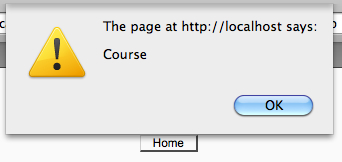
In this example, we will retrieve the built-in Moodle language string course and show that it is available from our JavaScript code by displaying it with the alert function.

We start once again with a basic Moodle page and associated .js file:

<?php
require_once(dirname(__FILE__) . '/../config.php');
$PAGE->set_context(get_context_instance(CONTEXT_SYSTEM));
$PAGE->set_url('/cook/requirejs_init_lang.php');
$PAGE->requires->js('/cook/requirejs_init_lang.js');
$PAGE->requires->string_for_js('course', 'moodle');
$PAGE->requires->js_init_call('lang');
echo $OUTPUT->header();
echo $OUTPUT->footer();
?>

As you can see, this code registers a call to the function lang which has been defined in the associated .js file:

function lang(Y)
{
alert(M.str.moodle.course);
}

Now when we load the page, we see that our JavaScript alert is executed, displaying the language string value we set up, as seen in the following screenshot:

How to do it...

We have included our .js with the method now familiar — $PAGE->requires->js.

After this line comes a new feature of the Page Requirements Manager, the string_for_js function:

$PAGE->requires->string_for_js('course', 'moodle');

Finally, we refer to this language string from our JavaScript code:

alert(M.str.moodle.course);

How it works...

We call the string_for_js method with two parameters: the name of the string we wish to retrieve and the location of this string. In this example, we are retrieving the language string for course from the core Moodle language file.

Now this string is made available to us as part of Moodle's global JavaScript namespace (M) in the format, M.str.<module name>.<string name>. In our example, this is M.str.moodle.course.

Using this method, the strings we have set up will be available to all subsequent JavaScript code. If we had simply passed this string as a parameter to the JavaScript function, it would only be available inside that function. If we required it to be available within additional functions, we would have to repeat the process, making copies of the string and passing those to the additional functions resulting in unnecessarily inefficient code.

Visually different images
CONTINUE READING
83
Tech Concepts
36
Programming languages
73
Tech Tools
Icon Unlimited access to the largest independent learning library in tech of over 8,000 expert-authored tech books and videos.
Icon Innovative learning tools, including AI book assistants, code context explainers, and text-to-speech.
Icon 50+ new titles added per month and exclusive early access to books as they are being written.
Moodle JavaScript Cookbook
notes
bookmark Notes and Bookmarks search Search in title playlist Add to playlist font-size Font size

Change the font size

margin-width Margin width

Change margin width

day-mode Day/Sepia/Night Modes

Change background colour

Close icon Search
Country selected

Close icon Your notes and bookmarks

Confirmation

Modal Close icon
claim successful

Buy this book with your credits?

Modal Close icon
Are you sure you want to buy this book with one of your credits?
Close
YES, BUY

Submit Your Feedback

Modal Close icon
Modal Close icon
Modal Close icon