Sign In Start Free Trial
Account

Add to playlist

Create a Playlist

Modal Close icon
You need to login to use this feature.
  • Book Overview & Buying Moodle 2.0 First Look
  • Table Of Contents Toc
Moodle 2.0 First Look

Moodle 2.0 First Look

By : Mary Cooch
4.3 (7)
close
close
Moodle 2.0 First Look

Moodle 2.0 First Look

4.3 (7)
By: Mary Cooch

Overview of this book

Moodle is currently the world's most popular E-learning platform. The long-awaited second version of Moodle is now available and brings with it greatly improved functionality. If you are planning to upgrade your site to Moodle 2.0 and want to be up-to-date with the latest developments, then this book is for you.This book takes an in-depth look at all of the major new features in Moodle 2.0 and how it differs from previous Moodle versions. It highlights changes to the standard installation and explains the new features with clear screenshots, so you can quickly take full advantage of Moodle 2.0. It also assists you in upgrading your site to Moodle 2.0, and will give you the confidence to make the move up to Moodle 2.0, either as an administrator or a course teacher.With its step-by-step introduction to the new features of Moodle 2.0, this book will leave you confident and keen to get your own courses up and running on Moodle 2.0. It will take you on a journey from basic navigation to advanced administration, looking at the changes in resource management and activity setup along the way. It will show you new ways tutors and students can control the pace of their learning and introduce you to the numerous possibilities for global sharing and collaborating now available in Moodle 2.0
Table of Contents (10 chapters)
close
close
9
Index

Control your students' progress

The word Moodle, although originally an acronym standing for (Modular Object (Oriented Dynamic Learning Environment), is also a verb. Moodling is the process of lazily meandering through something, doing things as it occurs to you to do them, an enjoyable tinkering that often leads to insight and creativity.

There is an irony here: with its roots in Social Constructionist Pedagogy (see http://docs.moodle.org/en/Philosophy), Moodle empowers students to manage their own learning: they can work at their own individual pace; collaborate with others to build on collective experiences and form new knowledge through active involvement rather than passive absorption. A Native American proverb (which has many variants) states:

Tell me and I'll forget

Show me and I may not remember

Involve me and I'll learn

And yet despite this, one of the most frequently requested features on Moodle has been a way to control the path of students' learning: how can we set our course so a learner can only progress to level 2 once they have reached a certain grade in Level1? How can we hide the Advanced work so they can't see it until they have completed the Basic work (in case—perish the thought—they might actually go, do the Advanced work and understand it ahead of the official schedule!)?

A workaround to controlling student access was made available for Moodle 1.9. It was known as "Activity Locking" and was a means whereby a teacher could set certain conditions on a task that the student had to meet before the next task became visible. With Moodle 2.0 this feature is standard, and is known as Conditional Activities. Whenever you set up an activity in your Moodle course, you now have the power to decide when to enable your student to move on.

This is essential for many situations, particularly in the commercial world. Imagine for example a Health and Safety programme where it's vital that procedures are carried out in a particular order. Or a language-learning course where students really need to understand the basics of the present tense before they can tackle the complexities of the imperfect subjunctive.

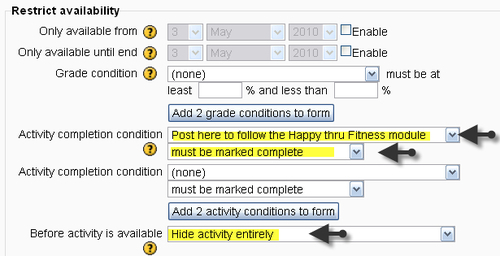
You can see the following screenshot of the setup screen of an assignment in one of our Moodle 2.0 courses. The student will not be able to tackle this assignment (indeed, not even see it) until they have made a post in an introductory forum:

Control your students' progress

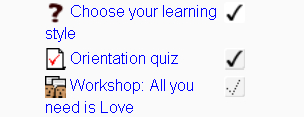
In Chapter 6, Managing the Learning Path we shall consider how we can best make use of Conditional Activities, alongside another new arrival the ability for users to mark tasks as "done". This is the Activity completion tracking facility. Next to each item on your Moodle course page you will see a dotted check mark (tick). This can be either manually checked by the student if they feel they have finished a task (they can change their mind) or else the teacher can set it to be checked automatically once the student has actually completed the activity. You can see from the next screenshot that the activities Choose your learning style and Orientation quiz are marked complete. The lighter background denotes an automatic check while the grey background denotes a manual check.

Control your students' progress

Similarly, the new Course Completion feature enables teachers to set conditions for a whole course or set of courses to be marked as complete—again either dependent on certain grades being obtained, activities being completed or activities being manually marked off by the students themselves.

CONTINUE READING
83
Tech Concepts
36
Programming languages
73
Tech Tools
Icon Unlimited access to the largest independent learning library in tech of over 8,000 expert-authored tech books and videos.
Icon Innovative learning tools, including AI book assistants, code context explainers, and text-to-speech.
Icon 50+ new titles added per month and exclusive early access to books as they are being written.
Moodle 2.0 First Look
notes
bookmark Notes and Bookmarks search Search in title playlist Add to playlist font-size Font size

Change the font size

margin-width Margin width

Change margin width

day-mode Day/Sepia/Night Modes

Change background colour

Close icon Search
Country selected

Close icon Your notes and bookmarks

Confirmation

Modal Close icon
claim successful

Buy this book with your credits?

Modal Close icon
Are you sure you want to buy this book with one of your credits?
Close
YES, BUY

Submit Your Feedback

Modal Close icon
Modal Close icon
Modal Close icon