Sign In Start Free Trial
Account

Add to playlist

Create a Playlist

Modal Close icon
You need to login to use this feature.
  • Book Overview & Buying Moodle 2.0 First Look
  • Table Of Contents Toc
Moodle 2.0 First Look

Moodle 2.0 First Look

By : Mary Cooch
4.3 (7)
close
close
Moodle 2.0 First Look

Moodle 2.0 First Look

4.3 (7)
By: Mary Cooch

Overview of this book

Moodle is currently the world's most popular E-learning platform. The long-awaited second version of Moodle is now available and brings with it greatly improved functionality. If you are planning to upgrade your site to Moodle 2.0 and want to be up-to-date with the latest developments, then this book is for you.This book takes an in-depth look at all of the major new features in Moodle 2.0 and how it differs from previous Moodle versions. It highlights changes to the standard installation and explains the new features with clear screenshots, so you can quickly take full advantage of Moodle 2.0. It also assists you in upgrading your site to Moodle 2.0, and will give you the confidence to make the move up to Moodle 2.0, either as an administrator or a course teacher.With its step-by-step introduction to the new features of Moodle 2.0, this book will leave you confident and keen to get your own courses up and running on Moodle 2.0. It will take you on a journey from basic navigation to advanced administration, looking at the changes in resource management and activity setup along the way. It will show you new ways tutors and students can control the pace of their learning and introduce you to the numerous possibilities for global sharing and collaborating now available in Moodle 2.0
Table of Contents (10 chapters)
close
close
9
Index

Students comment on the usefulness of a resource


Andy, our teacher in the How To Be Happy course, has added several resources he feels the students might appreciate. Some are links to websites; others are downloadable resources. He would like the students to have a simple, one click way to let him know how useful the materials are to help him improve the course for future students.

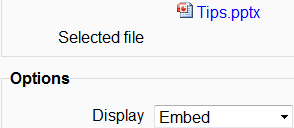
An example is a PowerPoint he has added on Top Ten Tips for a Good Night's Sleep. When he uploaded it, in the editing screen, he set the Display option to Embed, as shown in the following screenshot:

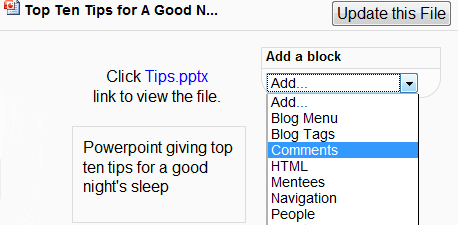
Once saved, this shows the link to the PowerPoint on its own page on the course with the possibility to add a Comments block:

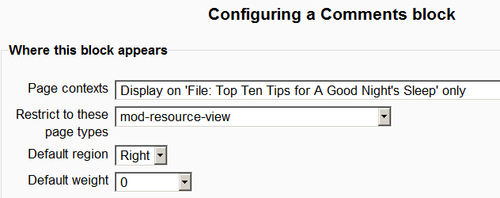
When he then clicks the configuration (hand/pen) icon, Andy gets the positioning options for this particular block. He chooses to have it showing only on this page where the link to the PowerPoint appears:

When a student such as Emma accesses this resource, she can now offer a comment as to its...

CONTINUE READING
83
Tech Concepts
36
Programming languages
73
Tech Tools
Icon Unlimited access to the largest independent learning library in tech of over 8,000 expert-authored tech books and videos.
Icon Innovative learning tools, including AI book assistants, code context explainers, and text-to-speech.
Icon 50+ new titles added per month and exclusive early access to books as they are being written.
Moodle 2.0 First Look
notes
bookmark Notes and Bookmarks search Search in title playlist Add to playlist font-size Font size

Change the font size

margin-width Margin width

Change margin width

day-mode Day/Sepia/Night Modes

Change background colour

Close icon Search
Country selected

Close icon Your notes and bookmarks

Confirmation

Modal Close icon
claim successful

Buy this book with your credits?

Modal Close icon
Are you sure you want to buy this book with one of your credits?
Close
YES, BUY

Submit Your Feedback

Modal Close icon
Modal Close icon
Modal Close icon