Sign In Start Free Trial
Account

Add to playlist

Create a Playlist

Modal Close icon
You need to login to use this feature.
  • Book Overview & Buying gnuplot Cookbook
  • Table Of Contents Toc
gnuplot Cookbook

gnuplot Cookbook

By : Lee Phillips
3.8 (4)
close
close
gnuplot Cookbook

gnuplot Cookbook

3.8 (4)
By: Lee Phillips

Overview of this book

gnuplot is the world's finest technical plotting software, used by scientists, engineers, and others for many years. It is in constant development and runs on practically every operating system, and can produce output in almost any format. The quality of its 3d plots is unmatched and its ability to be incorporated into computer programs and document preparation systems is excellent. gnuplot Cookbook ñ it will help you master gnuplot. Start using gnuplot immediately to solve your problems in data analysis and presentation. Quickly find a visual example of the graph you want to make and see a complete, working script for producing it. Learn how to use the new features in gnuplot 4.4. Find clearly explained, working examples of using gnuplot with LaTeX and with your own computer programming language. You will master all the ins and outs of gnuplot through gnuplot Cookbook. You will learn to plot basic 2d to complex 3d plots, annotate from simple labels to equations, integrate from simple scripts to full documents and computer progams. You will be taught to annotate graphs with equations and symbols that match the style of the rest of your text, thus creating a seamless, professional document. You will be guided to create a web page with an interactive graph, and add graphical output to your simulation or numerical analysis program. Start using all of gnuplot's simple to complex features to suit your needs, without studying its 200 page manual through this Cookbook.
Table of Contents (18 chapters)
close
close
gnuplot Cookbook
Credits
About the Author
About the Reviewers
www.PacktPub.com
Preface
1
Finding Help and Information
2
Index

Using two different y-axes


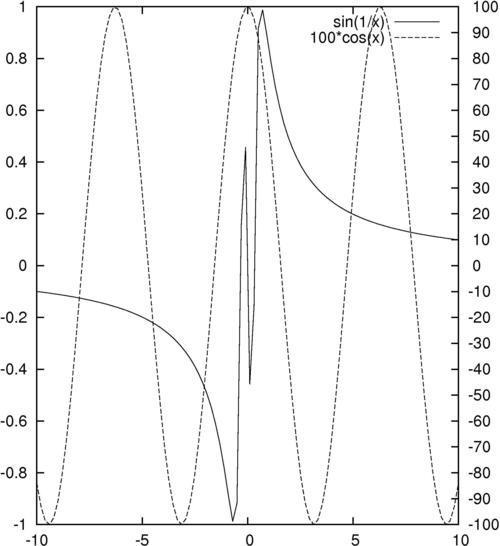
Sometimes our curves can or should not share the same y-axis. Gnuplot handles this with its tics commands, which we cover in greater detail in Chapter 4, Controlling your Tics. The following figure is a plot of two functions covering very different ranges; if the two curves were plotted against the same y-axis, one would be too small to see:

How to do it…

The following simple three-line script will create the previous figure:

set y2tics -100, 10
set ytics nomirror
plot sin(1/x) axis x1y1,100*cos(x) axis x1y2

Tip

You can download the example code files for all Packt books you have purchased from your account at http://www.packtpub.com. If you purchased this book elsewhere, you can visit http://www.packtpub.com/support and register to have the files e-mailed directly to you.

How it works…

Gnuplot can have two different y-axes and two different x-axes. In order to define a second y-axis, use the y2tics command; the first parameter is the starting value at the bottom of the graph, and the second is the interval between tics on the axis. The command set ytics nomirror tells gnuplot to use a different axis on the right-hand side, rather than simply mirroring the left-hand y-axis. The final plot command is similar to the ones we've seen before, with the addition of the "axis" commands; these tell gnuplot which set of axes to use for which curve.

There's more…

One of our functions, sin(1/x), oscillates infinitely quickly near x = 0. Experiment with issuing the command set samples N before the plot command to see how more information is plotted near the singularity at the origin if you use larger values of N.

You can have two x-axes as well (but be careful, this can often lead to plots that are difficult to understand). The following script is used to set the ranges of the two x axes to be different:

set x2tics -20 2
set xtics nomirror
set xrange [-10:10]
set x2range [-20:0]
plot sin(1/x) axis x1y1, 100*cos(x-1) axis x2y2

The previous script creates a plot that sets different scales on the top and bottom axes as well as on left and right axes; it uses the axis command in the last line to specify against which axes the curves are plotted.

One problem with the graphs in this recipe is that, although there is a legend generated automatically to show which curve is a plot of which function, there is nothing to show us which curve is plotted against which axis. In Chapter 2, Annotating with Labels and Legends, you will see how to put informative labels and arrows on your plots to address this.

CONTINUE READING
83
Tech Concepts
36
Programming languages
73
Tech Tools
Icon Unlimited access to the largest independent learning library in tech of over 8,000 expert-authored tech books and videos.
Icon Innovative learning tools, including AI book assistants, code context explainers, and text-to-speech.
Icon 50+ new titles added per month and exclusive early access to books as they are being written.
gnuplot Cookbook
notes
bookmark Notes and Bookmarks search Search in title playlist Add to playlist font-size Font size

Change the font size

margin-width Margin width

Change margin width

day-mode Day/Sepia/Night Modes

Change background colour

Close icon Search
Country selected

Close icon Your notes and bookmarks

Confirmation

Modal Close icon
claim successful

Buy this book with your credits?

Modal Close icon
Are you sure you want to buy this book with one of your credits?
Close
YES, BUY

Submit Your Feedback

Modal Close icon
Modal Close icon
Modal Close icon