
Sign In Start Free Trial
Account

Add to playlist

Create a Playlist

Modal Close icon
You need to login to use this feature.
  • Book Overview & Buying AWS Certified Developer - Associate Guide
  • Table Of Contents Toc
  • Feedback & Rating feedback
AWS Certified Developer - Associate Guide

AWS Certified Developer - Associate Guide - Second Edition

By : Tankariya, Parmar
4 (7)
close
close
AWS Certified Developer - Associate Guide

AWS Certified Developer - Associate Guide

4 (7)
By: Tankariya, Parmar

Overview of this book

This book will focus on the revised version of AWS Certified Developer Associate exam. The 2019 version of this exam guide includes all the recent services and offerings from Amazon that benefits developers. AWS Certified Developer - Associate Guide starts with a quick introduction to AWS and the prerequisites to get you started. Then, this book will describe about getting familiar with Identity and Access Management (IAM) along with Virtual private cloud (VPC). Next, this book will teach you about microservices, serverless architecture, security best practices, advanced deployment methods and more. Going ahead we will take you through AWS DynamoDB A NoSQL Database Service, Amazon Simple Queue Service (SQS) and CloudFormation Overview. Lastly, this book will help understand Elastic Beanstalk and will also walk you through AWS lambda. At the end of this book, we will cover enough topics, tips and tricks along with mock tests for you to be able to pass the AWS Certified Developer - Associate exam and develop as well as manage your applications on the AWS platform.
Table of Contents (30 chapters)
close
close
Lock Free Chapter
1
Overview of AWS Certified Developer - Associate Certification

Creating a DynamoDB table

After going through the core components of a DynamoDB table, it's time to create a table. This section describes the process of creating a DynamoDB table:

  1. Log into your AWS account and open the DynamoDB console at https://console.aws.amazon.com/dynamodb/.
  2. Click the Create table button.
  1. In the Create DynamoDB table dialog, you can choose various options, as shown:
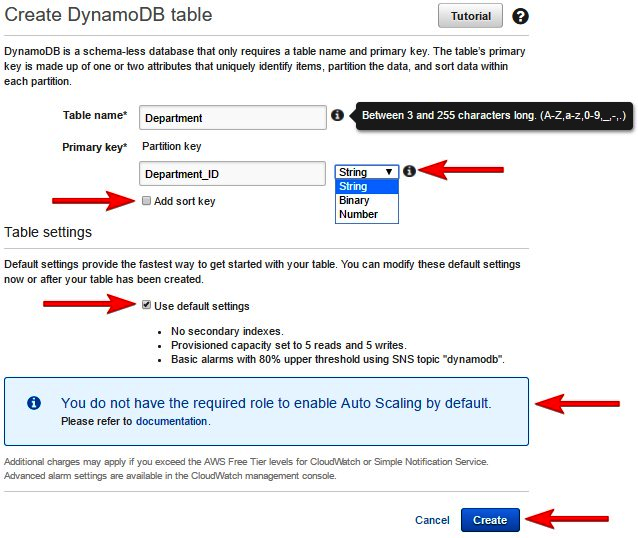
Creating a DynamoDB table

You can use following guidelines to complete step 3:

    1. Enter the desired table name, as shown in the preceding screenshot. The Table name can be between 3 and 255 characters long.
    2. Enter the partition key name and select the key type from the drop-down menu. Any primary key can only be a scalar data type, that is, String, Binary, or Number.
    1. Check the Add sort key checkbox, if required, and enter the sort key name and data type. This is required only if...

Visually different images
CONTINUE READING
83
Tech Concepts
36
Programming languages
73
Tech Tools
Icon Unlimited access to the largest independent learning library in tech of over 8,000 expert-authored tech books and videos.
Icon Innovative learning tools, including AI book assistants, code context explainers, and text-to-speech.
Icon 50+ new titles added per month and exclusive early access to books as they are being written.
AWS Certified Developer - Associate Guide
notes
bookmark Notes and Bookmarks search Search in title playlist Add to playlist font-size Font size

Change the font size

margin-width Margin width

Change margin width

day-mode Day/Sepia/Night Modes

Change background colour

Close icon Search
Country selected

Close icon Your notes and bookmarks

Confirmation

Modal Close icon
claim successful

Buy this book with your credits?

Modal Close icon
Are you sure you want to buy this book with one of your credits?
Close
YES, BUY

Submit Your Feedback

Modal Close icon
Modal Close icon
Modal Close icon