Sign In Start Free Trial
Account

Add to playlist

Create a Playlist

Modal Close icon
You need to login to use this feature.
  • Book Overview & Buying Microsoft 365 Security, Compliance, and Identity Administration
  • Table Of Contents Toc
Microsoft 365 Security, Compliance, and Identity Administration

Microsoft 365 Security, Compliance, and Identity Administration

By : Rising
4.9 (16)
close
close
Microsoft 365 Security, Compliance, and Identity Administration

Microsoft 365 Security, Compliance, and Identity Administration

4.9 (16)
By: Rising

Overview of this book

The Microsoft 365 Security, Compliance, and Identity Administration is designed to help you manage, implement, and monitor security and compliance solutions for Microsoft 365 environments. With this book, you’ll first configure, administer identity and access within Microsoft 365. You’ll learn about hybrid identity, authentication methods, and conditional access policies with Microsoft Intune. Next, you’ll discover how RBAC and Azure AD Identity Protection can be used to detect risks and secure information in your organization. You’ll also explore concepts such as Microsoft Defender for endpoint and identity, along with threat intelligence. As you progress, you’ll uncover additional tools and techniques to configure and manage Microsoft 365, including Azure Information Protection, Data Loss Prevention (DLP), and Microsoft Defender for Cloud Apps. By the end of this book, you’ll be well-equipped to manage and implement security measures within your Microsoft 365 suite successfully.
Table of Contents (25 chapters)
close
close
1
Part 1: Implementing and Managing Identity and Access
7
Part 2: Implementing and Managing Threat Protection
13
Part 3: Implementing and Managing Information Protection
17
Part 4: Managing Compliance Features in Microsoft 365

Event monitoring and troubleshooting in Azure AD Connect

Now that you have your hybrid identity method configured, it should all run smoothly. However, occasionally, you may still encounter some problems. This is where the ability to assess and troubleshoot Azure AD Connect with tools from the Microsoft 365 portal can assist administrators in quickly identifying and resolving issues. Administrators will be able to perform the following tasks as part of troubleshooting in Azure AD Connect:

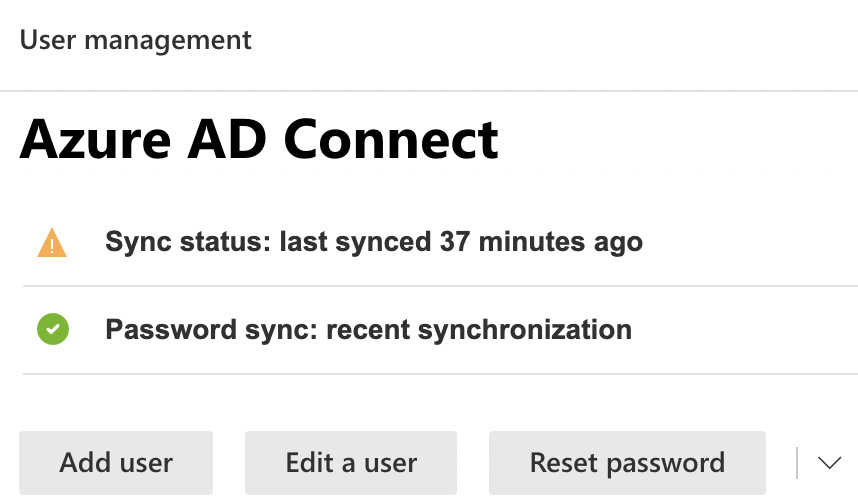
  1. Review and interpret synchronization errors by accessing the Microsoft 365 admin center via https://admin.microsoft.com and examining the Azure AD Connect directory sync status. Here, you will see an overview of all directory synchronization errors. A common example may be a duplicate proxy address or UPNs causing conflicts and preventing an object from syncing. The following screenshot shows the Azure AD Connect tile in the admin center. Any issues with synchronization will be shown here by using red circles for critical warnings or yellow triangles for lesser warnings. A green circle means all is OK and healthy:

Figure 1.16: Azure AD Connect sync status

Figure 1.16: Azure AD Connect sync status

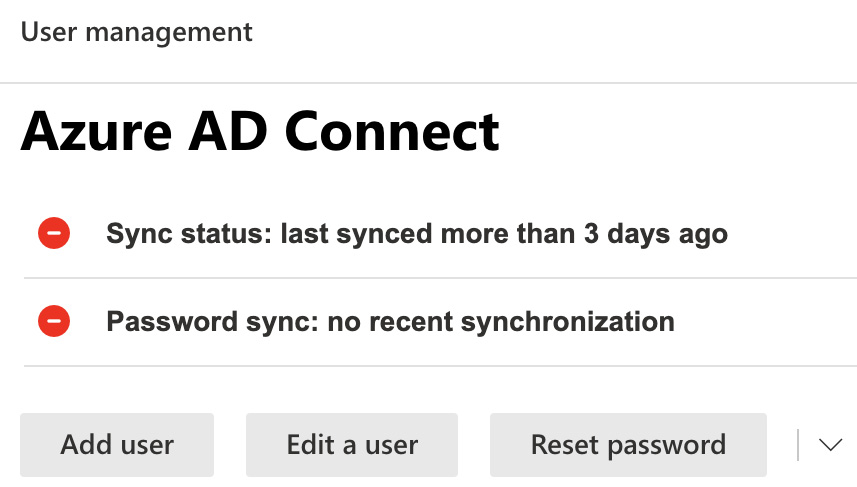
The preceding figure shows a sync status of only 37 minutes ago, which results in a yellow warning. Figure 1.17 shows more serious red warnings when sync has not completed for 3 days:

Figure 1.17: Azure AD Connect status

Figure 1.17: Azure AD Connect status

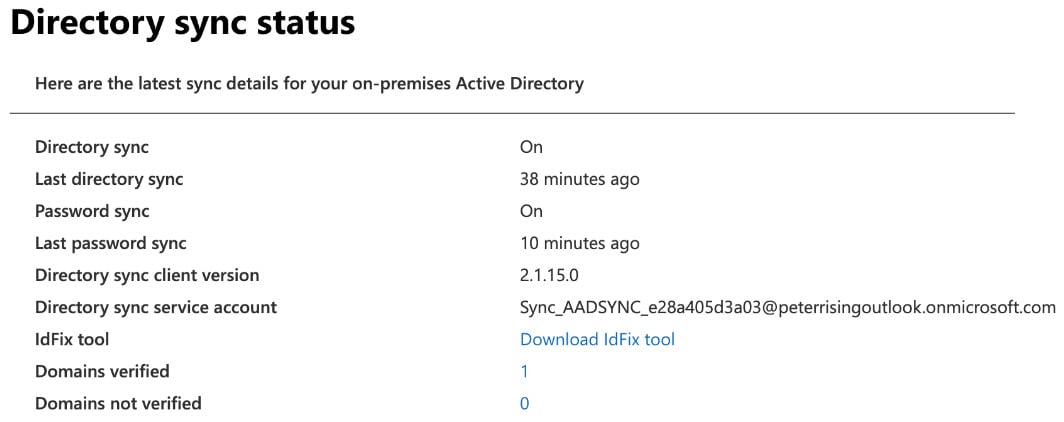
  1. If you scroll down further, you will see additional details about your Directory sync status, as shown in the following screenshot. One of the tools you can download from here is IdFix. You can run this tool from any domain-joined workstation in your environment. It provides detailed information on synchronization issues and guidelines on how to resolve them:

Figure 1.18: Directory sync status

Figure 1.18: Directory sync status

  1. Receive and act on email notifications relating to an unhealthy identity synchronization. These email alerts are configured by default to alert only the technical contact defined in your Microsoft 365 tenant under the organization profile. The technical contact will continue receiving these emails until the issue is resolved.
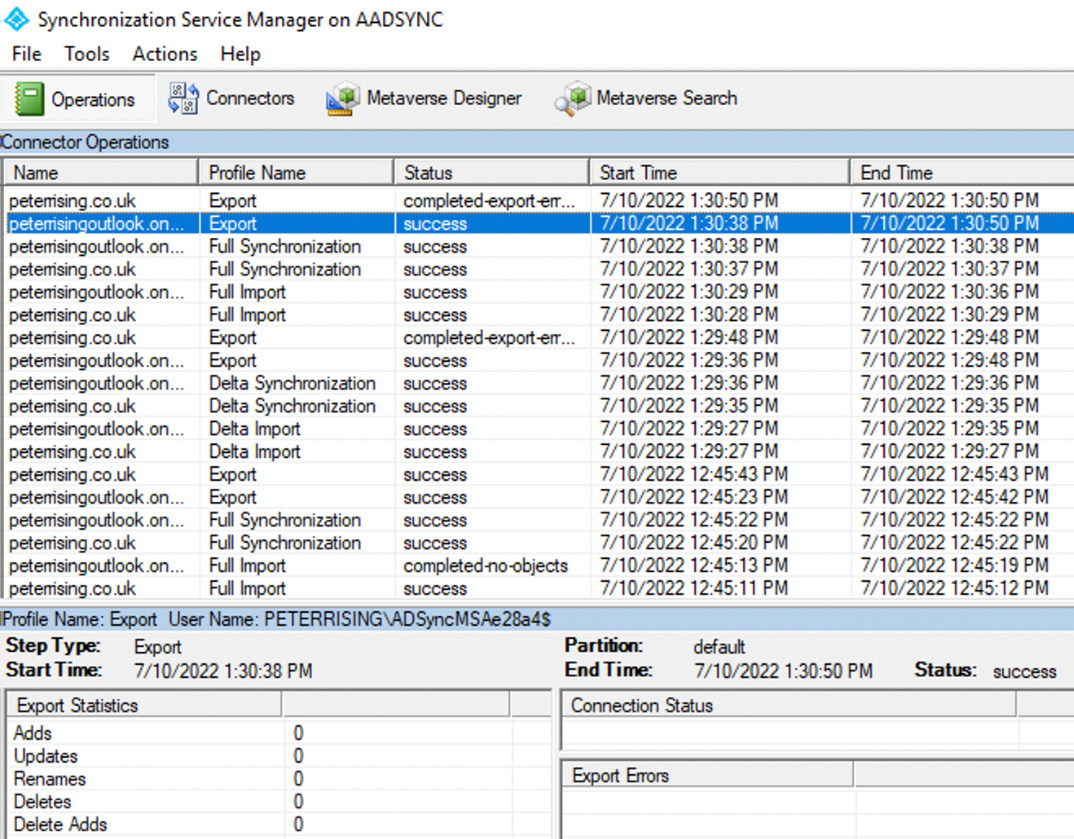
  2. Check Synchronization Service Manager on the Azure AD Connect server to confirm that the operations required for successful synchronization have been completed. If any errors occur, they will be displayed here with explanations for why the operation failed:

Figure 1.19: Synchronization Service Manager

Figure 1.19: Synchronization Service Manager

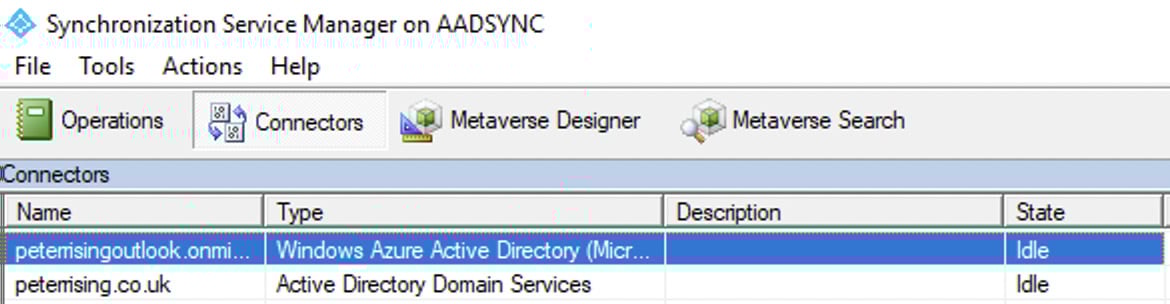
  1. Directory synchronization occurs every 30 minutes by default. However, you can generate a synchronization on demand by opening the Connectors tab and manually starting the process, as shown in the following screenshot:
Figure 1.20: Synchronization Service Manager

Figure 1.20: Synchronization Service Manager

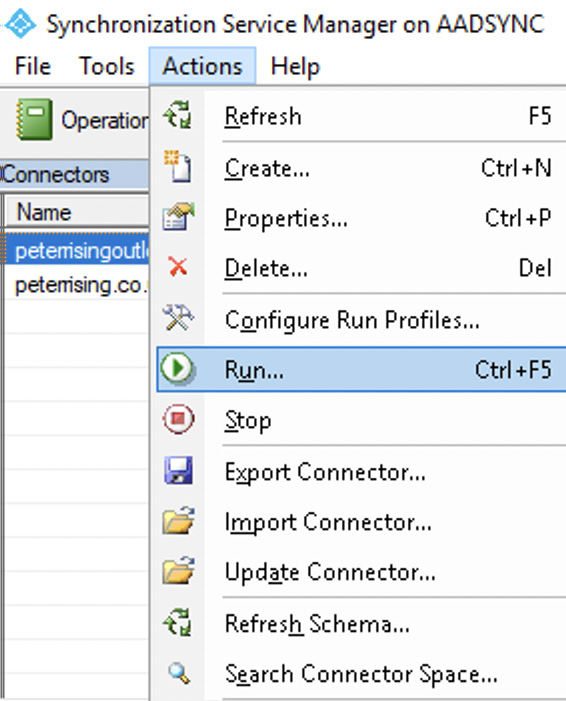
  1. Click on Actions and select Run:

Figure 1.21: Connector actions

Figure 1.21: Connector actions

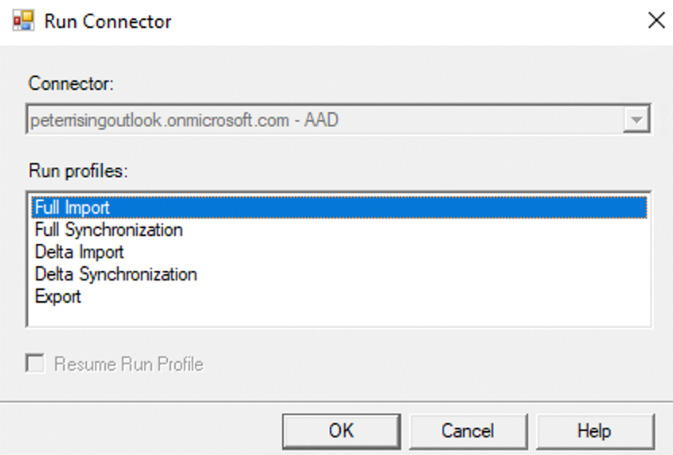
  1. You will be able to run the desired connectors from here, as shown:

Figure 1.22: Connector options

Figure 1.22: Connector options

  1. It is also possible, and far simpler, to run a manual synchronization process using PowerShell from your AD Connect server with the following commands:
    • To initiate a full synchronization:
      Start-ADSyncSyncCycle -PolicyType Initial
    • To initiate a delta synchronization
      Start-ADSyncSyncCycle -PolicyType Delta

In this section, we examined event monitoring and troubleshooting techniques in Azure AD Connect. We learned how to review, interpret, and respond to synchronization errors in the Office 365 portal and by checking the Synchronization Service Manager tool. We also explored how you can manually trigger the synchronization process from the Synchronization Service Manager tool and by using PowerShell.

CONTINUE READING
83
Tech Concepts
36
Programming languages
73
Tech Tools
Icon Unlimited access to the largest independent learning library in tech of over 8,000 expert-authored tech books and videos.
Icon Innovative learning tools, including AI book assistants, code context explainers, and text-to-speech.
Icon 50+ new titles added per month and exclusive early access to books as they are being written.
Microsoft 365 Security, Compliance, and Identity Administration
notes
bookmark Notes and Bookmarks search Search in title playlist Add to playlist font-size Font size

Change the font size

margin-width Margin width

Change margin width

day-mode Day/Sepia/Night Modes

Change background colour

Close icon Search
Country selected

Close icon Your notes and bookmarks

Confirmation

Modal Close icon
claim successful

Buy this book with your credits?

Modal Close icon
Are you sure you want to buy this book with one of your credits?
Close
YES, BUY

Submit Your Feedback

Modal Close icon
Modal Close icon
Modal Close icon