Sign In Start Free Trial
Account

Add to playlist

Create a Playlist

Modal Close icon
You need to login to use this feature.
  • Book Overview & Buying Terraform Cookbook
  • Table Of Contents Toc
  • Feedback & Rating feedback
Terraform Cookbook

Terraform Cookbook - Second Edition

By : Mikael Krief
4.7 (50)
close
close
Terraform Cookbook

Terraform Cookbook

4.7 (50)
By: Mikael Krief

Overview of this book

Imagine effortlessly provisioning complex cloud infrastructure across various cloud platforms, all while ensuring robustness, reusability, and security. Introducing the Terraform Cookbook, Second Edition - your go-to guide for mastering Infrastructure as Code (IaC) effortlessly. This new edition is packed with real-world examples for provisioning robust Cloud infrastructure mainly across Azure but also with a dedicated chapter for AWS and GCP. You will delve into manual and automated testing with Terraform configurations, creating and managing a balanced, efficient, reusable infrastructure with Terraform modules. You will learn how to automate the deployment of Terraform configurations through continuous integration and continuous delivery (CI/CD), unleashing Terraform's full potential. New chapters have been added that describe the use of Terraform for Docker and Kubernetes, and explain how to test Terraform configurations using different tools to check code and security compliance. The book devotes an entire chapter to achieving proficiency in Terraform Cloud, covering troubleshooting strategies for common issues and offering resolutions to frequently encountered errors. Get the insider knowledge to boost productivity with Terraform - the indispensable guide for anyone adopting Infrastructure as Code solutions.
Table of Contents (20 chapters)
close
close
16
Other Books You May Enjoy
17
Index

Adding custom pre and postconditions

In a previous recipe, Manipulating variables, we learned that it is possible to add condition validation inside the variable definition.

In Terraform version 1.2 and newer, it’s possible to add custom validation directly in resources, modules, or data sources with preconditions and postconditions.

These customs validations allow Terraform to set some custom rules during the execution of terraform plan. The precondition will be checked just before the rendering of the plan and the postcondition will be checked just after the rendering.

Let’s get started!

Getting ready

To complete this recipe, we will start with this basic Terraform configuration:

resource "azurerm_virtual_network" "vnet" {
  name                = "vnet"
  location            = azurerm_resource_group.rg.location
  resource_group_name = azurerm_resource_group.rg.name
  address_space       =  [var.address_space] 
}

The above Terraform configuration creates an Azure virtual network.

The first check that we want to perform is to be sure that the address_space variable’s value is IP mask /16.

The second check is to verify that the region (location) of the virtual network is "westeurope".

The source code of this recipe is available at https://github.com/PacktPublishing/Terraform-Cookbook-Second-Edition/tree/main/CHAP02/prepostcond.

How to do it…

The following step shows you how to perform the first check, which is the verification of the IP address range:

  1. Update the Terraform configuration of the Azure virtual network with the code below:
    resource "azurerm_virtual_network" "vnet" {
    …..
      address_space       =  [var.address_space]
      lifecycle {
        precondition {
          condition = cidrnetmask(var.address_space) == "255.255.0.0"
          error_message = "The IP Range must be /16"
        }
      }
    }
    
  2. Then, add the second check to verify the location by adding this configuration in the Azure virtual network:
    resource "azurerm_virtual_network" "vnet" {
      name                = "vnet"
      location            = azurerm_resource_group.rg.location
      resource_group_name = azurerm_resource_group.rg.name
      address_space       =  [var.address_space]
      lifecycle {
        precondition {
          condition = cidrnetmask(var.address_space) == "255.255.0.0"
          error_message = "The IP Range must be /16"
        }
        postcondition {
          condition = self.location  == "westeurope"
          error_message = "Location must be westeurope"
        }
      }
    }
    
  3. Finally, run the Terraform workflow and check that no Terraform error is displayed in the console output.

How it works…

In Step 1, we added the first custom check, which corresponds to the precondition that will be run just before the plan. The precondition block is new inside the lifecycle block metadata. Let’s see this precondition in detail:

precondition {
      condition = cidrnetmask(var.address_space) == "255.255.0.0"
      error_message = "The IP Range must be /16"
}

The precondition block contains two properties:

  1. The condition, that is, the code for the check. Here, we check that the cidrmask of the value of the address_mask variable is equal to “255.255.0.0", that is, that the IP range is /16.
  2. The error_message, that is, the error message that is displayed in the console output if the check returns false.

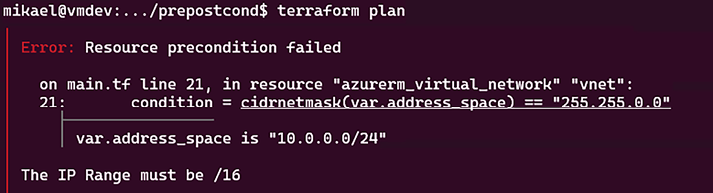
To test this precondition, if we set the value of the address_space variable to "10.0.0.0/24", the terraform plan execution returns this output:

Une image contenant texte  Description générée automatiquement

Figure 2.18: Precondition custom validation error

The error message is displayed and the terraform plan command doesn’t continue.

Then in Step 2, we add the check for testing the region (the data center’s location) of the Azure virtual network, which must be equal to “westeurope". To do this, we add a postcondition block inside the lifecycle metadata with the following configuration:

postcondition {
      condition = self.location  == "westeurope"
      error_message = "Location must be West Europe"
}

In the configuration above, we set the condition property by using the self keyword to refer to the current resource (in this case this is the Azure virtual network) and we set the error message.

Note that the self keyword can be used only on postconditions, at the moment that all properties are determined, which is only after the terraform plan command has been run.

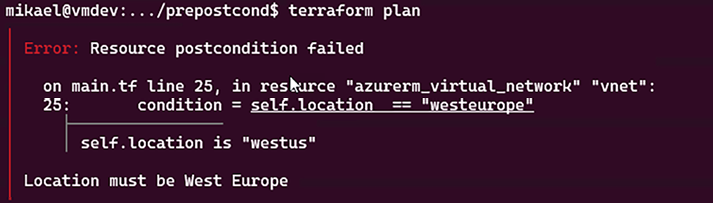
To test this postcondition, we set the location to "westus" and we get this terraform plan output:

Une image contenant texte  Description générée automatiquement

Figure 2.19: Postcondition custom validation error

We can see that the error message is displayed.

See also

Visually different images
CONTINUE READING
83
Tech Concepts
36
Programming languages
73
Tech Tools
Icon Unlimited access to the largest independent learning library in tech of over 8,000 expert-authored tech books and videos.
Icon Innovative learning tools, including AI book assistants, code context explainers, and text-to-speech.
Icon 50+ new titles added per month and exclusive early access to books as they are being written.
Terraform Cookbook
notes
bookmark Notes and Bookmarks search Search in title playlist Add to playlist download Download options font-size Font size

Change the font size

margin-width Margin width

Change margin width

day-mode Day/Sepia/Night Modes

Change background colour

Close icon Search
Country selected

Close icon Your notes and bookmarks

Confirmation

Modal Close icon
claim successful

Buy this book with your credits?

Modal Close icon
Are you sure you want to buy this book with one of your credits?
Close
YES, BUY

Submit Your Feedback

Modal Close icon
Modal Close icon
Modal Close icon