Sign In Start Free Trial
Account

Add to playlist

Create a Playlist

Modal Close icon
You need to login to use this feature.
  • Book Overview & Buying R Graph Essentials
  • Table Of Contents Toc
R Graph Essentials

R Graph Essentials

4.5 (4)
close
close
R Graph Essentials

R Graph Essentials

4.5 (4)

Overview of this book

This book is targeted at R programmers who want to learn the graphing capabilities of R. This book will presume that you have working knowledge of R.
Table of Contents (6 chapters)
close
close
5
Index

Creating axis labels

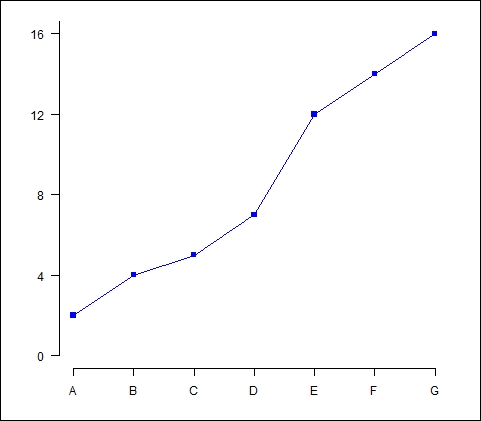
The first argument in the axis() command (the number 1) specifies the horizontal axis. The at argument allows you to specify where to place the axis labels. The vector called lab stores the actual labels. Now we create a y axis with horizontal labels, and ticks every four units, using the syntax at=4*0: yaxismax as shown:

axis(2, las=1, at=4*0: yaxismax)

Now what does our graph look like?

Creating axis labels

Now we have included a vertical axis. The argument las controls the orientation of the axis labels. Your labels can be either parallel (las=0) or perpendicular (las=2) to your axis. Using las=1 ensures horizontal labels, while las=3 ensures vertical labels.

Now we create a box around the plot and then we add in the two new curves using the lines() command, using two different symbol types.

box()

lines(Y2, pch = 16, type="o", lty=2, col="red")

lines(Y3, pch = 17, type="o", lty=3, col="darkgreen")

Let's create a title using the following command:

title(main="SEVERAL LINE PLOTS", col.main="darkgreen", font.main=2)

Now we label the x and y axes using title(), along with xlab and ylab.

title(xlab=toupper("Letters"), col.lab="purple")

title(ylab="Values", col.lab="brown")

Note the toupper() command, which always ensures that text within parentheses is uppercase. The tolower() command ensures that your text is lowercase.

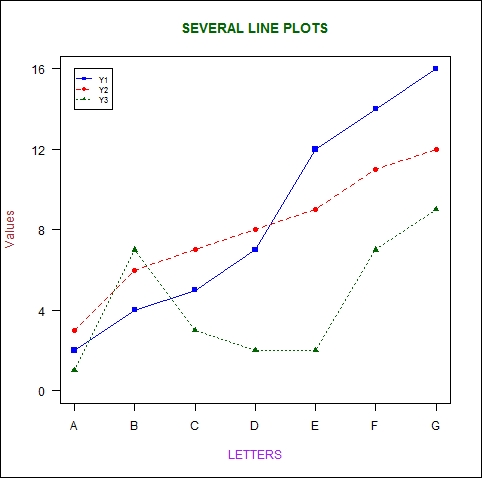
Finally, we create a legend at the location (1, yaxismax), though the legend() command allows us to position the legend anywhere on the graph (see Chapter 2, Advanced Functions in Base Graphics, for more detail). We include the legend keys using the c operator. We control the colors using col and ensure that the symbol types match those of the graph using pch. To do this job, we include the legend colors in the same logical order in which we created the curves:

legend(1, yaxismax, c("Y1","Y2", "Y3"), cex=0.7, col=c("blue", "red", "darkgreen"), pch=c(15, 16, 17), lty=1:3)

The following is our final plot:

Creating axis labels
CONTINUE READING
83
Tech Concepts
36
Programming languages
73
Tech Tools
Icon Unlimited access to the largest independent learning library in tech of over 8,000 expert-authored tech books and videos.
Icon Innovative learning tools, including AI book assistants, code context explainers, and text-to-speech.
Icon 50+ new titles added per month and exclusive early access to books as they are being written.
R Graph Essentials
notes
bookmark Notes and Bookmarks search Search in title playlist Add to playlist font-size Font size

Change the font size

margin-width Margin width

Change margin width

day-mode Day/Sepia/Night Modes

Change background colour

Close icon Search
Country selected

Close icon Your notes and bookmarks

Confirmation

Modal Close icon
claim successful

Buy this book with your credits?

Modal Close icon
Are you sure you want to buy this book with one of your credits?
Close
YES, BUY

Submit Your Feedback

Modal Close icon
Modal Close icon
Modal Close icon