Sign In Start Free Trial
Account

Add to playlist

Create a Playlist

Modal Close icon
You need to login to use this feature.
  • Book Overview & Buying Learning Predictive Analytics with Python
  • Table Of Contents Toc
Learning Predictive Analytics with Python

Learning Predictive Analytics with Python

By : Kumar, Gary Dougan
3.4 (11)
close
close
Learning Predictive Analytics with Python

Learning Predictive Analytics with Python

3.4 (11)
By: Kumar, Gary Dougan

Overview of this book

Social Media and the Internet of Things have resulted in an avalanche of data. Data is powerful but not in its raw form - It needs to be processed and modeled, and Python is one of the most robust tools out there to do so. It has an array of packages for predictive modeling and a suite of IDEs to choose from. Learning to predict who would win, lose, buy, lie, or die with Python is an indispensable skill set to have in this data age. This book is your guide to getting started with Predictive Analytics using Python. You will see how to process data and make predictive models from it. We balance both statistical and mathematical concepts, and implement them in Python using libraries such as pandas, scikit-learn, and numpy. You’ll start by getting an understanding of the basics of predictive modeling, then you will see how to cleanse your data of impurities and get it ready it for predictive modeling. You will also learn more about the best predictive modeling algorithms such as Linear Regression, Decision Trees, and Logistic Regression. Finally, you will see the best practices in predictive modeling, as well as the different applications of predictive modeling in the modern world.
Table of Contents (12 chapters)
close
close
10
A. A List of Links
11
Index

IDEs for Python

The IDE or the Integrated Development Environment is a software that provides the source-code editor cum debugger for the purpose of writing code. Using these software, one can write, test, and debug a code snippet before adding the snippet in the production version of the code.

IDLE: IDLE is the default Integrated Development Environment for Python that comes with the default implementation of Python. It comes with the following features:

  • Multi-window text-editor with auto-completion, smart-indent, syntax, and keyword highlighting
  • Python shell with syntax highlighting

IDLE is widely popular as an IDE for beginners; it is simple to use and works well for simple tasks. Some of the issues with IDLE are bad output reporting, absence of line numbering options, and so on. As a result, advanced practitioners move on to better IDEs.

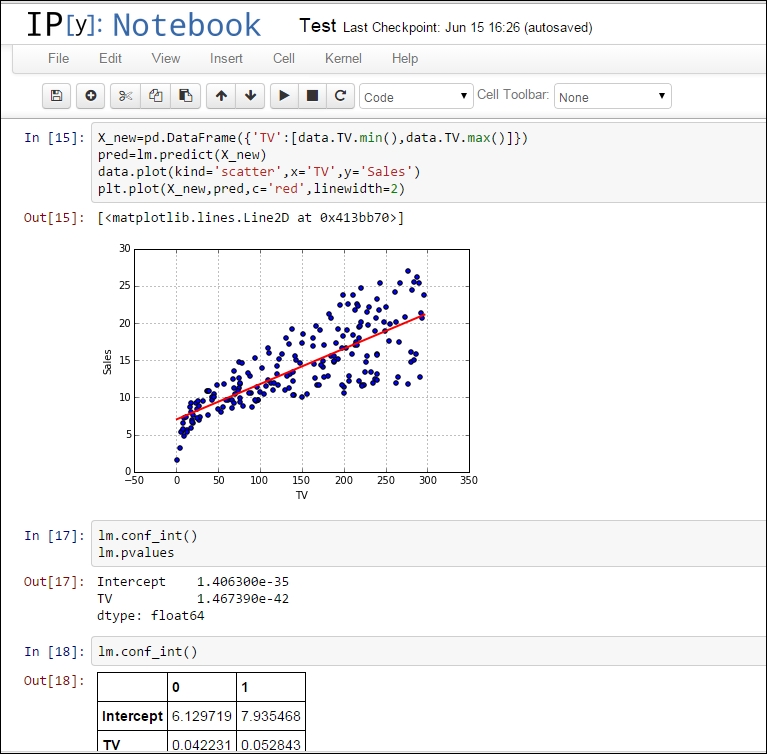
IPython Notebook: IPython Notebook is a powerful computational environment where code, execution, results, and media can co-exist in one single document. There are two components of this computing environment:

  • IPython Notebook: Web applications containing code, executions, plots, and results are stored in different cells; they can be saved and edited as and when required
  • Notebook: It is a plain text document meant to record and distribute the result of a computational analysis

The IPython documents are stored with an extension .ipynb in the directory where it is installed on the computer.

Some of the features of IPython Notebook are as follows:

  • Inline figure rendering of the matplotlib plots that can be saved in multiple formats(JPEG, PNG).
  • Standard Python syntax in the notebook can be saved as a Python script.
  • The notebooks can be saved as HTML files and .ipynb files. These notebooks can be viewed in browsers and this has been developed as a popular tool for illustrated blogging in Python. A notebook in IPython looks as shown in the following screenshot:
    IDEs for Python

    An Ipython Notebook

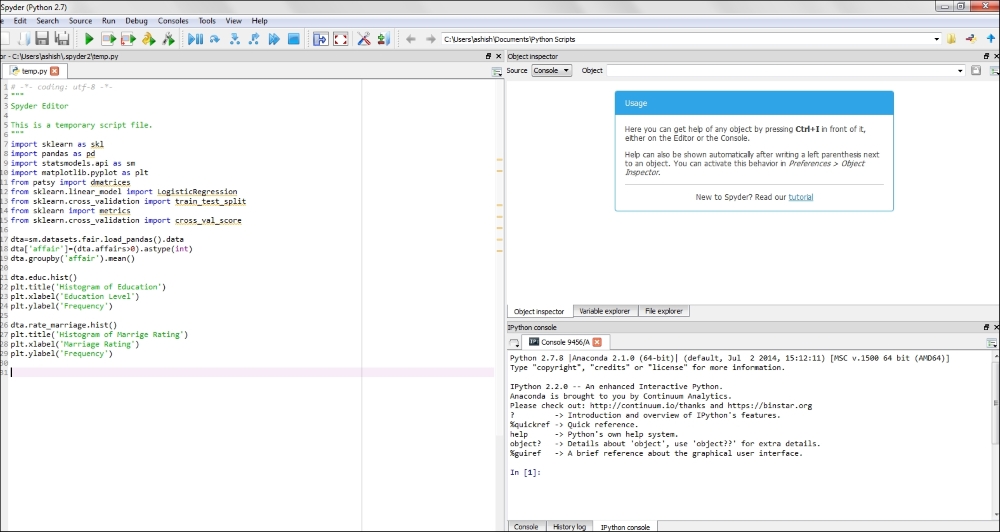
Spyder: Spyder is a powerful scientific computing and development environment for Python. It has the following features:

  • Advanced editing, auto-completion, debugging, and interactive testing
  • Python kernel and code editor with line numbering in the same screen
  • Preinstalled scientific packages like NumPy, pandas, scikit-learn, matplotlib, and so on.
  • In some ways, Spyder is very similar to RStudio environment where text editing and interactive testing go hand in hand:
    IDEs for Python

    The interface of Spyder IDE

In this book, IPython Notebook and Spyder have been used extensively. IDLE has been used from time to time and some people use other environments, such as Pycharm. Readers of this book are free to use such editors if they are more comfortable with them. However, they should make sure that all the required packages are working fine in those environments.

Visually different images
CONTINUE READING
83
Tech Concepts
36
Programming languages
73
Tech Tools
Icon Unlimited access to the largest independent learning library in tech of over 8,000 expert-authored tech books and videos.
Icon Innovative learning tools, including AI book assistants, code context explainers, and text-to-speech.
Icon 50+ new titles added per month and exclusive early access to books as they are being written.
Learning Predictive Analytics with Python
notes
bookmark Notes and Bookmarks search Search in title playlist Add to playlist font-size Font size

Change the font size

margin-width Margin width

Change margin width

day-mode Day/Sepia/Night Modes

Change background colour

Close icon Search
Country selected

Close icon Your notes and bookmarks

Confirmation

Modal Close icon
claim successful

Buy this book with your credits?

Modal Close icon
Are you sure you want to buy this book with one of your credits?
Close
YES, BUY

Submit Your Feedback

Modal Close icon
Modal Close icon
Modal Close icon