Sign In Start Free Trial
Account

Add to playlist

Create a Playlist

Modal Close icon
You need to login to use this feature.
  • Book Overview & Buying Python Data Analysis Cookbook
  • Table Of Contents Toc
Python Data Analysis Cookbook

Python Data Analysis Cookbook

By : Ivan Idris
3 (2)
close
close
Python Data Analysis Cookbook

Python Data Analysis Cookbook

3 (2)
By: Ivan Idris

Overview of this book

Data analysis is a rapidly evolving field and Python is a multi-paradigm programming language suitable for object-oriented application development and functional design patterns. As Python offers a range of tools and libraries for all purposes, it has slowly evolved as the primary language for data science, including topics on: data analysis, visualization, and machine learning. Python Data Analysis Cookbook focuses on reproducibility and creating production-ready systems. You will start with recipes that set the foundation for data analysis with libraries such as matplotlib, NumPy, and pandas. You will learn to create visualizations by choosing color maps and palettes then dive into statistical data analysis using distribution algorithms and correlations. You’ll then help you find your way around different data and numerical problems, get to grips with Spark and HDFS, and then set up migration scripts for web mining. In this book, you will dive deeper into recipes on spectral analysis, smoothing, and bootstrapping methods. Moving on, you will learn to rank stocks and check market efficiency, then work with metrics and clusters. You will achieve parallelism to improve system performance by using multiple threads and speeding up your code. By the end of the book, you will be capable of handling various data analysis techniques in Python and devising solutions for problem scenarios.
Table of Contents (18 chapters)
close
close
13
A. Glossary
17
Index

Configuring matplotlib

The matplotlib library allows configuration via the matplotlibrc files and Python code. The last option is what we are going to do in this recipe. Small configuration tweaks should not matter if your data analysis is strong. However, it doesn't hurt to have consistent and attractive plots. Another option is to apply stylesheets, which are files comparable to the matplotlibrc files. However, in my opinion, the best option is to use Seaborn on top of matplotlib. I will discuss Seaborn and matplotlib in more detail in Chapter 2, Creating Attractive Data Visualizations.

Getting ready

You need to install matplotlib for this recipe. Visit http://matplotlib.org/users/installing.html (retrieved July 2015) for more information. I have matplotlib 1.4.3 via Anaconda. Install Seaborn using Anaconda:

$ conda install seaborn

I have installed Seaborn 0.6.0 via Anaconda.

How to do it...

We can set options via a dictionary-like variable. The following function from the options.py file in dautil sets three options:

def set_mpl_options():
    mpl.rcParams['legend.fancybox'] = True
    mpl.rcParams['legend.shadow'] = True
    mpl.rcParams['legend.framealpha'] = 0.7

The first three options have to do with legends. The first option specifies rounded corners for the legend, the second options enables showing a shadow, and the third option makes the legend slightly transparent. The matplotlib rcdefaults() function resets the configuration.

To demonstrate these options, let's use sample data made available by matplotlib. The imports are as follows:

import matplotlib.cbook as cbook
import pandas as pd
import matplotlib.pyplot as plt
from dautil import options
import matplotlib as mpl
from dautil import plotting
import seaborn as sns 

The data is in a CSV file and contains stock price data for AAPL. Use the following commands to read the data and stores them in a pandas DataFrame:

data = cbook.get_sample_data('aapl.csv', asfileobj=True)
df = pd.read_csv(data, parse_dates=True, index_col=0)

Resample the data to average monthly values as follows:

df = df.resample('M')

The full code is in the configure_matplotlib.ipynb file in this book's code bundle:

import matplotlib.cbook as cbook
import pandas as pd
import matplotlib.pyplot as plt
from dautil import options
import matplotlib as mpl
from dautil import plotting
import seaborn as sns


data = cbook.get_sample_data('aapl.csv', asfileobj=True)
df = pd.read_csv(data, parse_dates=True, index_col=0)
df = df.resample('M')
close = df['Close'].values
dates = df.index.values
fig, axes = plt.subplots(4)


def plot(title, ax):
    ax.set_title(title)
    ax.set_xlabel('Date')

    plotter = plotting.CyclePlotter(ax)
    plotter.plot(dates, close, label='Close')
    plotter.plot(dates, 0.75 * close, label='0.75 * Close')
    plotter.plot(dates, 1.25 * close, label='1.25 * Close')

    ax.set_ylabel('Price ($)')
    ax.legend(loc='best')

plot('Initial', axes[0])
sns.reset_orig()
options.set_mpl_options()

plot('After setting options', axes[1])

sns.reset_defaults()
plot('After resetting options', axes[2])

with plt.style.context(('dark_background')):
    plot('With dark_background stylesheet', axes[3])
    fig.autofmt_xdate()
    plt.show()

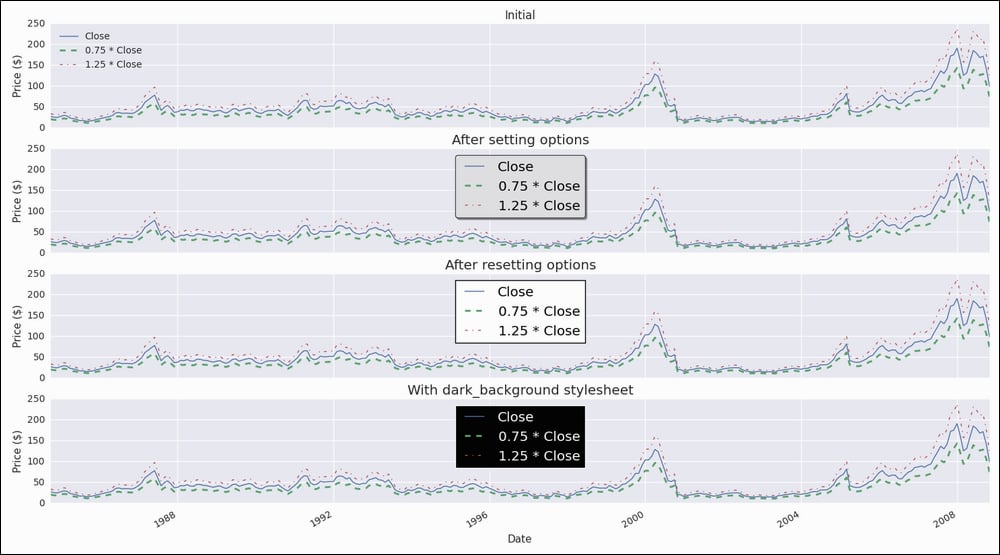
The program plots the data and arbitrary upper and lower band with the default options, custom options, and after a reset of the options. I used the following helper class from the plotting.py file of dautil:

from itertools import cycle


class CyclePlotter():
    def __init__(self, ax):
        self.STYLES = cycle(["-", "--", "-.", ":"])
        self.LW = cycle([1, 2])
        self.ax = ax

    def plot(self, x, y, *args, **kwargs):
        self.ax.plot(x, y, next(self.STYLES),
                     lw=next(self.LW), *args, **kwargs)

The class cycles through different line styles and line widths. Refer to the following plot for the end result:

How to do it...

How it works...

Importing Seaborn dramatically changes the look and feel of matplotlib plots. Just temporarily comment the seaborn lines out to convince yourself. However, Seaborn doesn't seem to play nicely with the matplotlib options we set, unless we use the Seaborn functions reset_orig() and reset_defaults().

See also

CONTINUE READING
83
Tech Concepts
36
Programming languages
73
Tech Tools
Icon Unlimited access to the largest independent learning library in tech of over 8,000 expert-authored tech books and videos.
Icon Innovative learning tools, including AI book assistants, code context explainers, and text-to-speech.
Icon 50+ new titles added per month and exclusive early access to books as they are being written.
Python Data Analysis Cookbook
notes
bookmark Notes and Bookmarks search Search in title playlist Add to playlist font-size Font size

Change the font size

margin-width Margin width

Change margin width

day-mode Day/Sepia/Night Modes

Change background colour

Close icon Search
Country selected

Close icon Your notes and bookmarks

Confirmation

Modal Close icon
claim successful

Buy this book with your credits?

Modal Close icon
Are you sure you want to buy this book with one of your credits?
Close
YES, BUY

Submit Your Feedback

Modal Close icon
Modal Close icon
Modal Close icon