Sign In Start Free Trial
Account

Add to playlist

Create a Playlist

Modal Close icon
You need to login to use this feature.
  • Book Overview & Buying Data Analysis and Business Modeling with Excel 2013
  • Table Of Contents Toc
  • Feedback & Rating feedback
Data Analysis and Business Modeling with Excel 2013

Data Analysis and Business Modeling with Excel 2013

By : Rojas
4.5 (2)
close
close
Data Analysis and Business Modeling with Excel 2013

Data Analysis and Business Modeling with Excel 2013

4.5 (2)
By: Rojas

Overview of this book

Excel 2013 is one of the easiest to use data analysis tools you will ever come across. Its simplicity and powerful features has made it the go to tool for all your data needs. Complex operations with Excel, such as creating charts and graphs, visualization, and analyzing data make it a great tool for managers, data scientists, financial data analysts, and those who work closely with data. Learning data analysis and will help you bring your data skills to the next level. This book starts by walking you through creating your own data and bringing data into Excel from various sources. You’ll learn the basics of SQL syntax and how to connect it to a Microsoft SQL Server Database using Excel’s data connection tools. You will discover how to spot bad data and strategies to clean that data to make it useful to you. Next, you'll learn to create custom columns, identify key metrics, and make decisions based on business rules. You’ll create macros using VBA and use Excel 2013’s shiny new macros. Finally, at the end of the book, you'll be provided with useful shortcuts and tips, enabling you to do efficient data analysis and business modeling with Excel 2013.
Table of Contents (13 chapters)
close
close
10
10. Creating Interactive Spreadsheets Using Tables and Slicers
11
A. Tips, Tricks, and Shortcuts
12
Index

Using built-in functions

Excel comes with a vast amount of handy formulas that we do not have to create from scratch. These formulas range from data cleaning to financial formulas a CPA may use on a daily basis. In this section we will cover some of the common ones every Excel developer should be aware of.

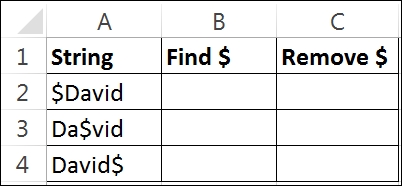
  1. Fire up Excel 2013 and create a new spreadsheet. Manually enter the following information:
    Using built-in functions

    The goal of this exercise is to remove the $ character from the String column. We will use two Excel functions to accomplish this task:

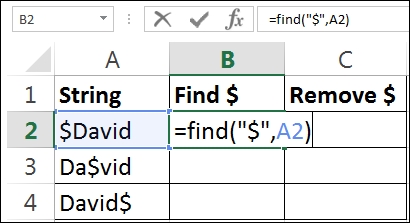
  2. In cell B2, type =find("$",A2), as shown in the following screenshot. Note that this search is case sensitive.
    Using built-in functions

    The find function will look for a string within a string. If it finds a match, it returns the integer position of the location. The first parameter asks us to enter the string that we are looking for. In our case, it is the dollar sign. The second parameter asks us to enter the location of the string that we will be searching for. In our case, the...

Visually different images
CONTINUE READING
83
Tech Concepts
36
Programming languages
73
Tech Tools
Icon Unlimited access to the largest independent learning library in tech of over 8,000 expert-authored tech books and videos.
Icon Innovative learning tools, including AI book assistants, code context explainers, and text-to-speech.
Icon 50+ new titles added per month and exclusive early access to books as they are being written.
Data Analysis and Business Modeling with Excel 2013
notes
bookmark Notes and Bookmarks search Search in title playlist Add to playlist font-size Font size

Change the font size

margin-width Margin width

Change margin width

day-mode Day/Sepia/Night Modes

Change background colour

Close icon Search
Country selected

Close icon Your notes and bookmarks

Confirmation

Modal Close icon
claim successful

Buy this book with your credits?

Modal Close icon
Are you sure you want to buy this book with one of your credits?
Close
YES, BUY

Submit Your Feedback

Modal Close icon
Modal Close icon
Modal Close icon