Sign In Start Free Trial
Account

Add to playlist

Create a Playlist

Modal Close icon
You need to login to use this feature.
  • Book Overview & Buying Python for Finance Cookbook
  • Table Of Contents Toc
Python for Finance Cookbook

Python for Finance Cookbook - Second Edition

By : Eryk Lewinson
4.9 (38)
close
close
Python for Finance Cookbook

Python for Finance Cookbook

4.9 (38)
By: Eryk Lewinson

Overview of this book

Python is one of the most popular programming languages in the financial industry, with a huge collection of accompanying libraries. In this new edition of the Python for Finance Cookbook, you will explore classical quantitative finance approaches to data modeling, such as GARCH, CAPM, factor models, as well as modern machine learning and deep learning solutions. You will use popular Python libraries that, in a few lines of code, provide the means to quickly process, analyze, and draw conclusions from financial data. In this new edition, more emphasis was put on exploratory data analysis to help you visualize and better understand financial data. While doing so, you will also learn how to use Streamlit to create elegant, interactive web applications to present the results of technical analyses. Using the recipes in this book, you will become proficient in financial data analysis, be it for personal or professional projects. You will also understand which potential issues to expect with such analyses and, more importantly, how to overcome them.
Table of Contents (18 chapters)
close
close
16
Other Books You May Enjoy
17
Index

Getting data from Alpha Vantage

Alpha Vantage is another popular data vendor providing high-quality financial data. Using their API, we can download the following:

  • Stock prices, including intraday and real-time (paid access)
  • Fundamentals: earnings, income statement, cash flow, earnings calendar, IPO calendar
  • Forex and cryptocurrency exchange rates
  • Economic indicators such as real GDP, Federal Funds Rate, Consumer Price Index, and consumer sentiment
  • 50+ technical indicators

In this recipe, we show how to download a selection of crypto-related data. We start with historical daily Bitcoin prices, and then show how to query the real-time crypto exchange rate.

Getting ready

Before downloading the data, we need to register at https://www.alphavantage.co/support/#api-key to obtain the API key. Access to the API and all the endpoints is free of charge (excluding the real-time stock prices) within some bounds (5 API requests per minute; 500 API requests per day).

How to do it…

Execute the following steps to download data from Alpha Vantage:

  1. Import the libraries:
    from alpha_vantage.cryptocurrencies import CryptoCurrencies
    
  2. Authenticate using your personal API key and select the API:
    ALPHA_VANTAGE_API_KEY = "YOUR_KEY_HERE"
    crypto_api = CryptoCurrencies(key=ALPHA_VANTAGE_API_KEY,
                                  output_format= "pandas")
    
  3. Download the daily prices of Bitcoin, expressed in EUR:
    data, meta_data = crypto_api.get_digital_currency_daily(
        symbol="BTC", 
        market="EUR"
    )
    

    The meta_data object contains some useful information about the details of the query. You can see it below:

    {'1. Information': 'Daily Prices and Volumes for Digital Currency',
     '2. Digital Currency Code': 'BTC',
     '3. Digital Currency Name': 'Bitcoin',
     '4. Market Code': 'EUR',
     '5. Market Name': 'Euro',
     '6. Last Refreshed': '2022-08-25 00:00:00',
     '7. Time Zone': 'UTC'}
    

    The data DataFrame contains all the requested information. We obtained 1,000 daily OHLC prices, the volume, and the market capitalization. What is also noteworthy is that all the OHLC prices are provided in two currencies: EUR (as we requested) and USD (the default one).

    Figure 1.10: Preview of the downloaded prices, volume, and market cap

  1. Download the real-time exchange rate:
    crypto_api.get_digital_currency_exchange_rate(
        from_currency="BTC", 
        to_currency="USD"
    )[0].transpose()
    

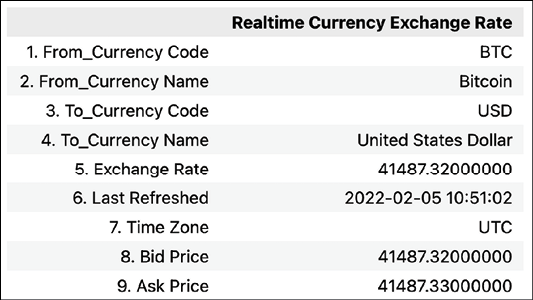
    Running the command returns the following DataFrame with the current exchange rate:

Figure 1.11: BTC-USD exchange rate

How it works…

After importing the alpha_vantage library, we had to authenticate using the personal API key. We did so while instantiating an object of the CryptoCurrencies class. At the same time, we specified that we would like to obtain output in the form of a pandas DataFrame. The other possibilities are JSON and CSV.

In Step 3, we downloaded the daily BTC prices using the get_digital_currency_daily method. Additionally, we specified that we wanted to get the prices in EUR. By default, the method will return the requested EUR prices, as well as their USD equivalents.

Lastly, we downloaded the real-time BTC/USD exchange rate using the get_digital_currency_exchange_rate method.

There’s more...

So far, we have used the alpha_vantage library as a middleman to download information from Alpha Vantage. However, the functionalities of the data vendor evolve faster than the third-party library and it might be interesting to learn an alternative way of accessing their API.

  1. Import the libraries:
    import requests
    import pandas as pd
    from io import BytesIO
    
  2. Download Bitcoin’s intraday data:
    AV_API_URL = "https://www.alphavantage.co/query"
    parameters = {
        "function": "CRYPTO_INTRADAY",
        "symbol": "ETH",
        "market": "USD",
        "interval": "30min",
        "outputsize": "full",
        "apikey": ALPHA_VANTAGE_API_KEY
    }
    r = requests.get(AV_API_URL, params=parameters)
    data = r.json()
    df = (
        pd.DataFrame(data["Time Series Crypto (30min)"])
        .transpose()
    )
    df
    

    Running the snippet above returns the following preview of the downloaded DataFrame:

    Figure 1.12: Preview of the DataFrame containing Bitcoin’s intraday prices

    We first defined the base URL used for requesting information via Alpha Vantage’s API. Then, we defined a dictionary containing the additional parameters of the request, including the personal API key. In our function call, we specified that we want to download intraday ETH prices expressed in USD and sampled every 30 minutes. We also indicated we want a full output (by specifying the outputsize parameter). The other option is compact output, which downloads the 100 most recent observations.

    Having prepared the request’s parameters, we used the get function from the requests library. We provide the base URL and the parameters dictionary as arguments. After obtaining the response to the request, we can access it in JSON format using the json method. Lastly, we convert the element of interest into a pandas DataFrame.

    Alpha Vantage’s documentation shows a slightly different approach to downloading this data, that is, by creating a long URL with all the parameters specified there. Naturally, that is also a possibility, however, the option presented above is a bit neater. To see the very same request URL as presented by the documentation, you can run r.request.url.

  1. Download the upcoming earnings announcements within the next three months:
    AV_API_URL = "https://www.alphavantage.co/query"
    parameters = {
        "function": "EARNINGS_CALENDAR",
        "horizon": "3month",
        "apikey": ALPHA_VANTAGE_API_KEY
    }
    r = requests.get(AV_API_URL, params=parameters)
    pd.read_csv(BytesIO(r.content))
    

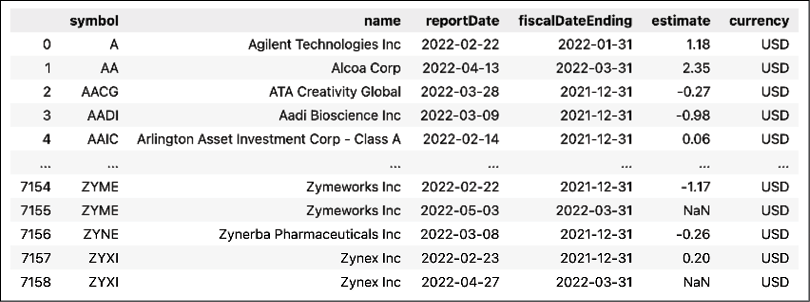
    Running the snippet returns the following output:

Figure 1.13: Preview of a DataFrame containing the downloaded earnings information

While getting the response to our API request is very similar to the previous example, handling the output is much different.

The output of r.content is a bytes object containing the output of the query as text. To mimic a normal file in-memory, we can use the BytesIO class from the io module. Then, we can normally load that mimicked file using the pd.read_csv function.

In the accompanying notebook, we present a few more functionalities of Alpha Vantage, such as getting the quarterly earnings data, downloading the calendar of the upcoming IPOs, and using alpha_vantage's TimeSeries module to download stock price data.

See also

CONTINUE READING
83
Tech Concepts
36
Programming languages
73
Tech Tools
Icon Unlimited access to the largest independent learning library in tech of over 8,000 expert-authored tech books and videos.
Icon Innovative learning tools, including AI book assistants, code context explainers, and text-to-speech.
Icon 50+ new titles added per month and exclusive early access to books as they are being written.
Python for Finance Cookbook
notes
bookmark Notes and Bookmarks search Search in title playlist Add to playlist download Download options font-size Font size

Change the font size

margin-width Margin width

Change margin width

day-mode Day/Sepia/Night Modes

Change background colour

Close icon Search
Country selected

Close icon Your notes and bookmarks

Confirmation

Modal Close icon
claim successful

Buy this book with your credits?

Modal Close icon
Are you sure you want to buy this book with one of your credits?
Close
YES, BUY

Submit Your Feedback

Modal Close icon
Modal Close icon
Modal Close icon