Sign In Start Free Trial
Account

Add to playlist

Create a Playlist

Modal Close icon
You need to login to use this feature.
  • Book Overview & Buying RAG from First Principles
  • Table Of Contents Toc
RAG from First Principles

RAG from First Principles

By : Jia Huang
close
close
RAG from First Principles

RAG from First Principles

By: Jia Huang

Overview of this book

Most developers can spin up a RAG pipeline in an afternoon using LangChain or LlamaIndex. Far fewer understand why retrieval fails or how to fix it. This book is for those who want to go deeper. RAG From First Principles dismantles the retrieval-augmented generation stack layer by layer, explaining how documents are ingested and parsed, why chunking strategy directly impacts answer quality, how embedding models encode meaning, what happens inside a vector database, and how sparse and dense retrieval interact in a hybrid system. Written by Jia Huang, a research engineer and bestselling AI author, it brings both research depth and production experience to one of AI's most critical engineering disciplines. Structured as a progressive dialogue between a seasoned engineer and two students, the book surfaces the questions practitioners actually ask. Each chapter builds on the last, covering topics from data import and chunking to embedding selection, index design, hybrid search, and post-retrieval processing, before moving on to response generation, evaluation, and advanced paradigms including GraphRAG, Agentic RAG, and Modular RAG. By the end, you'll have the architectural understanding to optimize, debug, and extend your RAG systems with confidence. *Email sign-up and proof of purchase required
Table of Contents (14 chapters)
close
close
12
Other Books You May Enjoy
13
Index

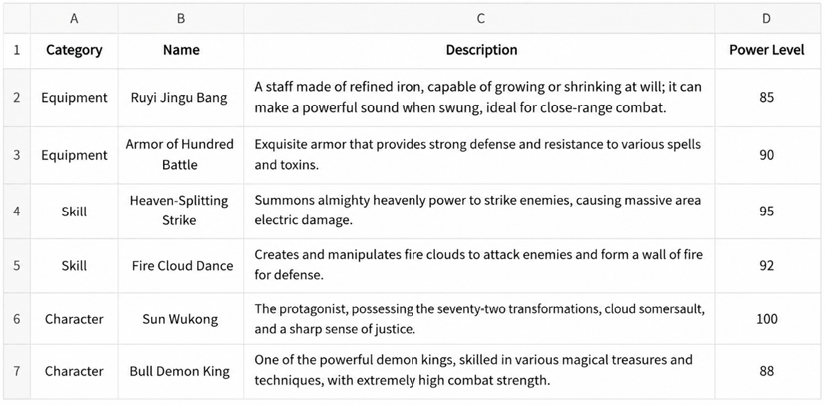
Importing table data in CSV format

When processing and parsing data, importing CSV files is a common requirement. The CSVLoader tool provided by LangChain can fulfill this need.

Importing data using CSVLoader

When loading CSV files, CSVLoader automatically generates page_content and metadata for each row of data. Among these, metadata includes the data source (source) and row number (row), which is very useful for subsequent data processing and querying.

Figure 1.12: Spreadsheet table with category names, descriptions, and power levels in numbers

Figure 1.12: Spreadsheet table with category names, descriptions, and power levels in numbers

The following code example demonstrates a simple operation process (refer to https://github.com/PacktPublishing/RAG-from-First-Principles for the complete code):

from langchain.document_loaders import CSVLoader
file_path = 'data/BlackMyth/BlackMythWukong.csv'
loader = CSVLoader(file_path=file_path)
data = loader.load()
for record in data[:2]:
    print(record)
page_content='Category: Equipment Name: Bronze Cloud Staff Description: A sturdy bronze staff that emits a sharp sound when swung, suitable for melee attacks. PowerLevel: 85'
metadata={'source': 'data/BlackMyth/BlackMythWukong.csv', 'row': 0}
page_content='Category: Equipment Name: Hundred Tricks Undergarment Armor Description: A finely crafted battle armor that provides strong defense and resists potent poison damage. PowerLevel: 90'
metadata={'source': 'data/BlackMyth/BlackMythWukong.csv', 'row': 1}

In this example, page_content contains the detailed contents of each row, while metadata provides the file path and row number of the data source, which is helpful for subsequent data querying and processing. It is important to note that the first row of the CSV file is considered the header row, and its contents are used as the field names by default, i.e., column names.

In the code example below, we specify some parameters of the CSV file through csv_args and use custom column names:

loader = CSVLoader(
file_path=file_path,
csv_args={
'delimiter': ',',
'quotechar': '\'',
'fieldnames': ['Category', 'Name', 'Description', 'PowerLevel'],
},
)
data = loader.load()
for record in data[:2]:
    print(record)
page_content='Category: Category Name: Name Description: Description PowerLevel: PowerLevel'
metadata={'source': 'data/black myth/black myth wukong.csv', 'row': 0}
page_content='Category: Equipment Name: Bronze Cloud Staff Description: A sturdy bronze staff that can produce a swooshing sound when swung, suitable for melee attacks. PowerLevel: 85'
metadata={'source': 'data/black myth/black myth wukong.csv', 'row': 1}

After this processing, new column names such as Category, Name, etc., will replace the original field names in page_content. Since additional field names are specified, this import method will treat the first line inside the file directly as a data row rather than a header row.

You can use a specific column from the CSV file to set the value for the metadata source. The content from this column will replace the default CSV filename and become the source identifier for each document entry. This is demonstrated in the following code example:

loader = CSVLoader(file_path=file_path, source_column='Name')
data = loader.load()
for record in data[:2]:
    print(record)
page_content='Category: Equipment Name: Bronze Cloud Rod Description: A sturdy bronze rod that produces a whistling sound when swung, suitable for close combat attacks. PowerLevel: 85'
metadata={'source': 'Bronze Cloud Rod', 'row': 0}
page_content='Category: Equipment Name: Hundred Tricks Coin Armor Description: A finely crafted combat armor that provides strong defense and resists powerful poison damage. PowerLevel: 90'
metadata={'source': 'Hundred Tricks Coin Armor', 'row': 1}

In this example, the source_column parameter specifies the Name column as the data source. Therefore, the source field in metadata takes the value of the corresponding Name column for each row. For example, for the first record, the source value is “Bronze Cloud Rod”; for the second record, it is “Hundred Tricks Coin Armor”.

This newly generated metadata information is very useful when querying specific items. For example, in a Q&A chain, if you want to query only records related to Hundred Tricks Coin Armor, you can filter by the source field.

Comparing CSVLoader and UnstructuredCSVLoader

Alex: Lewis, you mentioned earlier that the Unstructured tool can load almost all types of files. Can we compare the results of CSVLoader and UnstructuredCSVLoader?

Lewis: Of course. The following code example shows how to use UnstructuredCSVLoader to load data from a specified path and print it out:

from langchain_community.document_loaders import UnstructuredCSVLoader
loader = UnstructuredCSVLoader(file_path=file_path)
data = loader.load()
print(data)
[Document(metadata={'source': 'data/black myth/black myth wukong.csv'}, page_content='\n\nCategory\nName\nDescription\nPowerLevel\n\nEquipment\nBronze Cloud Staff\nA sturdy bronze staff that makes a whistling sound when swung, suitable for close combat.\n85\n\nEquipment\nHundred Show Lining Armor\nAn exquisite battle armor that provides strong defense and resists poisonous damage.\n90\n\nSkill\nHeavenly Thunder Strike\nSummon heavenly thunder to attack enemies, causing a wide range of lightning damage.\n95\n\nSkill\nFlame Dance\nPerform a fiery dance, surrounding enemies in searing flames.\n92\n\nCharacter\nWukong\nThe protagonist, possesses the abilities of seventy-two transformations and riding clouds and mist, upholding justice.\n100\n\nCharacter\nSilver Horn King\nOne of the powerful demon kings, skilled at wielding various magical artifacts, with extremely high combat power.\n88\n\n')]

Alex: For CSV files, LangChain’s CSVLoader is more practical than UnstructuredCSVLoader because the document structure is preserved better. Each row is processed as an independent Document object, and the metadata retains the important row id field, which can be used as a “data source index” in the retrieval process. Of course, if your task requires treating the entire CSV file as a single text block, that’s a different story.

Lewis: Yes, preserving the structural information of the original document as much as possible is an eternal goal in data ingestion for RAG systems, and it is also a challenge. For example, row numbers in CSV files, headings and hierarchy in Markdown files, and the placement of images on PDF pages with both text and images—all these are factors that need to be considered during the data ingest process.

Alex: So, Lewis, if I use DirectoryLoader to load multiple types of documents at once, and I want to use the default loader for files like PDFs, but use CSVLoader for CSV files, how should I do it?

Lewis: That’s also very simple. You can refer to the following code to do it (refer to https://github.com/PacktPublishing/RAG-from-First-Principles for the complete code):

loader = DirectoryLoader(
path= 'data/Black Myth',
glob='**/*.csv',   # Pattern to match all CSV files
loader_cls=CSVLoader  # Specify using CSVLoader for matched files
)

After this setup, DirectoryLoader will use CSVLoader to load all CSV files located in the specified directory instead of using the default UnstructuredCSVLoader.

CONTINUE READING
83
Tech Concepts
36
Programming languages
73
Tech Tools
Icon Unlimited access to the largest independent learning library in tech of over 8,000 expert-authored tech books and videos.
Icon Innovative learning tools, including AI book assistants, code context explainers, and text-to-speech.
Icon 50+ new titles added per month and exclusive early access to books as they are being written.
RAG from First Principles
notes
bookmark Notes and Bookmarks search Search in title playlist Add to playlist download Download options font-size Font size

Change the font size

margin-width Margin width

Change margin width

day-mode Day/Sepia/Night Modes

Change background colour

Close icon Search
Country selected

Close icon Your notes and bookmarks

Confirmation

Modal Close icon
claim successful

Buy this book with your credits?

Modal Close icon
Are you sure you want to buy this book with one of your credits?
Close
YES, BUY

Submit Your Feedback

Modal Close icon
Modal Close icon
Modal Close icon