Sign In Start Free Trial
Account

Add to playlist

Create a Playlist

Modal Close icon
You need to login to use this feature.
  • Book Overview & Buying MongoDB Fundamentals
  • Table Of Contents Toc
MongoDB Fundamentals

MongoDB Fundamentals

By : Amit Phaltankar , Juned Ahsan , Michael Harrison , Liviu Nedov , Sam Anderson
5 (24)
close
close
MongoDB Fundamentals

MongoDB Fundamentals

5 (24)
By: Amit Phaltankar , Juned Ahsan , Michael Harrison , Liviu Nedov , Sam Anderson

Overview of this book

MongoDB is one of the most popular database technologies for handling large collections of data. This book will help MongoDB beginners develop the knowledge and skills to create databases and process data efficiently. Unlike other MongoDB books, MongoDB Fundamentals dives into cloud computing from the very start – showing you how to get started with Atlas in the first chapter. You will discover how to modify existing data, add new data into a database, and handle complex queries by creating aggregation pipelines. As you progress, you'll learn about the MongoDB replication architecture and configure a simple cluster. You will also get to grips with user authentication, as well as techniques for backing up and restoring data. Finally, you'll perform data visualization using MongoDB Charts. You will work on realistic projects that are presented as bitesize exercises and activities, allowing you to challenge yourself in an enjoyable and attainable way. Many of these mini-projects are based around a movie database case study, while the last chapter acts as a final project where you will use MongoDB to solve a real-world problem based on a bike-sharing app. By the end of this book, you'll have the skills and confidence to process large volumes of data and tackle your own projects using MongoDB.
Table of Contents (15 chapters)
close
close
Preface

Introduction to JSON

JSON is a full-text, lightweight format for data representation and transportation. JavaScript's simple representation of objects gave birth to JSON. Douglas Crockford, who was one of the developers of the JavaScript language, came up with the proposal for the JSON specification that defines the grammar and data types for the JSON syntax.

The JSON specification became a standard in 2013. If you have been developing applications for a while, you might have seen the transition of applications from XML to JSON. JSON offers a human-readable, plain-text way of representing data. In comparison to XML, where information is wrapped inside tags, and lots of tags make it look bulky, JSON offers a compact and natural format where you can easily focus on the information.

To read or write information in JSON or XML format, the programming languages use their respective parsers. As XML documents are bound by schema definitions and tag library definitions, parsers need to do a lot of work to read and validate XML Schema Definition (XSD) and Tag Library Descriptors (TLDs).

On the other hand, JSON does not have any schema definition, and JSON parsers only need to deal with opening and closing brackets and colons. Different programming languages have different ways of representing language constructs, such as objects, lists, arrays, variables, and more. When two systems, written in two different programming languages, want to exchange data, they need to have a mutually agreed standard for representing information. JSON provides that standard with its lightweight format. The objects, collections, and variables of any programming language can naturally fit into the JSON structure. Most programming languages have parsers that can translate their own objects to and from JSON documents.

Note

JSON does not impose JavaScript language internals on other languages. JSON is the syntax for language-independent data representation. The grammar that defines the JSON format was derived from JavaScript's syntax. However, to use JSON, programmers do not need to know JavaScript internals

JSON Syntax

JSON documents or objects are a plain-text set of zero or more key-value pairs. The key-value pairs form an object, and if the value is a collection of zero or more values, they form an array. JSON has a very simple structure where, by only using a set of curly braces ({}), square brackets ([]), colons (:), and commas(,), you can represent any complex piece of information in a compact form.

In a JSON object, key-value pairs are enclosed within curly braces: {}. Within an object, the key is always a string. However, the value can be any of JSON's specified types. The JSON grammar specification does not define any order for JSON fields and can be represented as follows:

{
  key : value
}

The preceding document represents a valid JSON object that has a single key-value pair. Moving on to JSON arrays, an array is a set of zero or more values that are enclosed within square brackets, [], and separated by commas. While most programming languages have support for ordered arrays, JSON's specification does not specify the order for array elements. Let's take a look at an example array that has three fields separated by commas:

[
  value1,
  value2,
  value3
]

Now that we have looked at JSON syntax, let's consider a sample JSON document that contains the basic information of a company. The example demonstrates how naturally a piece of information can be presented in document format, making it easily readable:

{
  "company_name" : "Sparter",
  "founded_year" : 2007,
  "twitter_username" : null,
  "address" : "15 East Street",
  "no_of_employees" : 7890,
  "revenue" : 879423000
}

From the preceding document, we can see the following:

  • Company name and address, both being string fields
  • Foundation year, number of employees, and revenue as numeric fields
  • The company's Twitter username as null or no information

JSON Data Types

Unlike many programming languages, JSON supports a limited and basic set of data types, as follows:

  • String: Refers to plain text
  • Number: Consists of all numeric fields
  • Boolean: Consists of True or False
  • Object: Other embedded JSON objects
  • Array: Collection of fields
  • Null: Special value to denote fields without any value

One of the major reasons for the wide acceptance of JSON is its language-independent format. Different languages have different data types. Some languages support statically typed variables, while some support dynamically typed variables. If JSON had many data types, it would be more in line with a number of languages—though, not all.

JSON is a data exchange format. When an application transmits a piece of information over the wire, the information gets serialized into plain strings. The receiving application then deserializes the information into its objects so that it becomes available to use. The presence of basic data types provided by JSON reduces complexity during this process.

Thus, JSON keeps it simple and minimal in terms of data types. JSON parsers specific to programming languages can easily relate basic data types to the most specific types the language provides.

JSON and Numbers

As per the JSON specification, a number is just a sequence of digits. It does not differentiate between numbers such as integer, float, or long. Additionally, it restricts the range limits of numbers. This leads to greater flexibility when data is transferred or represented.

However, there are some challenges involved. Most programming languages represent numbers in the form of integer, float, or long. When a piece of information is presented in JSON, the parsers cannot anticipate the exact format or range of a numeric field in the entire document. To avoid number format corruption or the loss of precision of numeric fields, the two parties exchanging data should agree and follow a certain contract in advance.

For instance, say you are reading a movie record set in the form of JSON documents. When you look at the first record, you find the audience_rating field is an integer. However, when you reach the next record, you realize it is a float:

{audience_rating: 6}
{audience_rating: 7.6}

We will look at how this issue can be overcome in an upcoming section, BSON.

JSON and Dates

As you may have noticed, JSON documents do not support the Date data type, and all dates are represented as plain strings. Let's look at an example of a few JSON documents, each of which has a valid date representation:

{"title": "A Swedish Love Story", released: "1970-04-24"}
{"title": "A Swedish Love Story", released: "24-04-1970"}
{"title": "A Swedish Love Story", released: "24th April 1970"}
{"title": "A Swedish Love Story", released: "Fri, 24 Apr 1970"}

Although all the documents represent the same date, they are written in a different format. Different systems, based on their local standards, use different formats to write the same date and time instances.

Like the examples of JSON numbers, the parties exchanging the information need to standardize the Date format during the transfers.

Note

Remember that the JSON specification defines syntax and grammar for data representation. However, how you read the data depends on the interpreters of the languages and their data exchange contracts.

Exercise 2.01: Creating Your Own JSON Document

Now that you have learned the basics of JSON syntax, it is time to put this knowledge into practice. Suppose your organization wants to build a dataset of movies and series, and they want to use MongoDB to store the records. As a proof of concept, they ask you to choose a random movie and represent it in JSON format.

In this exercise, you will write your first basic JSON document from scratch and verify whether it is a grammatically valid document. For this exercise, you will consider a sample movie, Beauty and the Beast, and refer to the Movie ID, Movie Title, Release Year, Language, IMDb Rating Genre, Director, and Runtime fields, which contain the following information:

Movie Id = 14253
Movie Title = Beauty and the Beast
Release Year = 2016
Language = English
IMDb Rating = 6.4
Genre = Romance
Director = Christophe Gans
Runtime = 112

To successfully create a JSON document for the preceding listed fields, first differentiate each field into key-value pairs. Execute the following steps to achieve the desired result:

  1. Open a JSON validator—for example, https://jsonlint.com/.
  2. Type the preceding information in JSON format, which looks as follows:
    {
      "id" : 14253,
      "title" : "Beauty and the Beast",
      "year" : 2016,
      "language" : "English",
      "imdb_rating" : 6.4,
      "genre" : "Romance",
      "director" : "Christophe Gans",
      "runtime" : 112
    }

    Remember, a JSON document always starts with { and ends with }. Each element is separated by a colon (:) and the key-value pairs are separated by a comma (,).

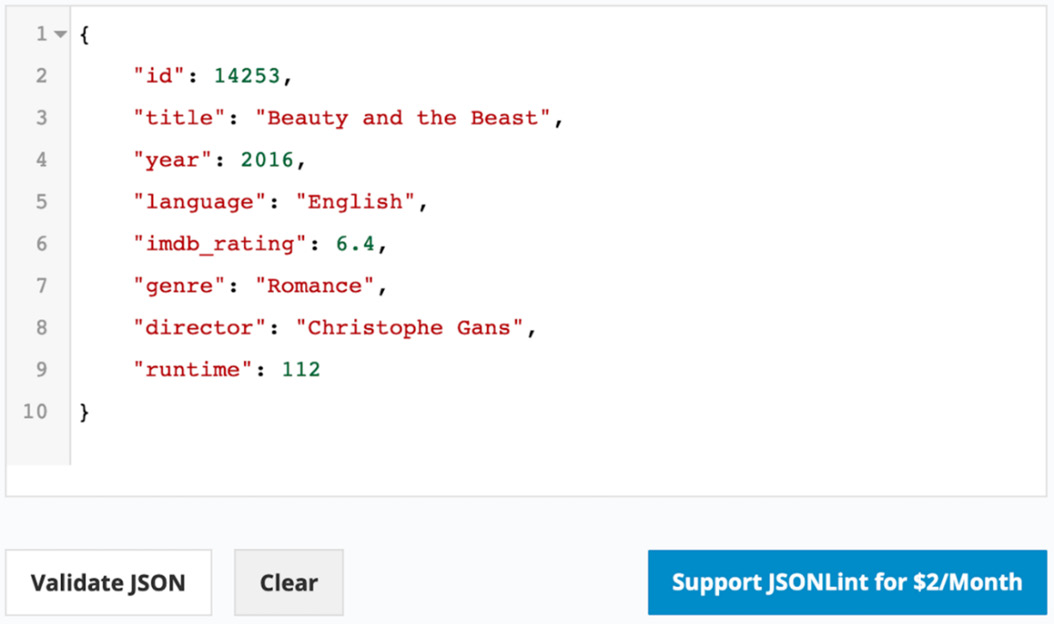
  3. Click on Validate JSON to validate the code. The following screenshot displays the expected output and validity of the JSON document:
    Figure 2.1: The JSON document and its validity check

Figure 2.1: The JSON document and its validity check

In this exercise, you modeled a movie record into a document format and created a grammatically valid JSON object. To practice it more, you can consider any general item, such as a product you recently bought or a book you read, and model it as a valid JSON document. In the next section, we will look at a brief overview of MongoDB's BSON.

CONTINUE READING
83
Tech Concepts
36
Programming languages
73
Tech Tools
Icon Unlimited access to the largest independent learning library in tech of over 8,000 expert-authored tech books and videos.
Icon Innovative learning tools, including AI book assistants, code context explainers, and text-to-speech.
Icon 50+ new titles added per month and exclusive early access to books as they are being written.
MongoDB Fundamentals
notes
bookmark Notes and Bookmarks search Search in title playlist Add to playlist download Download options font-size Font size

Change the font size

margin-width Margin width

Change margin width

day-mode Day/Sepia/Night Modes

Change background colour

Close icon Search
Country selected

Close icon Your notes and bookmarks

Confirmation

Modal Close icon
claim successful

Buy this book with your credits?

Modal Close icon
Are you sure you want to buy this book with one of your credits?
Close
YES, BUY

Submit Your Feedback

Modal Close icon
Modal Close icon
Modal Close icon