-
Book Overview & Buying
-
Table Of Contents
MongoDB Fundamentals
By :
A MongoDB database is composed of collections and documents. A database can have one or more collections, and each collection can store one or more related BSON documents. In comparison to RDBMS, collections are analogous to tables and documents are analogous to rows within a table. However, documents are much more flexible compared with the rows in a table.
RDBMSes consist of a tabular data model that comprises rows and columns. However, your applications may need to support more complex data structures, such as a nested object or a collection of objects. Tabular databases restrict the storage of such complex data structures. In such cases, you will have to split your data into multiple tables and change the application's object structures accordingly. On the other hand, the document-based data model of MongoDB allows your application to store and retrieve more complex object structures due to the flexible JSON-like format of the documents.
The following list details some of the major features of MongoDB's document-based data model:
As stated earlier, MongoDB documents are a flexible way of storing data. Consider the following example. Imagine you are developing a movie service where you need to create a movie database. A movie record in a simple MongoDB document will look like this:
{"title" : "A Swedish Love Story"}
However, storing only the title is not enough. You need more fields. Now, let's consider a few more basic fields. With a list of movies in the MongoDB database, the documents will look like this:
{
"id" : 1122,
"title" : "A Swedish Love Story",
"release_date" : ISODate("1970-04-24T00:00:00Z"),
"user_rating" : 6.7
}
{
"id" : 1123,
"title" : "The Stunt Man",
"release_date" : ISODate("1980-06-26T00:00:00Z"),
"user_rating" : 7.8
}
Say you are using an RDBMS table instead. On an RDBMS platform, you need to define your schema at the beginning, and to do that, first, you must think about the columns and data types. You might then come up with a CREATE TABLE query as follows:
CREATE TABLE movies( id INT, title VARCHAR(250), release_date DATE, user_ratings FLOAT );
This query is a clear indication that relational tables are bound by a definition called the schema definition. However, considering the restrictions, you cannot assign a float value in the id field and user_ratings can never be a string.
With a few records inserted, the table will appear as in Figure 2.2. This table is as good as a MongoDB document:
Figure 2.2: The movies table
Now, say you want to include the IMDb ratings for each of the movies listed in the table, and going forward, all the movies will have imdb_ratings included in the table. For an existing list of movies, imdb_ratings can be set to null:
To meet this requirement, you will include an ALTER TABLE query in your syntax:
ALTER TABLE movies ADD COLUMN imdb_ratings FLOAT default null;
The query is correct, but there can be instances where table alterations may block the table for some time, especially for large datasets. When a table is blocked, other read and write operations will have to wait until the table is altered, which may lead to downtime. Now, let's see how we can tackle the same situation in MongoDB.
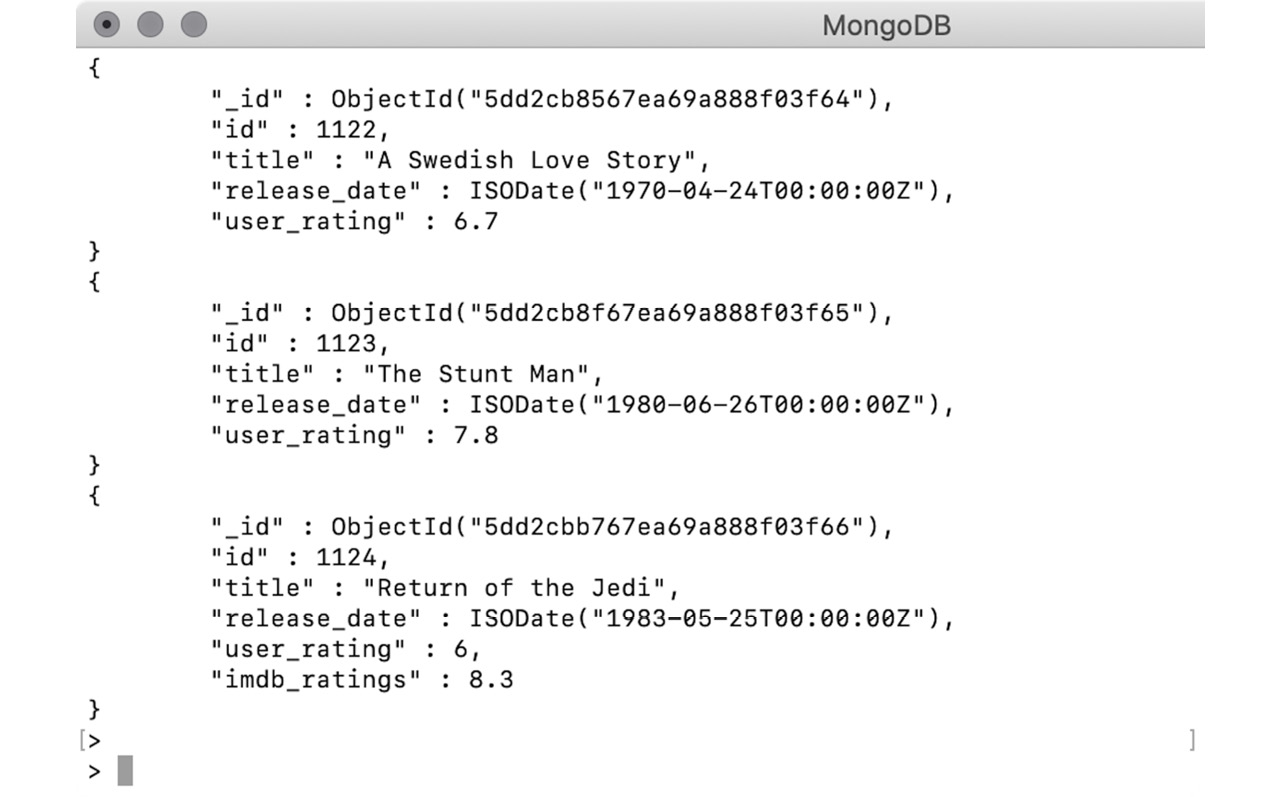
MongoDB supports a flexible schema, and there is no specific schema definition. Without altering anything on the database or the collection, you can simply insert a new movie with the additional field. The collection will behave exactly like the modified table of the movies, where the latest insertions will have imdb_ratings and the previous ones will return a null value. In MongoDB documents, a non-existent field is always considered null.
Now, the whole collection will look similar to the following screenshot. You will notice that the last movie has a new field, imdb_ratings:
Figure 2.3: Result for imdb_ratings for the movies collection
The preceding examples clearly indicate that documents are extremely flexible in comparison to tabular databases. Documents can incorporate changes on the go without any downtime.