Sign In Start Free Trial
Account

Add to playlist

Create a Playlist

Modal Close icon
You need to login to use this feature.
  • Book Overview & Buying The Data Analysis Workshop
  • Table Of Contents Toc
The Data Analysis Workshop

The Data Analysis Workshop

By : Gururajan Govindan , Shubhangi Hora , Konstantin Palagachev , Brent Broadnax, John Wesley Doyle , Ashish Jain, Robert Thas John, Ravi Ranjan Prasad Karn, Pritesh Tiwari
4.4 (21)
close
close
The Data Analysis Workshop

The Data Analysis Workshop

4.4 (21)
By: Gururajan Govindan , Shubhangi Hora , Konstantin Palagachev , Brent Broadnax, John Wesley Doyle , Ashish Jain, Robert Thas John, Ravi Ranjan Prasad Karn, Pritesh Tiwari

Overview of this book

Businesses today operate online and generate data almost continuously. While not all data in its raw form may seem useful, if processed and analyzed correctly, it can provide you with valuable hidden insights. The Data Analysis Workshop will help you learn how to discover these hidden patterns in your data, to analyze them, and leverage the results to help transform your business. The book begins by taking you through the use case of a bike rental shop. You'll be shown how to correlate data, plot histograms, and analyze temporal features. As you progress, you’ll learn how to plot data for a hydraulic system using the Seaborn and Matplotlib libraries, and explore a variety of use cases that show you how to join and merge databases, prepare data for analysis, and handle imbalanced data. By the end of the book, you'll have learned different data analysis techniques, including hypothesis testing, correlation, and null-value imputation, and will have become a confident data analyst.
Table of Contents (12 chapters)
close
close
Preface
7
7. Analyzing the Heart Disease Dataset
9
9. Analysis of the Energy Consumed by Appliances

Initial Data Analysis

As a rule of thumb, when starting the analysis of a new dataset, it is good practice to check the dimensionality of the data, type of columns, possible missing values, and some generic statistics on the numerical columns. We can also get the first 5 to 10 entries in order to acquire a feeling for the data itself. We'll perform these steps in the following code snippets:

import pandas as pd
import seaborn as sns
import matplotlib.pyplot as plt
%matplotlib inline
# import data from the GitHub page of the book
data = pd.read_csv('https://raw.githubusercontent.com'\
                   '/PacktWorkshops/The-Data-Analysis-Workshop'\
                   '/master/Chapter02/data/'\
                   'Absenteeism_at_work.csv', sep=";")

Note that we are providing the separator parameter when reading the data because, although the original data file is in the CSV format, the ";" symbol has been used to separate the various fields.

In order to print the dimensionality of the data, column types, and the number of missing values, we can use the following code:

"""
print dimensionality of the data, columns, types and missing values
"""
print(f"Data dimension: {data.shape}")
for col in data.columns:
    print(f"Column: {col:35} | type: {str(data[col].dtype):7} \
| missing values: {data[col].isna().sum():3d}")

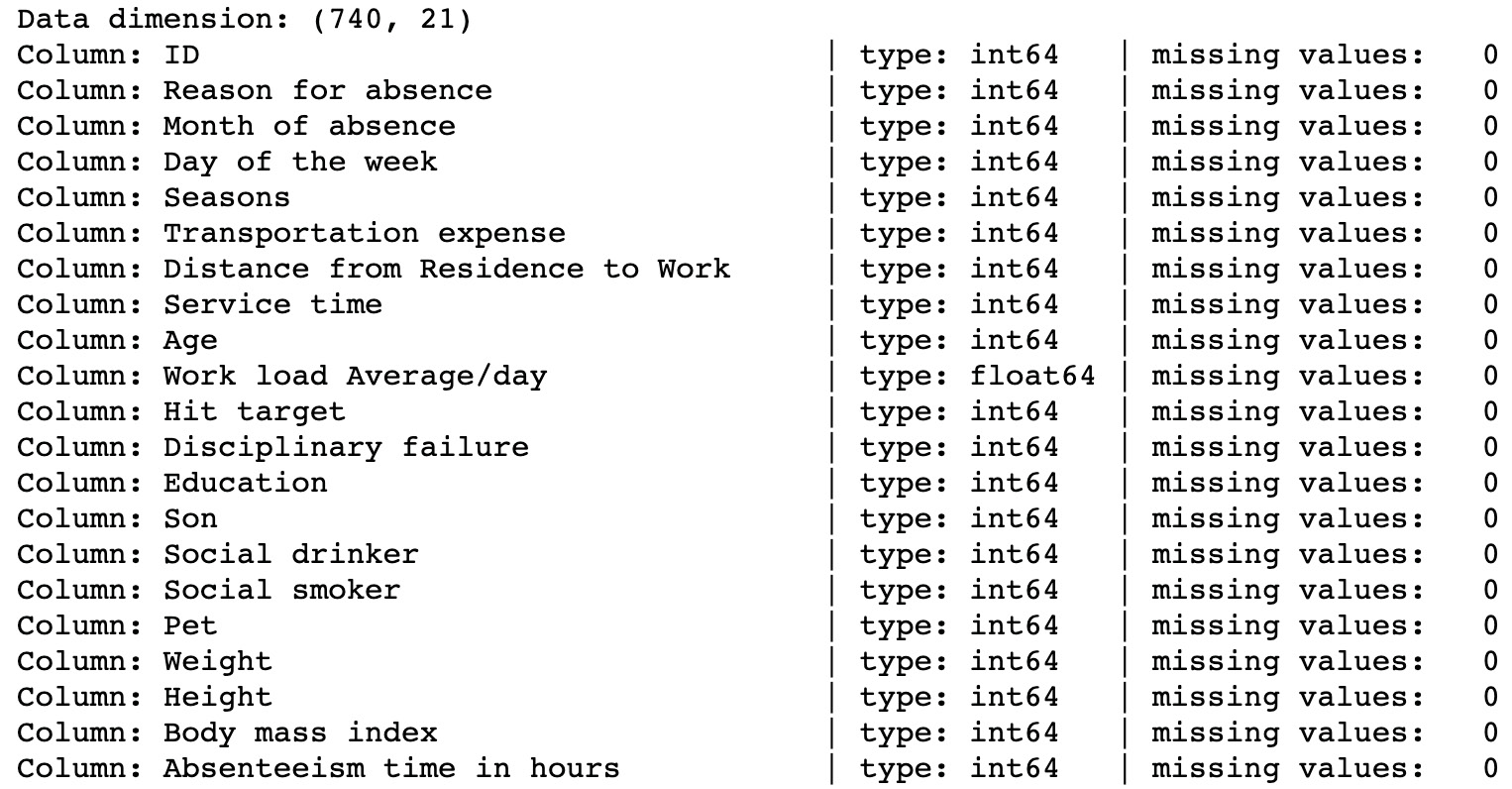
This returns the following output:

Figure 2.1: Dimensions of the Absenteeism_at_work dataset

Figure 2.1: Dimensions of the Absenteeism_at_work dataset

As we can see from these 21 columns, only one (Work Load Average/day) does not contain integer values. Since no missing values are present in the data, we can consider it quite clean. We can also derive some basic statistics by using the describe method:

# compute statistics on numerical features
data.describe().T

The output will be as follows:

Figure 2.2: Output of the describe() method

Figure 2.2: Output of the describe() method

Note that some of the columns, such as Month of absence, Day of the week, Seasons, Education, Disciplinary failure, Social drinker, and Social smoker, are encoding categorical values. So, we can back-transform the numerical values to their original categories so that we have better plotting features. We will perform the transformation by defining a Python dict object containing the mapping and then applying the apply() function to each feature, which applies the provided function to each of the values in the column. First, let's define the encoding dict objects:

# define encoding dictionaries
month_encoding = {1: "January", 2: "February", 3: "March", \
                  4: "April", 5: "May", 6: "June", 7: "July", \
                  8: "August", 9: "September", 10: "October", \
                  11: "November", 12: "December", 0: "Unknown"}
dow_encoding = {2: "Monday", 3: "Tuesday", 4: "Wednesday", \
                5: "Thursday", 6: "Friday"}
season_encoding = {1: "Spring", 2: "Summer", 3: "Fall", 4: "Winter"}
education_encoding = {1: "high_school", 2: "graduate", \
                      3: "postgraduate", 4: "master_phd"}
yes_no_encoding = {0: "No", 1: "Yes"}

Afterward, we apply the encoding dictionaries to the relevant features:

# backtransform numerical variables to categorical
preprocessed_data = data.copy()
preprocessed_data["Month of absence"] = preprocessed_data\
                                        ["Month of absence"]\
                                        .apply(lambda x: \
                                               month_encoding[x])
preprocessed_data["Day of the week"] = preprocessed_data\
                                       ["Day of the week"]\
                                       .apply(lambda x: \
                                              dow_encoding[x])
preprocessed_data["Seasons"] = preprocessed_data["Seasons"]\
                              .apply(lambda x: season_encoding[x])
preprocessed_data["Education"] = preprocessed_data["Education"]\
                                 .apply(lambda x: \
                                        education_encoding[x])
preprocessed_data["Disciplinary failure"] = \
preprocessed_data["Disciplinary failure"].apply(lambda x: \
                                                yes_no_encoding[x])
preprocessed_data["Social drinker"] = \
preprocessed_data["Social drinker"].apply(lambda x: \
                                          yes_no_encoding[x])
preprocessed_data["Social smoker"] = \
preprocessed_data["Social smoker"].apply(lambda x: \
                                         yes_no_encoding[x])
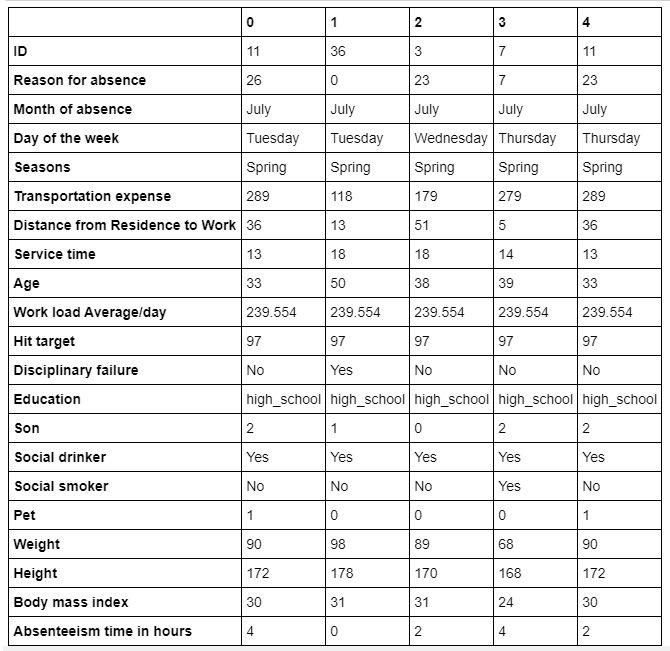
# transform columns
preprocessed_data.head().T

The output will be as follows:

Figure 2.3: Transformation of columns

Figure 2.3: Transformation of columns

In the previous code snippet, we created a clean copy of the original dataset by calling the .copy() method on the data object. In this way, a new copy of the original data is created. This is a convenient way to create new pandas DataFrames, without taking the risk of modifying the original raw data (as it might serve us later). Afterward, we created a set of dictionaries where the numerical values are keys and the categorical values are values. Finally, we used the .apply() method on each column we wanted to encode by mapping each value in the original column to its corresponding value in the encoding dictionary, which contains the target values. Note that in the Month of absence column, a 0 value is present, which is encoded as Unknown as no month corresponds to 0.

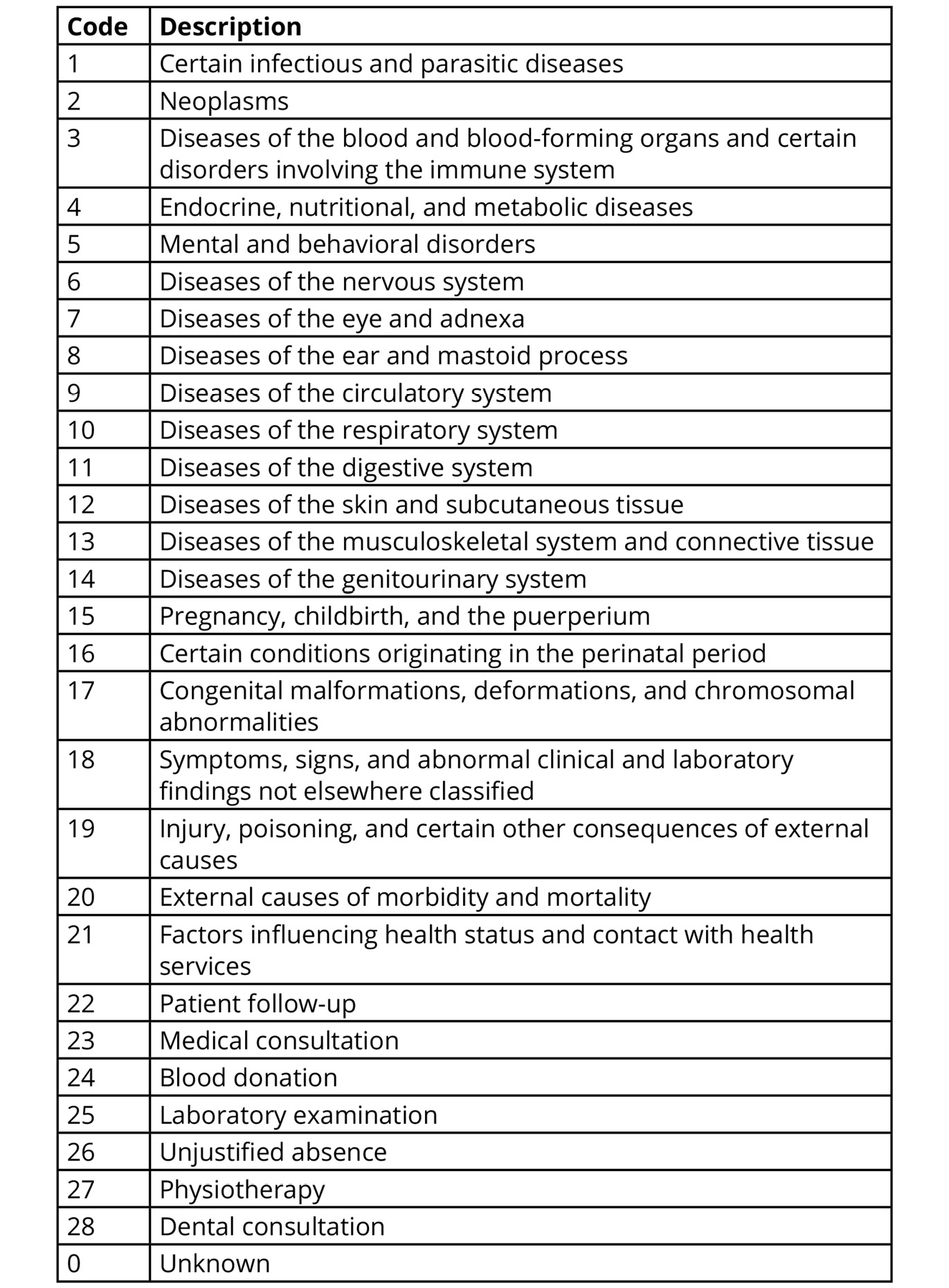
Based on the description of the data, the Reason for absence column contains information about the absence, which is encoded based on the International Code of Diseases (ICD). The following table represents the various encodings:

Figure 2.4: Reason for absence encoding

Figure 2.4: Reason for absence encoding

Note that only values 1 to 21 represent ICD encoding; values 22 to 28 are separate reasons, which do not represent a disease, while value 0 is not defined—hence the encoded reason Unknown. As all values contained in the ICD represent some type of disease, it makes sense to create a new binary variable that indicates whether the current reason for absence is related to some sort of disease or not. We will do this in the following exercise.

Exercise 2.01: Identifying Reasons for Absence

In this exercise, you will create a new variable, called Disease, which indicates whether a specific reason for absence is present in the ICD table or not. Please complete the initial data analysis before you begin this exercise. Now, follow these steps:

  1. First, define a function that returns Yes if a provided encoded value is contained in the ICD (values 1 to 21); otherwise, No:
    """
    define function, which checks if the provided integer value 
    is contained in the ICD or not
    """
    def in_icd(val):
        return "Yes" if val >= 1 and val <= 21 else "No"
  2. Combine the .apply() method with the previously defined in_icd() function in order to create the new Disease column in the preprocessed dataset:
    # add Disease column
    preprocessed_data["Disease"] = \
    preprocessed_data["Reason for absence"].apply(in_icd)
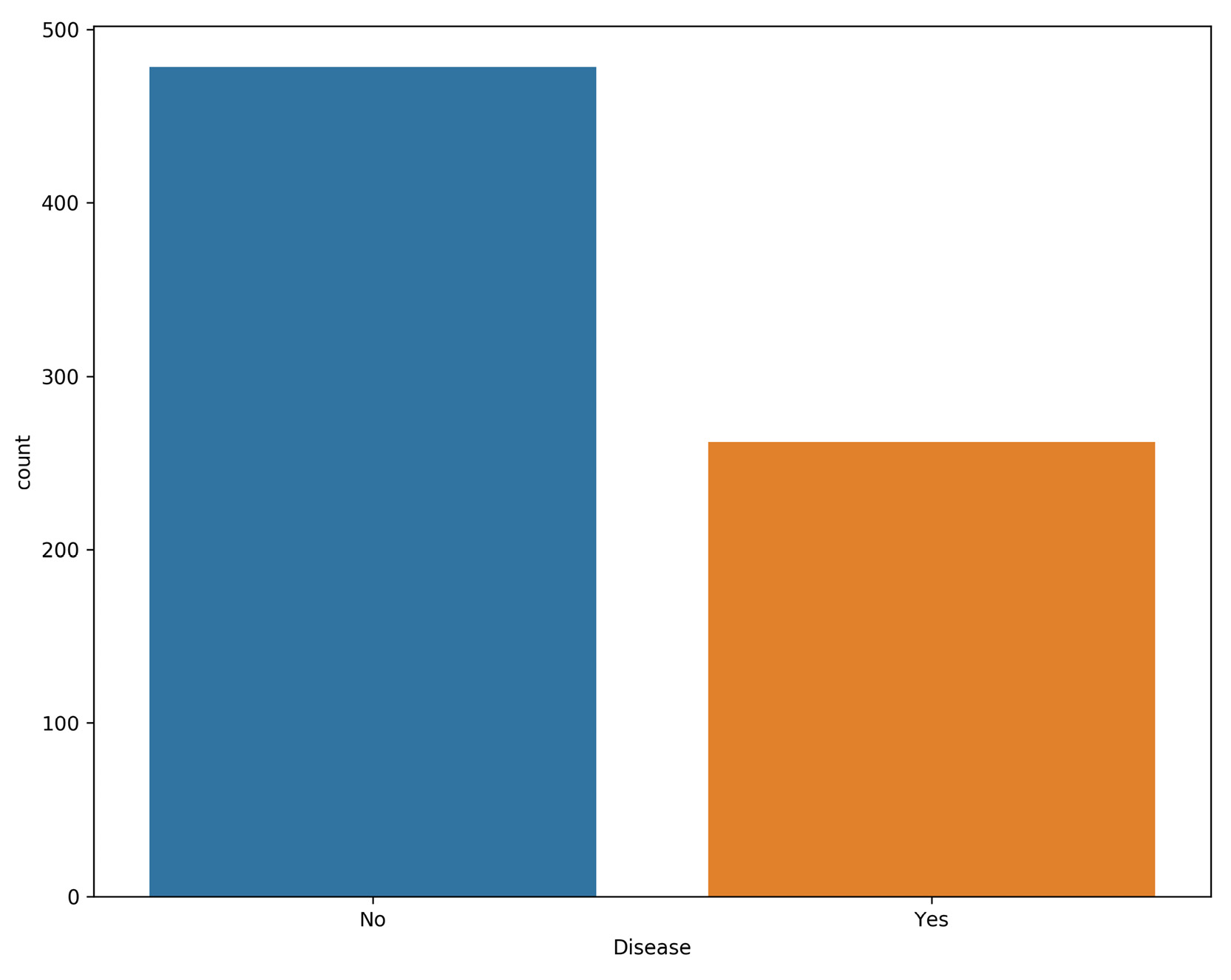
  3. Use bar plots in order to compare the absences due to disease reasons:
    plt.figure(figsize=(10, 8))
    sns.countplot(data=preprocessed_data, x='Disease')
    plt.savefig('figs/disease_plot.png', format='png', dpi=300)

    The output will be as follows:

    Figure 2.5: Comparing absence count to disease

Figure 2.5: Comparing absence count to disease

Here, we are using the seaborn .countplot() function, which is quite handy when creating this type of bar plot, in which we want to know the total number of entries for each specific class. As we can see, the number of reasons for absence that are not listed in the ICD table is almost twice the number of listed ones.

Note

To access the source code for this specific section, please refer to https://packt.live/2B9AqVJ.

You can also run this example online at https://packt.live/2UPwIr1. You must execute the entire Notebook in order to get the desired result.

In this section, we performed some simple data exploration and transformations on the initial absenteeism dataset. In the next section, we will go deeper into our data exploration and analyze some of the possible reasons for absence.

CONTINUE READING
83
Tech Concepts
36
Programming languages
73
Tech Tools
Icon Unlimited access to the largest independent learning library in tech of over 8,000 expert-authored tech books and videos.
Icon Innovative learning tools, including AI book assistants, code context explainers, and text-to-speech.
Icon 50+ new titles added per month and exclusive early access to books as they are being written.
The Data Analysis Workshop
notes
bookmark Notes and Bookmarks search Search in title playlist Add to playlist download Download options font-size Font size

Change the font size

margin-width Margin width

Change margin width

day-mode Day/Sepia/Night Modes

Change background colour

Close icon Search
Country selected

Close icon Your notes and bookmarks

Confirmation

Modal Close icon
claim successful

Buy this book with your credits?

Modal Close icon
Are you sure you want to buy this book with one of your credits?
Close
YES, BUY

Submit Your Feedback

Modal Close icon
Modal Close icon
Modal Close icon