Sign In Start Free Trial
Account

Add to playlist

Create a Playlist

Modal Close icon
You need to login to use this feature.
  • Book Overview & Buying WiX 3.6: A Developer's Guide to Windows Installer XML
  • Table Of Contents Toc
WiX 3.6: A Developer's Guide to Windows Installer XML

WiX 3.6: A Developer's Guide to Windows Installer XML

By : Nicholas Matthew Ramirez
4.3 (36)
close
close
WiX 3.6: A Developer's Guide to Windows Installer XML

WiX 3.6: A Developer's Guide to Windows Installer XML

4.3 (36)
By: Nicholas Matthew Ramirez

Overview of this book

The cryptic science of Windows Installer can seem far off from the practical task of simply getting something installed. Luckily, we have WiX to simplify the matter. WiX is an XML markup, distributed with an open-source compiler and linker, used to produce a Windows Installer package. It is used by Microsoft and by countless other companies around the world to simplify deployments. "WiX 3.6: A Developer's Guide to Windows Installer XML" promises a friendly welcome into the world of Windows Installer. Starting off with a simple, practical example and continuing on with increasingly advanced scenarios, the reader will have a well-rounded education by book's end. With the help of this book, you'll understand your installer better, create it in less time, and save money in the process. No one really wants to devote a lifetime to understanding how to create a hassle-free installer. Learn to build a sophisticated deployment solution targeting the Windows platform in no time with this hands-on practical guide. Here we speed you through the basics and zoom right into the advanced. You'll get comfortable with components, features, conditions and actions. By the end, you'll be boasting your latest deployment victories at the local pub. Once you've finished "WiX 3.6: A Developer's Guide to Windows Installer XML", you'll realize just how powerful and awesome an installer can really be.
Table of Contents (23 chapters)
close
close
WiX 3.6: A Developer's Guide to Windows Installer XML
Credits
About the Author
About the Reviewers
www.PacktPub.com
Preface
1
Index

Viewing the MSI database


I mentioned before that an MSI file is really a sort of relational database. WiX does all the work of creating tables, inserting rows, and matching up keys in this database. However, as we progress through the rest of the book, I encourage you to explore how it looks behind the scenes. For example, we discussed the File and Component elements. Sure enough, there are two tables called File and Component in the MSI package that contain the definitions you've set with your XML markup. To get inside the installer, you'll need a tool called Orca.

Orca.exe

Once you've compiled your project in Visual Studio, you'll have a working MSI package that can be installed by double-clicking on it. If you'd like to see the database inside, install the MSI viewer, Orca.exe. Orca is provided as part of the Windows SDK and despite the icon of a whale on the shortcut, it stands for One Really Cool App. You can find versions of the SDK at Microsoft's Windows Development Center website:

http://msdn.microsoft.com/en-us/windows/bb980924.aspx

After you've installed the SDK (specifically, the .NET tools that are included), you can find the installer for Orca—Orca.msi—in the Microsoft SDKs folder in Program Files. On my machine, it can be found in C:\Program Files\Microsoft SDKs\Windows\v7.0\Bin.

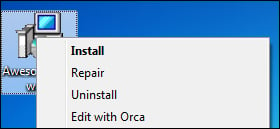
Install Orca and then right-click on your MSI file and select Edit with Orca, as shown in the following screenshot:

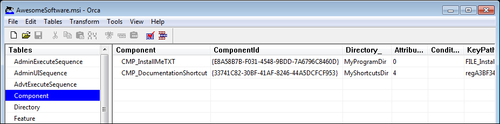
Orca lets you view the database structure of your installer. This can be a big help in troubleshooting problems or just to get a better idea about how different elements work together. The following is a screenshot of the Component database:

If you wanted to, you could edit your MSI package directly with Orca. This is helpful when learning or trying out different concepts. You'll need to know exactly which tables and rows to modify. Sometimes, though, you'll be able to just change a single value and check its effect.

CONTINUE READING
83
Tech Concepts
36
Programming languages
73
Tech Tools
Icon Unlimited access to the largest independent learning library in tech of over 8,000 expert-authored tech books and videos.
Icon Innovative learning tools, including AI book assistants, code context explainers, and text-to-speech.
Icon 50+ new titles added per month and exclusive early access to books as they are being written.
WiX 3.6: A Developer's Guide to Windows Installer XML
notes
bookmark Notes and Bookmarks search Search in title playlist Add to playlist download Download options font-size Font size

Change the font size

margin-width Margin width

Change margin width

day-mode Day/Sepia/Night Modes

Change background colour

Close icon Search
Country selected

Close icon Your notes and bookmarks

Confirmation

Modal Close icon
claim successful

Buy this book with your credits?

Modal Close icon
Are you sure you want to buy this book with one of your credits?
Close
YES, BUY

Submit Your Feedback

Modal Close icon
Modal Close icon
Modal Close icon